
On premise AI for business refers to deploying artificial intelligence systems directly on company-owned hardware or private servers rather than accessing them through a cloud provider. It gives organizations complete authority over their data, how the AI behaves, and what it connects to.
Most conversations about AI for business focus on which cloud tool to subscribe to next. That framing misses something important. For a growing number of organizations, the real question is not which platform to pay for, but whether to bring the entire stack in-house. The answer depends on your industry, your data sensitivity, your team's technical capacity, and your long-term cost expectations. This guide walks through all of it so you can make an informed decision rather than a reactive one.

What On Premise AI for Business Actually Means
The phrase sounds technical, but the concept is straightforward. When you use a service like Microsoft Azure OpenAI or Google Vertex AI, your data travels to external servers, gets processed, and comes back. The provider manages the infrastructure, the model updates, and the security of their end of the pipeline.
On premise flips that model entirely. The AI runs on servers your company owns or leases exclusively, whether that is a rack in your office, a colocation facility, or a private cloud environment that no third party can access. Your data never leaves the perimeter you define.
This matters enormously for industries where data handling is regulated. A hospital using an on premise AI system to analyze patient records does not need to worry about whether the vendor's data processing agreements comply with healthcare regulations. A law firm running contract analysis locally does not need to disclose to clients that their documents passed through a third-party server. The data simply stays where it belongs.
For businesses outside regulated industries, the appeal is still real. Competitive intelligence, internal financial data, customer behavioral patterns, and product development roadmaps are all things companies reasonably prefer to keep inside their own walls.
Why More Businesses Are Moving in This Direction

The Data Control Argument
Cloud AI vendors are reputable, but they are not invisible. When you send data to a third-party model, you are accepting their terms of service, their security posture, and their policy decisions about what gets logged, retained, or used for model improvement. Most enterprise agreements include opt-outs for training data, but the underlying dependency on someone else's infrastructure remains.
On premise deployment removes that dependency. Your security team sets the rules. Your IT infrastructure handles the access controls. Your compliance officers can audit the entire pipeline without waiting on a vendor's cooperation. For organizations that have experienced data breaches through third-party services, that level of direct control is not a luxury, it is a requirement.
Long-Term Cost Predictability
Cloud AI pricing is attractive at small scale but becomes unpredictable as usage grows. A team running hundreds of thousands of inference calls per month starts to feel the per-token costs stack up in ways that were not obvious during the pilot phase. Hardware is expensive upfront, but it does not send you a bill every time an employee asks the AI a question.
For businesses with consistent, high-volume AI usage, the break-even point between cloud costs and on-premise infrastructure investment often lands within two to three years. After that, the on-premise setup is effectively free to operate beyond maintenance and electricity.
Understanding how AI features map to hardware requirements helps teams plan that investment accurately before committing to infrastructure purchases.
Customization Without Limits
Cloud AI tools give you configuration options within a defined boundary. On premise gives you the actual model weights and the full stack to modify as needed. That means you can fine-tune models on your proprietary data, adjust the system behavior at every layer, integrate deeply with internal databases and tools, and version-control the entire AI environment the same way you manage any other internal software.
A retail company, for example, can fine-tune a language model on their specific product catalog and customer service history so it speaks accurately about their inventory rather than producing generic answers. That level of customization is simply not available through a standard cloud API.
How On Premise AI Deployments Are Typically Structured
The Core Architecture
Most on premise AI setups for business share a common pattern regardless of the specific tools involved.
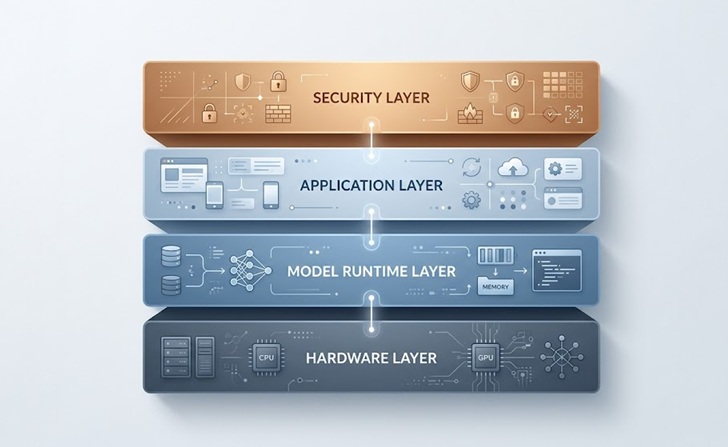
The foundation is the hardware layer, which includes the servers, GPUs, and networking equipment that run the model. Above that sits the model runtime, typically an orchestration tool that handles loading models into memory, managing requests, and exposing an API endpoint that other internal applications can call.
The application layer is where the actual business tools live, whether that is a customer service chatbot, an internal knowledge base assistant, a document processing pipeline, or a code generation tool for your engineering team. Each application connects to the model runtime through controlled APIs.
Finally, the security and access control layer wraps around everything, managing who can query the model, what data flows in and out, and how responses are logged for compliance purposes.
| Deployment Layer | What It Includes | Example Tools |
|---|---|---|
| Hardware | Servers, GPUs, networking | NVIDIA A100, on-site server racks |
| Model Runtime | Inference engine, model management | Ollama, vLLM, TGI |
| Application Layer | Business tools, interfaces, integrations | Custom apps, Open WebUI, internal portals |
| Security and Access | Auth, logging, encryption, network controls | VPN, LDAP, API gateways |
Getting this architecture right from the start saves a significant amount of pain later. Reviewing AI architecture best practices before designing your deployment helps avoid common structural mistakes that become expensive to fix.
Choosing the Right Model for Your Business Needs
The open source model landscape has matured to the point where most business use cases are well served without a proprietary model. Here is a practical breakdown of what different model types tend to handle well:
| Business Use Case | Recommended Model Size | Notes |
|---|---|---|
| Customer support FAQ, basic Q&A | 7B to 13B parameters | Runs efficiently on mid-range GPU hardware |
| Document analysis, contract review | 13B to 34B parameters | Benefits from longer context window support |
| Code generation and technical support | 7B to 13B (code-specific) | Models like CodeLlama are purpose-built for this |
| Complex reasoning and multi-step tasks | 34B to 70B parameters | Requires more substantial GPU infrastructure |
| Multimodal tasks including image analysis | Specialized multimodal models | Hardware requirements vary significantly |
Starting smaller and scaling up based on real usage data is almost always the smarter approach. Deploying a 70B model on day one when a 13B would have covered 90% of your workload is an expensive way to learn that lesson.
Practical Considerations Before You Deploy
What Your IT Team Needs to Prepare For
On premise AI is not a plug-and-play product. Your team will be responsible for model updates, security patching, hardware maintenance, and performance monitoring. These are manageable responsibilities for most enterprise IT departments, but they need to be accounted for in planning.
One practical tip: treat the AI deployment like any other critical internal service. That means redundancy planning, backup procedures, monitoring dashboards, and an escalation path when something goes wrong. Teams that approach it as just software installation often hit problems at the worst possible moments.
Security deserves specific attention. An AI system connected to internal databases and document storage is a high-value target if misconfigured. Reviewing AI security protocols before go-live, including network segmentation, authentication requirements, and output logging, is not optional, it is foundational.
Integration With Existing Business Systems
The real value of on premise AI for business often comes not from the assistant itself but from how deeply it connects to existing systems. An AI that can query your CRM, pull from your internal knowledge base, read emails in context, and write back to your project management tools is far more useful than a standalone chat interface.
This kind of integration is achievable on premise and is often easier to build when you control the full stack. You can expose internal APIs to the model, configure retrieval-augmented generation pipelines that pull live data from internal sources, and build custom tool-calling workflows tailored exactly to how your team operates.
One good example is a professional services firm that deployed an on premise assistant trained on their past project documentation. Consultants can now query years of internal case studies, methodologies, and client data without any of that information touching a cloud service. The assistant saves hours per engagement and the firm has full control over what it can and cannot access.
Things To Know
A few important details often get left out of the standard pitch for on premise AI:
The initial setup timeline is longer than most teams expect. A realistic enterprise deployment from hardware procurement to production-ready assistant typically takes between six and twelve weeks, depending on integration complexity.
GPU availability affects your model options. Not all open source models run efficiently on CPU-only hardware. If your infrastructure does not include modern GPU cards, you may be limited to smaller, quantized models until hardware is upgraded.
Fine-tuning requires clean, well-labeled data. Many businesses want to fine-tune models on proprietary data but underestimate how much preparation that data needs beforehand. Budget time for data cleaning before you budget time for fine-tuning.
Model licensing still applies on premise. Open source does not always mean unrestricted commercial use. Check the specific license for any model you plan to deploy in a business context. LLaMA 3, for example, has a custom commercial license with conditions tied to user base size.
Vendor support is limited. Unlike cloud AI products with dedicated support teams, on premise open source deployments largely rely on community documentation and internal expertise. Building in-house knowledge early reduces your dependency on external help desks.
Inference speed depends on your hardware. Cloud providers run optimized clusters with the latest accelerators. Your on-premise inference speed may be slower for large models, which matters for real-time user-facing applications. Plan accordingly.
Making the Right Call for Your Organization
On premise AI for business is not the right answer for every organization. If your team is small, your data is not particularly sensitive, and you need to move fast, a well-configured cloud AI deployment might be the better starting point. The operational overhead of running your own infrastructure has a real cost.
But if you are handling regulated data, building AI into core business operations, projecting high usage volumes, or simply unwilling to let a vendor's policy decisions affect your workflows, the on-premise path delivers something cloud services cannot match: genuine control. Your model, your data, your rules.
The tools to make it happen have never been more accessible. The open source community has done the hard work of making powerful AI models deployable by standard engineering teams without PhD-level ML expertise. What used to require a specialized AI team and a massive budget is now within reach of mid-size companies with a solid IT function and a clear use case.
Frequently Asked Questions
Can AI be deployed on premise?
Yes, AI can absolutely be deployed on premise using open source models and self-managed inference infrastructure on company-owned or privately leased hardware. Businesses across healthcare, finance, and legal industries already run production AI systems this way to meet compliance and data control requirements.
Which AI is best for business owners?
The best AI for a business owner depends on use case, but open source models like LLaMA 3 or Mistral deployed on private infrastructure offer the strongest combination of control, customization, and long-term cost efficiency. Cloud tools like ChatGPT for Business work well for lighter, less sensitive use cases where data handling flexibility is acceptable.
What is the 30% rule in AI?
The 30% rule in AI refers to the general guideline that AI automation should handle roughly 30% of a task or workflow, with humans managing the remaining 70% requiring judgment and context. It is a practical framework for identifying which business processes are good candidates for AI assistance without over-automating decisions that still need human oversight.
What is on premise AI?
On premise AI is an artificial intelligence system deployed on servers or hardware that a business owns and controls directly, rather than accessed through a third-party cloud provider. It keeps all data processing within the company's own infrastructure, which is critical for privacy-sensitive industries and organizations that need full control over their AI stack.
What are the 7 main types of AI?
The seven main types of AI are narrow AI, general AI, superintelligent AI, reactive machines, limited memory AI, theory of mind AI, and self-aware AI. Most business AI tools today fall into the narrow and limited memory categories, which are purpose-built systems designed to handle specific tasks rather than general reasoning or self-directed thinking.