
GitHub Integration
Triggerfish இரண்டு complementary approaches மூலம் GitHub உடன் integrate ஆகிறது:
Quick Setup: REST API Tools
GitHub connect செய்வதற்கான வேகமான வழி. Agent க்கு repos, PRs, issues, Actions, மற்றும் code search க்கான 14 built-in tools கொடுக்கிறது -- அனைத்தும் classification-aware taint propagation உடன்.
bash
triggerfish connect githubஇது fine-grained Personal Access Token உருவாக்க, validate செய்ய, மற்றும் OS keychain இல் store செய்ய guide செய்கிறது. அவ்வளவுதான் -- உங்கள் agent இப்போது அனைத்து github_* tools பயன்படுத்தலாம்.
Skills எவ்வாறு வேலை செய்கிறது என்பதற்கு Skills documentation பாருங்கள், அல்லது available tools அனைத்தும் பார்க்க triggerfish skills list இயக்கவும்.
Advanced: gh CLI + Webhooks
Full development feedback loop க்கு (agent branches உருவாக்கிறது, PRs opens செய்கிறது, code review க்கு respond செய்கிறது), Triggerfish exec மூலம் gh CLI மற்றும் webhook-driven review delivery ஆகியவற்றையும் support செய்கிறது. இது மூன்று composable pieces பயன்படுத்துகிறது:
ghCLI via exec -- அனைத்து GitHub actions perform செய்யவும் (PRs create செய்யவும், reviews படிக்கவும், comment செய்யவும், merge செய்யவும்)- Review delivery -- இரண்டு modes: webhook events (instant, public endpoint தேவை) அல்லது
gh pr viewமூலம் trigger-based polling (firewalls பின்னால் வேலை செய்கிறது) - git-branch-management skill -- Agent க்கு complete branch/PR/review workflow கற்பிக்கிறது
இவை சேர்ந்து ஒரு full development feedback loop உருவாக்குகின்றன: agent branches உருவாக்குகிறது, code commit செய்கிறது, PRs opens செய்கிறது, மற்றும் reviewer feedback க்கு respond செய்கிறது -- custom GitHub API code தேவையில்லை.
Prerequisites
gh CLI
GitHub CLI (gh) Triggerfish இயங்கும் environment இல் installed மற்றும் authenticated ஆக இருக்க வேண்டும்.
bash
# Install gh (Fedora/RHEL)
sudo dnf install gh

# Install gh (macOS)
brew install gh

# Install gh (Debian/Ubuntu)
sudo apt install gh

# Authenticate
gh auth login
Authentication verify செய்யவும்:
bash
gh auth statusAgent exec.run("gh ...") மூலம் gh பயன்படுத்துகிறது -- gh login க்கு அப்பால் separate GitHub token configuration தேவையில்லை.
Git
Git installed மற்றும் user name மற்றும் email உடன் configured ஆக இருக்க வேண்டும்:
bash
git config --global user.name "Triggerfish Agent"
git config --global user.email "triggerfish@example.com"
Repository Access
Agent இன் workspace ஒரு git repository ஆக (அல்லது ஒன்று contain செய்ய) இருக்க வேண்டும் மற்றும் remote க்கு push access உடன்.
Review Delivery
Agent புதிய PR reviews பற்றி தெரிந்துகொள்ள இரண்டு வழிகள் உள்ளன. ஒன்று தேர்வு செய்யுங்கள் அல்லது இரண்டையும் சேர்ந்து பயன்படுத்துங்கள்.
Option A: Trigger-Based Polling
Inbound connectivity தேவையில்லை. gh pr view பயன்படுத்தி schedule இல் GitHub poll செய்கிறது. எந்த firewall, NAT, அல்லது VPN பின்னாலும் வேலை செய்கிறது.
triggerfish.yaml இல் ஒரு cron job சேர்க்கவும்:
yaml
scheduler:
  cron:
    jobs:
      - id: pr-review-check
        schedule: "*/15 * * * *"
        task: >
          Check all open PR tracking files in scratch/pr-tracking/.
          For each open PR, query GitHub for new reviews or state changes
          using gh pr view. Address any review feedback, handle merges
          and closures.
        classification: INTERNAL
அல்லது regular trigger wakeup cycle போது execution க்கு agent இன் TRIGGER.md இல் "open PRs review feedback க்காக சரிபார்க்கவும்" சேர்க்கவும்.
Option B: Webhook Setup
Webhooks review events உடனடியாக deliver செய்கின்றன. இதற்கு Triggerfish gateway GitHub இன் servers இலிருந்து reachable ஆக இருக்க வேண்டும் (உதா. Tailscale Funnel, reverse proxy, அல்லது tunnel மூலம்).
படி 1: Webhook secret generate செய்யவும்
bash
openssl rand -hex 32இதை environment variable ஆக store செய்யவும்:
bash
export GITHUB_WEBHOOK_SECRET="<generated-secret>"Restarts முழுவதும் persist ஆக shell profile அல்லது secrets manager க்கு சேர்க்கவும்.
படி 2: Triggerfish கட்டமைக்கவும்
triggerfish.yaml இல் webhook endpoint சேர்க்கவும்:
yaml
webhooks:
  endpoints:
    - id: github
      path: /webhook/github
      # secret OS keychain இல் stored
      classification: INTERNAL
      actions:
        - event: "pull_request_review"
          task: >
            A PR review was submitted. Read the PR tracking file from
            scratch/pr-tracking/ to recover context. Check out the branch,
            read the review, address any requested changes, commit, push,
            and comment on the PR with a summary of changes made.
        - event: "pull_request_review_comment"
          task: >
            An inline review comment was posted on a PR. Read the PR
            tracking file, check out the branch, address the specific
            comment, commit, push.
        - event: "issue_comment"
          task: >
            A comment was posted on a PR or issue. Check if this is a
            tracked PR by looking up tracking files in scratch/pr-tracking/.
            If tracked, check out the branch and address the feedback.
        - event: "pull_request.closed"
          task: >
            A PR was closed or merged. Read the tracking file. If merged,
            clean up: delete local branch, archive tracking file to
            completed/. Notify the owner of the merge. If closed without
            merge, archive and notify.
படி 3: Webhook endpoint expose செய்யவும்
Triggerfish இன் gateway GitHub இன் servers இலிருந்து reachable ஆக இருக்க வேண்டும். Options:
Tailscale Funnel (personal use க்கு recommended):
yaml
# triggerfish.yaml இல்
remote:
  tailscale:
    serve: true
    funnel:
      enabled: true
      paths: ["/webhook/*"]
இது https://<your-machine>.ts.net/webhook/github ஐ internet க்கு expose செய்கிறது.
Reverse proxy (nginx, Caddy):
உங்கள் gateway இன் local port க்கு /webhook/github forward செய்யவும்.
ngrok (development/testing):
bash
ngrok http 8080Generated URL ஐ webhook target ஆக பயன்படுத்தவும்.
படி 4: GitHub webhook கட்டமைக்கவும்
உங்கள் GitHub repository இல் (அல்லது organization இல்):
- Settings > Webhooks > Add webhook க்கு செல்லவும்
- Payload URL ஐ உங்கள் exposed endpoint ஆக அமைக்கவும்:
https://<your-host>/webhook/github - Content type ஐ
application/jsonஆக அமைக்கவும் - Secret ஐ
GITHUB_WEBHOOK_SECRETஇன் அதே மதிப்பாக அமைக்கவும் - Which events would you like to trigger this webhook? இல், Let me select individual events தேர்வு செய்து check செய்யவும்:
- Pull requests (
pull_request.opened,pull_request.closedcover செய்கிறது) - Pull request reviews (
pull_request_reviewcover செய்கிறது) - Pull request review comments (
pull_request_review_commentcover செய்கிறது) - Issue comments (PRs மற்றும் issues இல்
issue_commentcover செய்கிறது)
- Pull requests (
- Add webhook click செய்யவும்
Connection verify செய்ய GitHub ஒரு ping event அனுப்பும். Receipt confirm செய்ய Triggerfish logs சரிபார்க்கவும்:
bash
triggerfish logs --tailFeedback Loop எவ்வாறு செயல்படுகிறது
Webhooks உடன் (instant)
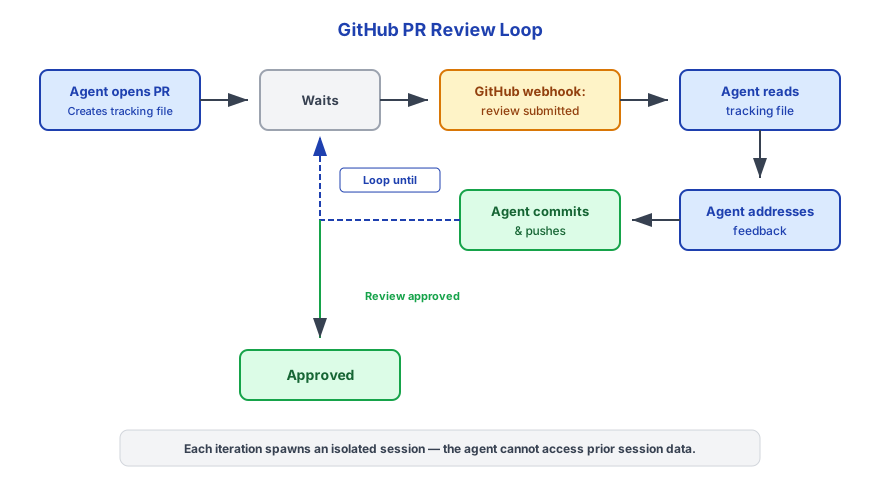
Trigger-based polling உடன் (firewall பின்னால்)
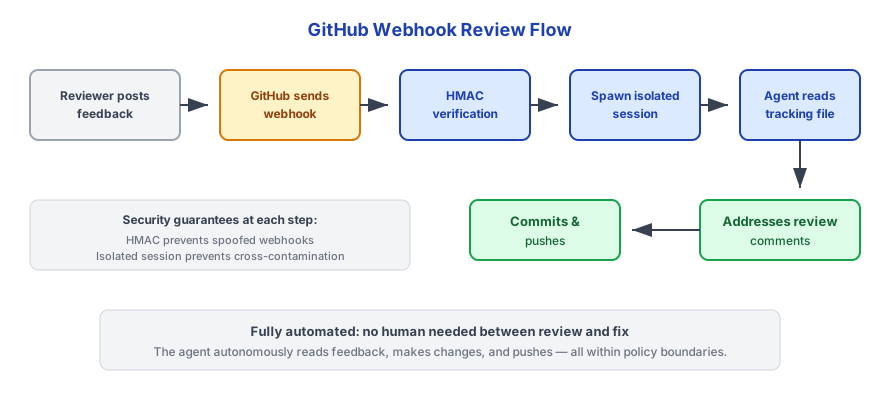
இரண்டு paths உம் அதே tracking files பயன்படுத்துகின்றன. Agent ~/.triggerfish/workspace/<agent-id>/scratch/pr-tracking/ இலிருந்து PR tracking file படிப்பதன் மூலம் context recover செய்கிறது.
PR Tracking Files
Agent create செய்யும் ஒவ்வொரு PR க்கும் tracking file எழுதுகிறது:
~/.triggerfish/workspace/<agent-id>/scratch/pr-tracking/<branch-name>.jsonSchema:
json
{
  "branch": "triggerfish/agent-1/fix-auth-timeout",
  "prNumber": 42,
  "prUrl": "https://github.com/owner/repo/pull/42",
  "task": "Fix authentication timeout when token expires during long requests",
  "repository": "owner/repo",
  "createdAt": "2025-01-15T10:30:00Z",
  "updatedAt": "2025-01-15T10:30:00Z",
  "lastCheckedAt": "2025-01-15T10:30:00Z",
  "lastReviewId": "",
  "status": "open",
  "commits": [
    "feat: add token refresh before expiry",
    "test: add timeout edge case coverage"
  ]
}
Merge ஆன பிறகு, tracking files completed/ க்கு archived ஆகின்றன.
Merge Policy
Default ஆக, agent approved PRs auto-merge செய்வதில்லை. ஒரு review approved ஆகும்போது, agent owner க்கு notify செய்து explicit merge instruction க்காக காத்திருக்கிறது.
Auto-merge enable செய்ய, triggerfish.yaml இல் சேர்க்கவும்:
yaml
github:
  auto_merge: true
Enabled ஆகும்போது, approving review பெற்ற பிறகு agent gh pr merge --squash --delete-branch இயக்கும்.
Auto-merge safety க்கு default ஆக disabled. Agent இன் changes trust செய்து GitHub இல் branch protection rules (required reviewers, CI checks) configured செய்திருந்தால் மட்டும் enable செய்யவும். :::
Optional: GitHub MCP Server
gh CLI மற்றும் built-in tools வழங்குவதற்கு அப்பால் richer GitHub API access க்கு, GitHub MCP server உம் configure செய்யலாம்:
yaml
mcp_servers:
  - id: github
    command: "npx"
    args: ["-y", "@modelcontextprotocol/server-github"]
    # GitHub token OS keychain இலிருந்து read ஆகிறது
    classification: CONFIDENTIAL
பெரும்பாலான workflows க்கு இது தேவையில்லை -- built-in github_* tools (triggerfish connect github மூலம் setup) மற்றும் gh CLI அனைத்து common operations cover செய்கின்றன. Built-in tools cover செய்யாத advanced queries க்கு MCP server useful.
Security Considerations
| Control | விவரம் |
|---|---|
| HMAC verification | அனைத்து GitHub webhooks உம் processing க்கு முன்பு HMAC-SHA256 மூலம் verified (webhook mode) |
| Classification | GitHub data default ஆக INTERNAL ஆக classified -- code மற்றும் PR data public channels க்கு leak ஆவதில்லை |
| Session isolation | ஒவ்வொரு webhook event அல்லது trigger wakeup உம் fresh isolated session spawn செய்கிறது |
| No Write-Down | INTERNAL-classified PR events க்கான Agent responses PUBLIC channels க்கு அனுப்ப முடியாது |
| Credential handling | gh CLI தன்னுடைய auth token manage செய்கிறது; triggerfish.yaml இல் GitHub tokens stored ஆவதில்லை |
| Branch naming | triggerfish/ prefix agent branches எளிதாக identifiable மற்றும் filterable ஆக்குகிறது |
உங்கள் repository sensitive code (proprietary, security-critical) contain செய்தால், webhook classification ஐ INTERNAL க்கு பதிலாக CONFIDENTIAL ஆக அமைக்க consider செய்யுங்கள். :::
Troubleshooting
Webhook events பெறவில்லை
- Webhook URL internet இலிருந்து reachable என்று சரிபார்க்கவும் (external machine இலிருந்து
curlபயன்படுத்தவும்) - GitHub இல், Settings > Webhooks க்கு சென்று errors க்கு Recent Deliveries tab சரிபார்க்கவும்
- GitHub மற்றும்
GITHUB_WEBHOOK_SECRETஇடையே secret match ஆகிறதா verify செய்யவும் - Triggerfish logs சரிபார்க்கவும்:
triggerfish logs --tail
PR reviews pick up ஆவதில்லை (polling mode)
triggerfish.yamlஇல்pr-review-checkcron job configured என்று சரிபார்க்கவும்- Daemon இயங்குகிறதா verify செய்யவும்:
triggerfish status ~/.triggerfish/workspace/<agent-id>/scratch/pr-tracking/இல் tracking files exist என்று சரிபார்க்கவும்- Manually test செய்யவும்:
gh pr view <number> --json reviews - Triggerfish logs சரிபார்க்கவும்:
triggerfish logs --tail
gh CLI authenticated ஆகவில்லை
bash
gh auth status
# Authenticated ஆகவில்லையென்றால்:
gh auth login
Agent remote க்கு push செய்ய முடியவில்லை
Git remote மற்றும் credentials verify செய்யவும்:
bash
git remote -v
gh auth status
Authenticated GitHub account க்கு repository க்கான push access இருப்பதை உறுதிப்படுத்தவும்.
Review போது Tracking file கிடைக்கவில்லை
Agent ~/.triggerfish/workspace/<agent-id>/scratch/pr-tracking/ இல் tracking files தேடுகிறது. File missing ஆனால், PR Triggerfish வெளியே create செய்யப்பட்டிருக்கலாம், அல்லது workspace cleaned ஆகியிருக்கலாம். Agent owner க்கு notify செய்து automated handling skip செய்ய வேண்டும்.