
GitHub 整合
Triggerfish 透過兩種互補的方式與 GitHub 整合:
快速設定:REST API 工具
連接 GitHub 最快的方式。為代理提供 14 個內建工具,用於倉庫、PR、issue、Actions 和程式碼搜尋——全部具有分類感知的 taint 傳播。
bash
triggerfish connect github這會引導您建立細粒度的個人存取權杖、驗證它,並將其儲存在作業系統金鑰鏈中。完成後,您的代理就可以使用所有 github_* 工具了。
請參閱 Skills 文件 了解 skill 的運作方式,或執行 triggerfish skills list 查看所有可用工具。
進階:gh CLI + Webhook
為了完整的開發回饋循環(代理建立分支、開啟 PR、回應程式碼審查),Triggerfish 也支援透過 exec 使用 gh CLI 和 webhook 驅動的審查交付。這使用三個可組合的部分:
- 透過 exec 的
ghCLI —— 執行所有 GitHub 操作(建立 PR、閱讀審查、留言、合併) - 審查交付 —— 兩種模式:webhook 事件(即時,需要公開端點)或基於觸發器的輪詢,透過
gh pr view(在防火牆後運作) - git-branch-management skill —— 教導代理完整的分支/PR/審查工作流程
這些一起建立了完整的開發回饋循環:代理建立分支、提交程式碼、開啟 PR,並回應審查者回饋——不需要自訂 GitHub API 程式碼。
先決條件
gh CLI
GitHub CLI(gh)必須在 Triggerfish 執行的環境中安裝並驗證。
bash
# 安裝 gh(Fedora/RHEL)
sudo dnf install gh

# 安裝 gh(macOS)
brew install gh

# 安裝 gh(Debian/Ubuntu)
sudo apt install gh

# 驗證
gh auth login
驗證身分:
bash
gh auth status代理透過 exec.run("gh ...") 使用 gh——除了 gh 登入之外,不需要額外的 GitHub 權杖配置。
Git
Git 必須安裝並配置使用者名稱和電子郵件:
bash
git config --global user.name "Triggerfish Agent"
git config --global user.email "triggerfish@example.com"
倉庫存取
代理的工作區必須是一個 git 倉庫(或包含一個),並且有推送到遠端的權限。
審查交付
有兩種方式讓代理了解新的 PR 審查。選擇一種或同時使用兩種。
選項 A:基於觸發器的輪詢
不需要入站連線。代理使用 gh pr view 按排程輪詢 GitHub。在任何防火牆、NAT 或 VPN 後都能運作。
在 triggerfish.yaml 中新增 cron 工作:
yaml
scheduler:
  cron:
    jobs:
      - id: pr-review-check
        schedule: "*/15 * * * *"
        task: >
          Check all open PR tracking files in scratch/pr-tracking/.
          For each open PR, query GitHub for new reviews or state changes
          using gh pr view. Address any review feedback, handle merges
          and closures.
        classification: INTERNAL
或者在代理的 TRIGGER.md 中加入「check open PRs for review feedback」,在常規觸發器喚醒週期中執行。
選項 B:Webhook 設定
Webhook 即時交付審查事件。這需要 Triggerfish gateway 可以從 GitHub 伺服器存取(例如透過 Tailscale Funnel、反向代理或隧道)。
步驟 1:產生 webhook 密鑰
bash
openssl rand -hex 32將此儲存為環境變數:
bash
export GITHUB_WEBHOOK_SECRET="<generated-secret>"將它加入您的 shell 設定檔或密鑰管理員,以便在重啟後持續有效。
步驟 2:配置 Triggerfish
在 triggerfish.yaml 中新增 webhook 端點:
yaml
webhooks:
  endpoints:
    - id: github
      path: /webhook/github
      # secret stored in OS keychain
      classification: INTERNAL
      actions:
        - event: "pull_request_review"
          task: >
            A PR review was submitted. Read the PR tracking file from
            scratch/pr-tracking/ to recover context. Check out the branch,
            read the review, address any requested changes, commit, push,
            and comment on the PR with a summary of changes made.
        - event: "pull_request_review_comment"
          task: >
            An inline review comment was posted on a PR. Read the PR
            tracking file, check out the branch, address the specific
            comment, commit, push.
        - event: "issue_comment"
          task: >
            A comment was posted on a PR or issue. Check if this is a
            tracked PR by looking up tracking files in scratch/pr-tracking/.
            If tracked, check out the branch and address the feedback.
        - event: "pull_request.closed"
          task: >
            A PR was closed or merged. Read the tracking file. If merged,
            clean up: delete local branch, archive tracking file to
            completed/. Notify the owner of the merge. If closed without
            merge, archive and notify.
步驟 3:暴露 webhook 端點
Triggerfish 的 gateway 必須可以從 GitHub 的伺服器存取。選項:
Tailscale Funnel(推薦用於個人使用):
yaml
# 在 triggerfish.yaml 中
remote:
  tailscale:
    serve: true
    funnel:
      enabled: true
      paths: ["/webhook/*"]
這會將 https://<your-machine>.ts.net/webhook/github 暴露到網際網路。
反向代理(nginx、Caddy):
將 /webhook/github 轉發到您的 gateway 本地連接埠。
ngrok(開發/測試):
bash
ngrok http 8080使用產生的 URL 作為 webhook 目標。
步驟 4:配置 GitHub webhook
在您的 GitHub 倉庫(或組織)中:
- 前往 Settings > Webhooks > Add webhook
- 將 Payload URL 設為您暴露的端點:
https://<your-host>/webhook/github - 將 Content type 設為
application/json - 將 Secret 設為與
GITHUB_WEBHOOK_SECRET相同的值 - 在 Which events would you like to trigger this webhook? 下,選擇 Let me select individual events 並勾選:
- Pull requests(涵蓋
pull_request.opened、pull_request.closed) - Pull request reviews(涵蓋
pull_request_review) - Pull request review comments(涵蓋
pull_request_review_comment) - Issue comments(涵蓋 PR 和 issue 上的
issue_comment)
- Pull requests(涵蓋
- 點擊 Add webhook
GitHub 會傳送 ping 事件以驗證連接。檢查 Triggerfish 日誌以確認收到:
bash
triggerfish logs --tail回饋循環如何運作
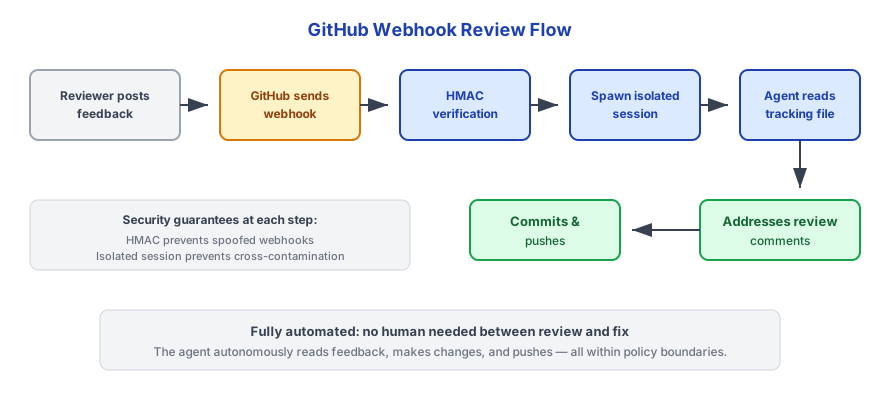
使用 webhook(即時)
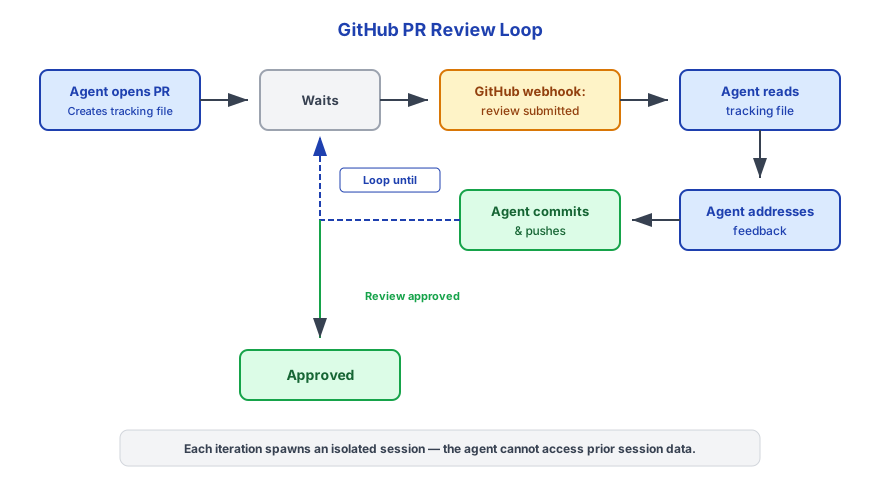
使用基於觸發器的輪詢(防火牆後)
兩條路徑使用相同的追蹤檔案。代理透過讀取 ~/.triggerfish/workspace/<agent-id>/scratch/pr-tracking/ 中的 PR 追蹤檔案來恢復上下文。
PR 追蹤檔案
代理為每個建立的 PR 寫入一個追蹤檔案:
~/.triggerfish/workspace/<agent-id>/scratch/pr-tracking/<branch-name>.json結構:
json
{
  "branch": "triggerfish/agent-1/fix-auth-timeout",
  "prNumber": 42,
  "prUrl": "https://github.com/owner/repo/pull/42",
  "task": "Fix authentication timeout when token expires during long requests",
  "repository": "owner/repo",
  "createdAt": "2025-01-15T10:30:00Z",
  "updatedAt": "2025-01-15T10:30:00Z",
  "lastCheckedAt": "2025-01-15T10:30:00Z",
  "lastReviewId": "",
  "status": "open",
  "commits": [
    "feat: add token refresh before expiry",
    "test: add timeout edge case coverage"
  ]
}
合併後,追蹤檔案歸檔到 completed/。
合併策略
預設情況下,代理不會自動合併已核准的 PR。當審查被核准時,代理通知擁有者並等待明確的合併指令。
要啟用自動合併,在 triggerfish.yaml 中新增:
yaml
github:
  auto_merge: true
啟用後,代理在收到核准審查後會執行 gh pr merge --squash --delete-branch。
自動合併預設為停用以確保安全。僅在您信任代理的變更並在 GitHub 中配置了分支保護規則(必要審查者、CI 檢查)時才啟用。 :::
可選:GitHub MCP 伺服器
如果您需要超出 gh CLI 和內建工具提供的更豐富 GitHub API 存取,您也可以配置 GitHub MCP 伺服器:
yaml
mcp_servers:
  - id: github
    command: "npx"
    args: ["-y", "@modelcontextprotocol/server-github"]
    # GitHub token is read from the OS keychain
    classification: CONFIDENTIAL
這對於大多數工作流程不是必需的——內建的 github_* 工具(透過 triggerfish connect github 設定)和 gh CLI 涵蓋所有常見操作。MCP 伺服器對於內建工具未涵蓋的進階查詢很有用。
安全考量
| 控制 | 詳情 |
|---|---|
| HMAC 驗證 | 所有 GitHub webhook 在處理前使用 HMAC-SHA256 驗證(webhook 模式) |
| 分類 | GitHub 資料預設分類為 INTERNAL——程式碼和 PR 資料不會洩漏到公開通道 |
| 工作階段隔離 | 每個 webhook 事件或觸發器喚醒產生全新的隔離工作階段 |
| 禁止降級寫入 | 對 INTERNAL 分類 PR 事件的代理回應無法傳送到 PUBLIC 通道 |
| 憑證處理 | gh CLI 管理自己的驗證權杖;triggerfish.yaml 中不儲存 GitHub 權杖 |
| 分支命名 | triggerfish/ 前綴使代理分支易於識別和篩選 |
如果您的倉庫包含敏感程式碼(專有、安全關鍵),考慮將 webhook 分類設為 CONFIDENTIAL 而非 INTERNAL。 :::
疑難排解
Webhook 未收到事件
- 檢查 webhook URL 是否可從網際網路存取(從外部機器使用
curl) - 在 GitHub 中,前往 Settings > Webhooks 並檢查 Recent Deliveries 標籤的錯誤
- 驗證 GitHub 和
GITHUB_WEBHOOK_SECRET之間的密鑰是否匹配 - 檢查 Triggerfish 日誌:
triggerfish logs --tail
PR 審查未被拾取(輪詢模式)
- 檢查
pr-review-checkcron 工作是否在triggerfish.yaml中配置 - 驗證 daemon 正在執行:
triggerfish status - 檢查追蹤檔案是否存在於
~/.triggerfish/workspace/<agent-id>/scratch/pr-tracking/ - 手動測試:
gh pr view <number> --json reviews - 檢查 Triggerfish 日誌:
triggerfish logs --tail
gh CLI 未驗證
bash
gh auth status
# 如果未驗證:
gh auth login
代理無法推送到遠端
驗證 git 遠端和憑證:
bash
git remote -v
gh auth status
確保已驗證的 GitHub 帳戶有倉庫的推送權限。
審查期間找不到追蹤檔案
代理在 ~/.triggerfish/workspace/<agent-id>/scratch/pr-tracking/ 中尋找追蹤檔案。如果檔案不存在,PR 可能是在 Triggerfish 外部建立的,或工作區被清理了。代理應通知擁有者並跳過自動處理。