
GitHub 集成
Triggerfish 通过两种互补的方式与 GitHub 集成:
快速设置:REST API 工具
连接 GitHub 最快的方式。为智能体提供 14 个内置工具,涵盖仓库、PR、问题、Actions 和代码搜索——全部具有分级感知的污染传播。
bash
triggerfish connect github这将引导您创建细粒度的个人访问令牌,验证它,并将其存储在操作系统密钥链中。就这样——您的智能体现在可以使用所有 github_* 工具。
有关技能工作方式的更多信息,请参阅技能文档,或运行 triggerfish skills list 查看所有可用工具。
高级:gh CLI + Webhooks
对于完整的开发反馈循环(智能体创建分支、打开 PR、响应代码审查),Triggerfish 还支持通过执行环境使用 gh CLI 和 webhook 驱动的审查交付。这使用三个可组合的部分:
- 通过执行环境使用
ghCLI——执行所有 GitHub 操作(创建 PR、读取审查、评论、合并) - 审查交付——两种模式:webhook 事件(即时,需要公共端点)或通过
gh pr view的基于触发器的轮询(在防火墙后工作) - git-branch-management 技能——教智能体完整的分支/PR/审查工作流
这些共同创建了完整的开发反馈循环:智能体创建分支、提交代码、打开 PR 并响应审查者反馈——无需自定义 GitHub API 代码。
前提条件
gh CLI
GitHub CLI(gh)必须在 Triggerfish 运行的环境中安装并认证。
bash
# 安装 gh(Fedora/RHEL)
sudo dnf install gh

# 安装 gh(macOS)
brew install gh

# 安装 gh(Debian/Ubuntu)
sudo apt install gh

# 认证
gh auth login
验证认证:
bash
gh auth status智能体通过 exec.run("gh ...") 使用 gh——除了 gh 登录外不需要单独的 GitHub 令牌配置。
Git
Git 必须安装并配置用户名和邮箱:
bash
git config --global user.name "Triggerfish Agent"
git config --global user.email "triggerfish@example.com"
仓库访问
智能体的工作区必须是一个 Git 仓库(或包含一个),并具有对远程的推送权限。
审查交付
有两种方式让智能体了解新的 PR 审查。选择一种或同时使用两种。
选项 A:基于触发器的轮询
无需入站连接。智能体使用 gh pr view 按计划轮询 GitHub。在任何防火墙、NAT 或 VPN 后都能工作。
在 triggerfish.yaml 中添加定时任务:
yaml
scheduler:
  cron:
    jobs:
      - id: pr-review-check
        schedule: "*/15 * * * *"
        task: >
          Check all open PR tracking files in scratch/pr-tracking/.
          For each open PR, query GitHub for new reviews or state changes
          using gh pr view. Address any review feedback, handle merges
          and closures.
        classification: INTERNAL
或在智能体的 TRIGGER.md 中添加"检查 PR 的审查反馈",以在常规触发器唤醒周期中执行。
选项 B:Webhook 设置
Webhooks 即时交付审查事件。这需要 Triggerfish Gateway 可从 GitHub 服务器访问(例如通过 Tailscale Funnel、反向代理或隧道)。
第 1 步:生成 webhook 密钥
bash
openssl rand -hex 32将其存储为环境变量:
bash
export GITHUB_WEBHOOK_SECRET="<generated-secret>"将其添加到您的 shell 配置文件或密钥管理器中,以便在重启后持续存在。
第 2 步:配置 Triggerfish
在 triggerfish.yaml 中添加 webhook 端点:
yaml
webhooks:
  endpoints:
    - id: github
      path: /webhook/github
      # secret 存储在操作系统密钥链中
      classification: INTERNAL
      actions:
        - event: "pull_request_review"
          task: >
            A PR review was submitted. Read the PR tracking file from
            scratch/pr-tracking/ to recover context. Check out the branch,
            read the review, address any requested changes, commit, push,
            and comment on the PR with a summary of changes made.
        - event: "pull_request_review_comment"
          task: >
            An inline review comment was posted on a PR. Read the PR
            tracking file, check out the branch, address the specific
            comment, commit, push.
        - event: "issue_comment"
          task: >
            A comment was posted on a PR or issue. Check if this is a
            tracked PR by looking up tracking files in scratch/pr-tracking/.
            If tracked, check out the branch and address the feedback.
        - event: "pull_request.closed"
          task: >
            A PR was closed or merged. Read the tracking file. If merged,
            clean up: delete local branch, archive tracking file to
            completed/. Notify the owner of the merge. If closed without
            merge, archive and notify.
第 3 步:暴露 webhook 端点
Triggerfish 的 Gateway 必须可从 GitHub 服务器访问。选项:
Tailscale Funnel(推荐用于个人使用):
yaml
# 在 triggerfish.yaml 中
remote:
  tailscale:
    serve: true
    funnel:
      enabled: true
      paths: ["/webhook/*"]
这将 https://<your-machine>.ts.net/webhook/github 暴露到互联网。
反向代理(nginx、Caddy):
将 /webhook/github 转发到您的 Gateway 的本地端口。
ngrok(开发/测试):
bash
ngrok http 8080使用生成的 URL 作为 webhook 目标。
第 4 步:配置 GitHub webhook
在您的 GitHub 仓库(或组织)中:
- 前往 Settings > Webhooks > Add webhook
- 将 Payload URL 设为您暴露的端点:
https://<your-host>/webhook/github - 将 Content type 设为
application/json - 将 Secret 设为与
GITHUB_WEBHOOK_SECRET相同的值 - 在 Which events would you like to trigger this webhook? 下,选择 Let me select individual events 并勾选:
- Pull requests(涵盖
pull_request.opened、pull_request.closed) - Pull request reviews(涵盖
pull_request_review) - Pull request review comments(涵盖
pull_request_review_comment) - Issue comments(涵盖 PR 和问题上的
issue_comment)
- Pull requests(涵盖
- 点击 Add webhook
GitHub 将发送 ping 事件以验证连接。检查 Triggerfish 日志确认接收:
bash
triggerfish logs --tail反馈循环的工作方式
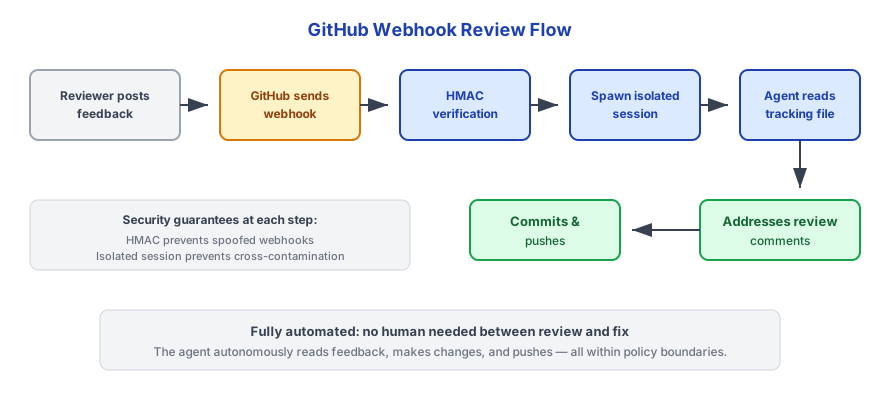
使用 webhooks(即时)
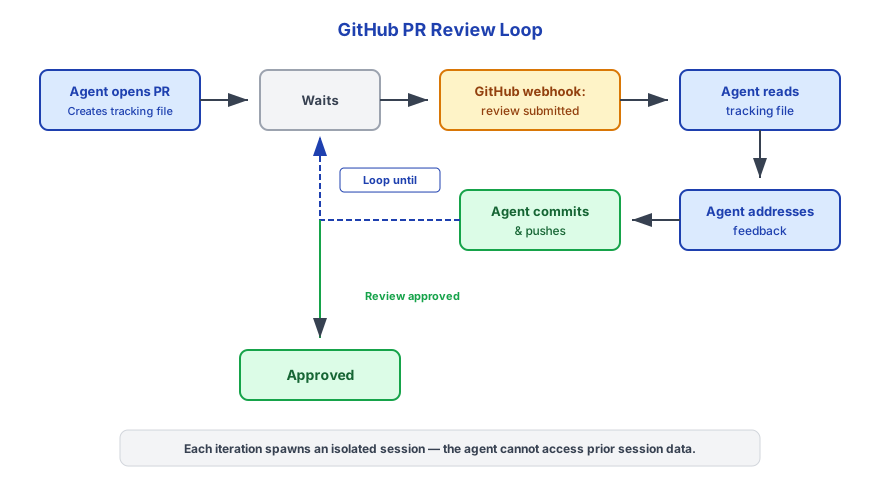
使用基于触发器的轮询(在防火墙后)
两条路径使用相同的追踪文件。智能体通过从 ~/.triggerfish/workspace/<agent-id>/scratch/pr-tracking/ 读取 PR 追踪文件来恢复上下文。
PR 追踪文件
智能体为每个创建的 PR 编写追踪文件:
~/.triggerfish/workspace/<agent-id>/scratch/pr-tracking/<branch-name>.json模式:
json
{
  "branch": "triggerfish/agent-1/fix-auth-timeout",
  "prNumber": 42,
  "prUrl": "https://github.com/owner/repo/pull/42",
  "task": "Fix authentication timeout when token expires during long requests",
  "repository": "owner/repo",
  "createdAt": "2025-01-15T10:30:00Z",
  "updatedAt": "2025-01-15T10:30:00Z",
  "lastCheckedAt": "2025-01-15T10:30:00Z",
  "lastReviewId": "",
  "status": "open",
  "commits": [
    "feat: add token refresh before expiry",
    "test: add timeout edge case coverage"
  ]
}
合并后,追踪文件被归档到 completed/。
合并策略
默认情况下,智能体不会自动合并已批准的 PR。当审查被批准时,智能体通知所有者并等待明确的合并指令。
要启用自动合并,在 triggerfish.yaml 中添加:
yaml
github:
  auto_merge: true
启用后,智能体将在收到批准审查后运行 gh pr merge --squash --delete-branch。
出于安全考虑,自动合并默认禁用。只有在您信任智能体的更改并在 GitHub 中配置了分支保护规则(必需审查者、CI 检查)时才启用它。 :::
可选:GitHub MCP 服务器
对于 gh CLI 和内置工具无法满足的更丰富的 GitHub API 访问,您还可以配置 GitHub MCP 服务器:
yaml
mcp_servers:
  - id: github
    command: "npx"
    args: ["-y", "@modelcontextprotocol/server-github"]
    # GitHub 令牌从操作系统密钥链读取
    classification: CONFIDENTIAL
这对大多数工作流不是必需的——通过 triggerfish connect github 设置的内置 github_* 工具和 gh CLI 涵盖所有常见操作。MCP 服务器对内置工具未涵盖的高级查询很有用。
安全注意事项
| 控制 | 详情 |
|---|---|
| HMAC 验证 | 所有 GitHub webhook 在处理前使用 HMAC-SHA256 验证(webhook 模式) |
| 分级 | GitHub 数据默认被分级为 INTERNAL——代码和 PR 数据不会泄漏到公共渠道 |
| 会话隔离 | 每个 webhook 事件或触发器唤醒生成一个全新的隔离会话 |
| 禁止降级写入 | 智能体对 INTERNAL 分级 PR 事件的响应不能发送到 PUBLIC 渠道 |
| 凭据处理 | gh CLI 管理自己的认证令牌;triggerfish.yaml 中不存储 GitHub 令牌 |
| 分支命名 | triggerfish/ 前缀使智能体分支容易识别和过滤 |
如果您的仓库包含敏感代码(专有、安全关键),考虑将 webhook 分级设为 CONFIDENTIAL 而非 INTERNAL。 :::
故障排除
Webhook 未接收事件
- 检查 webhook URL 是否可从互联网访问(从外部机器使用
curl) - 在 GitHub 中,前往 Settings > Webhooks 并检查 Recent Deliveries 标签中的错误
- 验证密钥在 GitHub 和
GITHUB_WEBHOOK_SECRET之间是否匹配 - 检查 Triggerfish 日志:
triggerfish logs --tail
PR 审查未被获取(轮询模式)
- 检查
pr-review-check定时任务是否在triggerfish.yaml中配置 - 验证守护进程正在运行:
triggerfish status - 检查
~/.triggerfish/workspace/<agent-id>/scratch/pr-tracking/中是否存在追踪文件 - 手动测试:
gh pr view <number> --json reviews - 检查 Triggerfish 日志:
triggerfish logs --tail
gh CLI 未认证
bash
gh auth status
# 如果未认证:
gh auth login
智能体无法推送到远程
验证 git 远程和凭据:
bash
git remote -v
gh auth status
确保已认证的 GitHub 账户有仓库的推送权限。
审查期间找不到追踪文件
智能体在 ~/.triggerfish/workspace/<agent-id>/scratch/pr-tracking/ 中查找追踪文件。如果文件缺失,PR 可能是在 Triggerfish 之外创建的,或者工作区被清理。智能体应通知所有者并跳过自动处理。