
GitHub Integration
Nag-i-integrate ang Triggerfish sa GitHub sa pamamagitan ng dalawang complementary approaches:
Quick Setup: REST API Tools
Ang pinakamabilis na paraan para i-connect ang GitHub. Binibigyan ang agent ng 14 built-in tools para sa repos, PRs, issues, Actions, at code search -- lahat na may classification-aware taint propagation.
bash
triggerfish connect githubGinagabayan ka nito sa paggawa ng fine-grained Personal Access Token, bini-validate ito, at ini-store sa OS keychain. Iyon lang -- maaari nang gamitin ng iyong agent ang lahat ng github_* tools.
Tingnan ang Skills documentation para sa karagdagang impormasyon kung paano gumagana ang skills, o patakbuhin ang triggerfish skills list para makita ang lahat ng available tools.
Advanced: gh CLI + Webhooks
Para sa buong development feedback loop (gumagawa ang agent ng branches, nagbubukas ng PRs, tumutugon sa code review), sinusuportahan din ng Triggerfish ang gh CLI sa pamamagitan ng exec at webhook-driven review delivery. Gumagamit ito ng tatlong composable na piraso:
ghCLI sa pamamagitan ng exec -- mag-perform ng lahat ng GitHub actions (gumawa ng PRs, basahin ang reviews, mag-comment, mag-merge)- Review delivery -- dalawang modes: webhook events (instant, nangangailangan ng public endpoint) o trigger-based polling sa pamamagitan ng
gh pr view(gumagana sa likod ng firewalls) - git-branch-management skill -- nagtuturo sa agent ng kumpletong branch/PR/review workflow
Magkakasama, gumagawa ang mga ito ng buong development feedback loop: gumagawa ang agent ng branches, nag-commit ng code, nagbubukas ng PRs, at tumutugon sa reviewer feedback -- walang kailangang custom GitHub API code.
Mga Prerequisites
gh CLI
Kailangang naka-install at authenticated ang GitHub CLI (gh) sa environment kung saan tumatakbo ang Triggerfish.
bash
# I-install ang gh (Fedora/RHEL)
sudo dnf install gh

# I-install ang gh (macOS)
brew install gh

# I-install ang gh (Debian/Ubuntu)
sudo apt install gh

# Mag-authenticate
gh auth login
I-verify ang authentication:
bash
gh auth statusGinagamit ng agent ang gh sa pamamagitan ng exec.run("gh ...") -- walang kailangang hiwalay na GitHub token configuration maliban sa gh login.
Git
Kailangan naka-install at configured ang Git na may user name at email:
bash
git config --global user.name "Triggerfish Agent"
git config --global user.email "triggerfish@example.com"
Repository Access
Ang workspace ng agent ay kailangang git repository (o naglalaman ng isa) na may push access sa remote.
Review Delivery
May dalawang paraan para malaman ng agent ang tungkol sa bagong PR reviews. Pumili ng isa o gamitin ang dalawa nang magkasama.
Option A: Trigger-Based Polling
Walang kailangang inbound connectivity. Nagpo-poll ang agent sa GitHub sa isang schedule gamit ang gh pr view. Gumagana sa likod ng anumang firewall, NAT, o VPN.
Magdagdag ng cron job sa triggerfish.yaml:
yaml
scheduler:
  cron:
    jobs:
      - id: pr-review-check
        schedule: "*/15 * * * *"
        task: >
          Check all open PR tracking files in scratch/pr-tracking/.
          For each open PR, query GitHub for new reviews or state changes
          using gh pr view. Address any review feedback, handle merges
          and closures.
        classification: INTERNAL
O idagdag ang "check open PRs for review feedback" sa TRIGGER.md ng agent para sa execution sa regular trigger wakeup cycle.
Option B: Webhook Setup
Agad na nagde-deliver ang webhooks ng review events. Kailangan nito na maabot ng GitHub servers ang Triggerfish gateway (hal. sa pamamagitan ng Tailscale Funnel, reverse proxy, o tunnel).
Step 1: Gumawa ng webhook secret
bash
openssl rand -hex 32I-store ito bilang environment variable:
bash
export GITHUB_WEBHOOK_SECRET="<generated-secret>"Idagdag ito sa iyong shell profile o secrets manager para ma-persist sa mga restart.
Step 2: I-configure ang Triggerfish
Idagdag ang webhook endpoint sa triggerfish.yaml:
yaml
webhooks:
  endpoints:
    - id: github
      path: /webhook/github
      # secret na naka-store sa OS keychain
      classification: INTERNAL
      actions:
        - event: "pull_request_review"
          task: >
            A PR review was submitted. Read the PR tracking file from
            scratch/pr-tracking/ to recover context. Check out the branch,
            read the review, address any requested changes, commit, push,
            and comment on the PR with a summary of changes made.
        - event: "pull_request_review_comment"
          task: >
            An inline review comment was posted on a PR. Read the PR
            tracking file, check out the branch, address the specific
            comment, commit, push.
        - event: "issue_comment"
          task: >
            A comment was posted on a PR or issue. Check if this is a
            tracked PR by looking up tracking files in scratch/pr-tracking/.
            If tracked, check out the branch and address the feedback.
        - event: "pull_request.closed"
          task: >
            A PR was closed or merged. Read the tracking file. If merged,
            clean up: delete local branch, archive tracking file to
            completed/. Notify the owner of the merge. If closed without
            merge, archive and notify.
Step 3: I-expose ang webhook endpoint
Kailangang maabot ng GitHub servers ang gateway ng Triggerfish. Mga options:
Tailscale Funnel (recommended para sa personal use):
yaml
# Sa triggerfish.yaml
remote:
  tailscale:
    serve: true
    funnel:
      enabled: true
      paths: ["/webhook/*"]
Nag-e-expose ito ng https://<your-machine>.ts.net/webhook/github sa internet.
Reverse proxy (nginx, Caddy):
I-forward ang /webhook/github sa local port ng iyong gateway.
ngrok (development/testing):
bash
ngrok http 8080Gamitin ang generated URL bilang webhook target.
Step 4: I-configure ang GitHub webhook
Sa iyong GitHub repository (o organization):
- Pumunta sa Settings > Webhooks > Add webhook
- I-set ang Payload URL sa iyong exposed endpoint:
https://<your-host>/webhook/github - I-set ang Content type sa
application/json - I-set ang Secret sa parehong value ng
GITHUB_WEBHOOK_SECRET - Sa Which events would you like to trigger this webhook?, piliin ang Let me select individual events at i-check ang:
- Pull requests (sinasaklaw ang
pull_request.opened,pull_request.closed) - Pull request reviews (sinasaklaw ang
pull_request_review) - Pull request review comments (sinasaklaw ang
pull_request_review_comment) - Issue comments (sinasaklaw ang
issue_commentsa PRs at issues)
- Pull requests (sinasaklaw ang
- I-click ang Add webhook
Magpapadala ang GitHub ng ping event para i-verify ang connection. I-check ang Triggerfish logs para i-confirm ang receipt:
bash
triggerfish logs --tailPaano Gumagana ang Feedback Loop
Sa webhooks (instant)
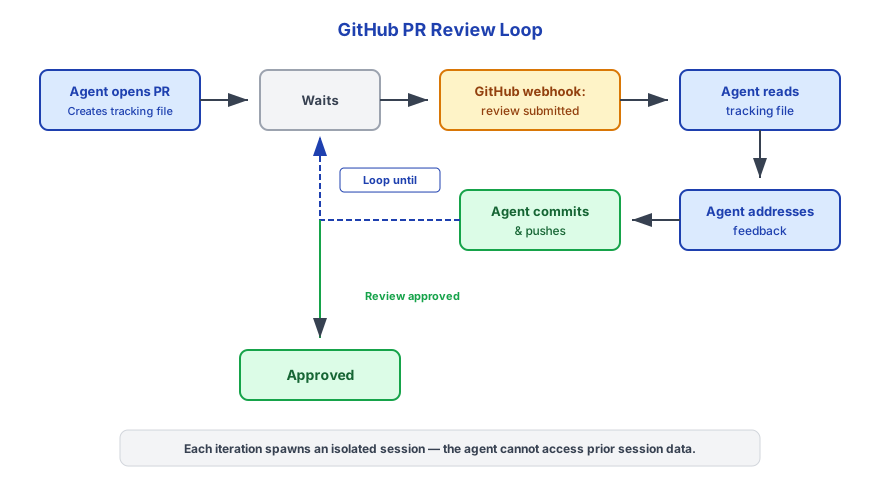
Sa trigger-based polling (sa likod ng firewall)
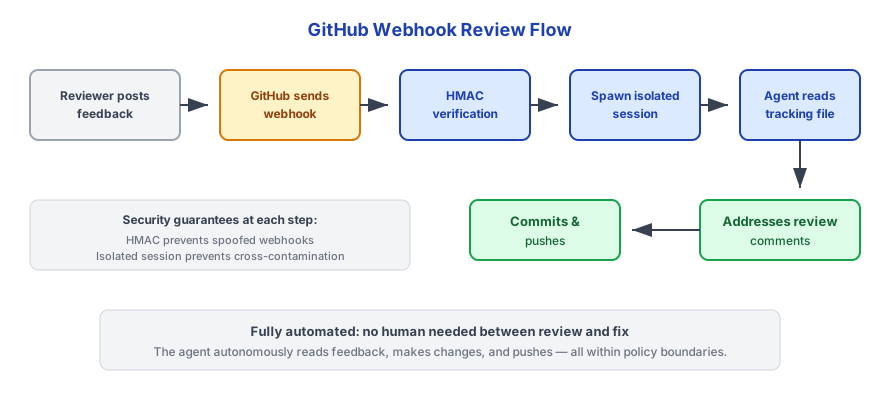
Parehong paths ang gumagamit ng parehong tracking files. Nire-recover ng agent ang context sa pamamagitan ng pagbasa ng PR tracking file mula sa ~/.triggerfish/workspace/<agent-id>/scratch/pr-tracking/.
Mga PR Tracking File
Nagsusulat ang agent ng tracking file para sa bawat PR na ginagawa nito:
~/.triggerfish/workspace/<agent-id>/scratch/pr-tracking/<branch-name>.jsonSchema:
json
{
  "branch": "triggerfish/agent-1/fix-auth-timeout",
  "prNumber": 42,
  "prUrl": "https://github.com/owner/repo/pull/42",
  "task": "Fix authentication timeout when token expires during long requests",
  "repository": "owner/repo",
  "createdAt": "2025-01-15T10:30:00Z",
  "updatedAt": "2025-01-15T10:30:00Z",
  "lastCheckedAt": "2025-01-15T10:30:00Z",
  "lastReviewId": "",
  "status": "open",
  "commits": [
    "feat: add token refresh before expiry",
    "test: add timeout edge case coverage"
  ]
}
Pagkatapos ng merge, ina-archive ang tracking files sa completed/.
Merge Policy
Bilang default, hindi auto-merge ng agent ang approved PRs. Kapag ang review ay approved, ino-notify ng agent ang owner at naghihintay ng explicit merge instruction.
Para i-enable ang auto-merge, idagdag sa triggerfish.yaml:
yaml
github:
  auto_merge: true
Kapag naka-enable, magpa-patakbo ang agent ng gh pr merge --squash --delete-branch pagkatapos makatanggap ng approving review.
Naka-disable ang auto-merge bilang default para sa kaligtasan. I-enable lang ito kung nagtitiwala ka sa mga pagbabago ng agent at may configured na branch protection rules (required reviewers, CI checks) sa GitHub. :::
Optional: GitHub MCP Server
Para sa mas mayamang GitHub API access na hindi saklaw ng gh CLI at mga built-in tools, maaari mo ring i-configure ang GitHub MCP server:
yaml
mcp_servers:
  - id: github
    command: "npx"
    args: ["-y", "@modelcontextprotocol/server-github"]
    # Binabasa ang GitHub token mula sa OS keychain
    classification: CONFIDENTIAL
Hindi ito kinakailangan para sa karamihan ng workflows -- sinasaklaw ng built-in github_* tools (na-setup sa pamamagitan ng triggerfish connect github) at gh CLI ang lahat ng karaniwang operations. Ang MCP server ay kapaki-pakinabang para sa advanced queries na hindi saklaw ng built-in tools.
Mga Security Consideration
| Control | Detalye |
|---|---|
| HMAC verification | Lahat ng GitHub webhooks ay nive-verify gamit ang HMAC-SHA256 bago i-process (webhook mode) |
| Classification | Ang GitHub data ay classified bilang INTERNAL bilang default -- hindi nali-leak ang code at PR data sa public channels |
| Session isolation | Bawat webhook event o trigger wakeup ay nagsi-spawn ng bagong isolated session |
| No Write-Down | Ang agent responses sa INTERNAL-classified PR events ay hindi maaaring ipadala sa PUBLIC channels |
| Credential handling | Namamahala ang gh CLI ng sarili nitong auth token; walang GitHub tokens na naka-store sa triggerfish.yaml |
| Branch naming | Ang triggerfish/ prefix ay ginagawang madaling matukoy at i-filter ang agent branches |
Kung ang iyong repository ay naglalaman ng sensitive code (proprietary, security-critical), pag-isipan ang pag-set ng webhook classification sa CONFIDENTIAL sa halip na INTERNAL. :::
Troubleshooting
Hindi tumatanggap ng events ang webhook
- I-check na maabot ang webhook URL mula sa internet (gumamit ng
curlmula sa external machine) - Sa GitHub, pumunta sa Settings > Webhooks at i-check ang Recent Deliveries tab para sa errors
- I-verify na tumutugma ang secret sa pagitan ng GitHub at
GITHUB_WEBHOOK_SECRET - I-check ang Triggerfish logs:
triggerfish logs --tail
Hindi naku-pick up ang PR reviews (polling mode)
- I-check na ang
pr-review-checkcron job ay configured satriggerfish.yaml - I-verify na tumatakbo ang daemon:
triggerfish status - I-check na may tracking files sa
~/.triggerfish/workspace/<agent-id>/scratch/pr-tracking/ - Manu-manong i-test:
gh pr view <number> --json reviews - I-check ang Triggerfish logs:
triggerfish logs --tail
Hindi authenticated ang gh CLI
bash
gh auth status
# Kung hindi authenticated:
gh auth login
Hindi maka-push sa remote ang agent
I-verify ang git remote at credentials:
bash
git remote -v
gh auth status
Siguraduhing may push access ang authenticated GitHub account sa repository.
Hindi nahanap ang tracking file sa review
Hinahanap ng agent ang tracking files sa ~/.triggerfish/workspace/<agent-id>/scratch/pr-tracking/. Kung nawawala ang file, maaaring ginawa ang PR sa labas ng Triggerfish, o na-clean ang workspace. Dapat i-notify ng agent ang owner at i-skip ang automated handling.