
Browser Automation
Triggerfish CDP (Chrome DevTools Protocol) பயன்படுத்தி ஒரு dedicated managed Chromium instance மூலம் deep browser control வழங்குகிறது. Agent web navigate செய்யலாம், pages உடன் interact செய்யலாம், forms fill செய்யலாம், screenshots capture செய்யலாம், மற்றும் web workflows automate செய்யலாம் -- அனைத்தும் policy enforcement இல்.
Architecture
Browser automation puppeteer-core மீது built, CDP மூலம் ஒரு managed Chromium instance உடன் connect செய்கிறது. ஒவ்வொரு browser action உம் browser ஐ அடைவதற்கு முன்பு policy layer மூலம் செல்கிறது.
Triggerfish Google Chrome, Chromium, மற்றும் Brave உள்பட Chromium-based browsers auto-detect செய்கிறது. Detection Linux, macOS, Windows, மற்றும் Flatpak environments இல் standard install paths cover செய்கிறது.
browser_navigate tool க்கு http:// அல்லது https:// URLs தேவை. Browser-internal schemes (chrome://, brave://, about: போன்றவை) supported அல்ல மற்றும் web URL பயன்படுத்துமாறு guidance உடன் error return செய்கின்றன. :::
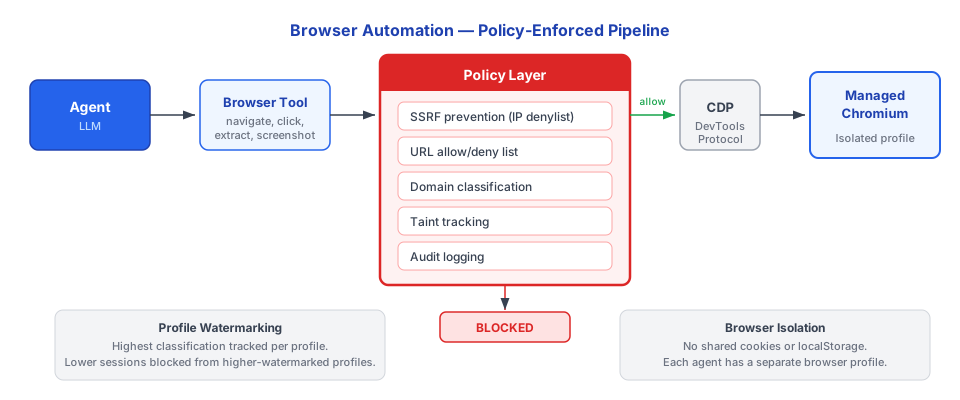
Browser profile per agent isolated. Managed Chromium instance உங்கள் personal browser உடன் cookies, sessions, அல்லது local storage share செய்வதில்லை. Credential autofill default ஆக disabled.
Available Actions
| Action | விளக்கம் | Example Use |
|---|---|---|
navigate | ஒரு URL க்கு செல்லவும் (domain policy க்கு உட்பட்டு) | Research க்கு web page திறக்கவும் |
snapshot | Page screenshot capture செய்யவும் | UI state document செய்யவும், visual information extract செய்யவும் |
click | Page இல் ஒரு element click செய்யவும் | Form submit செய்யவும், button activate செய்யவும் |
type | Input field இல் text type செய்யவும் | Search box fill செய்யவும், form complete செய்யவும் |
select | Dropdown இலிருந்து option select செய்யவும் | Menu இலிருந்து தேர்வு செய்யவும் |
upload | Form க்கு file upload செய்யவும் | Document attach செய்யவும் |
evaluate | Page context இல் JavaScript இயக்கவும் (sandboxed) | Data extract செய்யவும், DOM manipulate செய்யவும் |
wait | ஒரு element அல்லது condition காத்திருக்கவும் | Interact செய்வதற்கு முன்பு page load ஆனதை உறுதிப்படுத்தவும் |
Domain Policy Enforcement
Agent navigate செய்யும் ஒவ்வொரு URL உம் browser act செய்வதற்கு முன்பு domain allowlist மற்றும் denylist க்கு எதிராக checked ஆகிறது.
கட்டமைப்பு
yaml
browser:
  domain_policy:
    allow:
      - "*.example.com"
      - "github.com"
      - "docs.google.com"
      - "*.notion.so"
    deny:
      - "*.malware-site.com"
    classification:
      "*.internal.company.com": INTERNAL
      "github.com": INTERNAL
      "*.google.com": INTERNAL
Domain Policy எவ்வாறு செயல்படுகிறது
- Agent
browser.navigate("https://github.com/org/repo")call செய்கிறது - URL context ஆக
PRE_TOOL_CALLhook fire ஆகிறது - Policy engine domain ஐ allow/deny lists க்கு எதிராக check செய்கிறது
- Denied ஆனால் அல்லது allowlist இல் இல்லையென்றால், navigation blocked ஆகிறது
- Allowed ஆனால், domain classification lookup ஆகிறது
- Session taint domain classification உடன் match ஆக escalate செய்கிறது
- Navigation proceeds
SECURITY Domain allowlist இல் இல்லையென்றால், navigation default ஆக blocked. LLM domain policy override செய்ய முடியாது. இது agent arbitrary websites visit செய்வதை தடுக்கிறது -- sensitive data expose செய்யலாம் அல்லது unwanted actions trigger செய்யலாம். :::
Screenshots மற்றும் Classification
browser.snapshot மூலம் captured screenshots session இன் current taint level inherit செய்கின்றன. Session CONFIDENTIAL இல் tainted ஆனால், அந்த session இலிருந்து அனைத்து screenshots CONFIDENTIAL ஆக classified ஆகின்றன.
இது output policy க்கு முக்கியம். CONFIDENTIAL ஆக classified ஒரு screenshot PUBLIC channel க்கு அனுப்ப முடியாது. PRE_OUTPUT hook இதை boundary இல் enforce செய்கிறது.
Scraped Content மற்றும் Lineage
Agent web page இலிருந்து content extract செய்யும்போது (evaluate மூலம், text படிப்பதன் மூலம், அல்லது elements parse செய்வதன் மூலம்), extracted data:
- Domain இன் assigned classification level அடிப்படையில் classified ஆகிறது
- Source URL, extraction time, மற்றும் classification track செய்யும் ஒரு lineage record உருவாக்குகிறது
- Session taint க்கு contribute செய்கிறது (taint content classification உடன் match ஆக escalate ஆகிறது)
இந்த lineage tracking வாரங்களுக்கு முன்பு web page இலிருந்து scrape செய்யப்பட்டாலும் data எங்கிருந்து வந்தது என்று எப்போதும் trace செய்ய முடியும்.
Security Controls
Per-Agent Browser Isolation
ஒவ்வொரு agent உம் தன்னுடைய browser profile பெறுகிறது. இதன் பொருள்:
- Agents இடையே shared cookies இல்லை
- Shared local storage அல்லது session storage இல்லை
- Host browser cookies அல்லது sessions க்கு access இல்லை
- Credential autofill default ஆக disabled
- Browser extensions load ஆவதில்லை
Policy Hook Integration
அனைத்து browser actions உம் standard policy hooks மூலம் செல்கின்றன:
| Hook | எப்போது Fire ஆகிறது | என்ன Check செய்கிறது |
|---|---|---|
PRE_TOOL_CALL | ஒவ்வொரு browser action க்கும் முன்பு | Domain allowlist, URL policy, action permissions |
POST_TOOL_RESPONSE | Browser data return செய்த பிறகு | Response classify செய்யவும், session taint update செய்யவும், lineage உருவாக்கவும் |
PRE_OUTPUT | Browser content system விட்டு வெளியேறும்போது | Destination க்கு எதிராக Classification check |
Resource Limits
- Navigation timeout browser indefinitely hang ஆவதை தடுக்கிறது
- Page load size limits excessive memory consumption தடுக்கின்றன
- Concurrent tab limits per agent enforce ஆகின்றன
Enterprise Controls
Enterprise deployments க்கு browser automation க்கான கூடுதல் controls உள்ளன:
| Control | விளக்கம் |
|---|---|
| Domain-level classification | Intranet domains தானாக INTERNAL ஆக classified |
| Blocked domains list | Admin-managed prohibited domains பட்டியல் |
| Screenshot retention policy | Captured screenshots எவ்வளவு காலம் stored ஆகின்றன |
| Browser session audit logging | Compliance க்கு அனைத்து browser actions இன் full logging |
| Disable browser automation | Admin specific agents அல்லது roles க்கு browser tool முழுவதும் disable செய்யலாம் |
Example: Web Research Workflow
Browser automation பயன்படுத்தும் ஒரு typical agent workflow:
1. User:  "Research competitor pricing on example-competitor.com"

2. Agent: browser.navigate("https://example-competitor.com/pricing")
          -> PRE_TOOL_CALL: domain "example-competitor.com" allowlist க்கு எதிராக checked
          -> Allowed, PUBLIC ஆக classified
          -> Navigation proceeds

3. Agent: browser.snapshot()
          -> Screenshot captured, session taint level இல் classified (PUBLIC)

4. Agent: browser.evaluate("document.querySelector('.pricing-table').innerText")
          -> Text extracted, PUBLIC ஆக classified
          -> Lineage record created: source=example-competitor.com/pricing

5. Agent: Pricing information summarize செய்து user க்கு return செய்கிறது
          -> PRE_OUTPUT: PUBLIC data to user channel -- ALLOWED
ஒவ்வொரு step உம் logged, classified, மற்றும் auditable.