
Browser Automation
Triggerfish provides deep browser control through a dedicated managed Chromium instance using CDP (Chrome DevTools Protocol). The agent can navigate the web, interact with pages, fill forms, capture screenshots, and automate web workflows -- all under policy enforcement.
Architecture
Browser automation is built on puppeteer-core, connecting to a managed Chromium instance via CDP. Every browser action passes through the policy layer before reaching the browser.
Triggerfish auto-detects Chromium-based browsers including Google Chrome, Chromium, and Brave. Detection covers standard install paths on Linux, macOS, Windows, and Flatpak environments.
The browser_navigate tool requires http:// or https:// URLs.
Browser-internal schemes (like chrome://, brave://, about:) are not supported and will return an error with guidance to use a web URL instead. :::
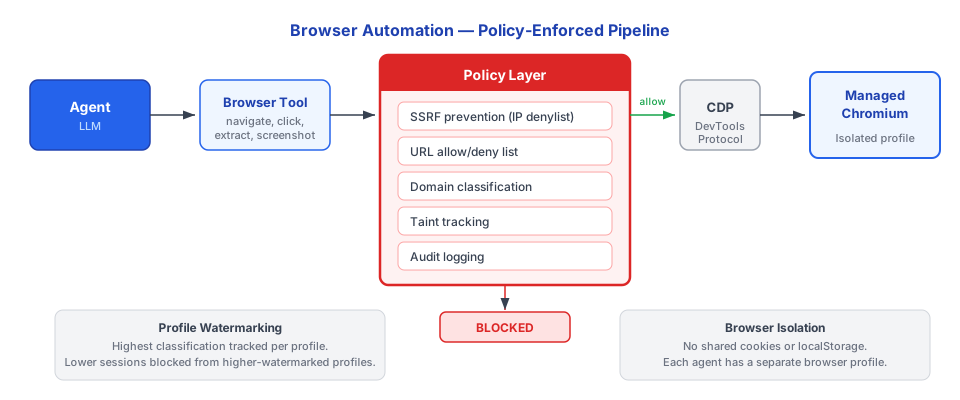
The browser profile is isolated per agent. The managed Chromium instance does not share cookies, sessions, or local storage with your personal browser. Credential autofill is disabled by default.
Available Actions
| Action | Description | Example Use |
|---|---|---|
navigate | Go to a URL (subject to domain policy) | Open a web page for research |
snapshot | Capture a page screenshot | Document a UI state, extract visual information |
click | Click an element on the page | Submit a form, activate a button |
type | Type text into an input field | Fill in a search box, complete a form |
select | Select an option from a dropdown | Choose from a menu |
upload | Upload a file to a form | Attach a document |
evaluate | Run JavaScript in the page context (sandboxed) | Extract data, manipulate the DOM |
wait | Wait for an element or condition | Ensure a page has loaded before interacting |
Domain Policy Enforcement
Every URL the agent navigates to is checked against a domain allowlist and denylist before the browser acts.
Configuration
yaml
browser:
  domain_policy:
    allow:
      - "*.example.com"
      - "github.com"
      - "docs.google.com"
      - "*.notion.so"
    deny:
      - "*.malware-site.com"
    classification:
      "*.internal.company.com": INTERNAL
      "github.com": INTERNAL
      "*.google.com": INTERNAL
How Domain Policy Works
- Agent calls
browser.navigate("https://github.com/org/repo") PRE_TOOL_CALLhook fires with the URL as context- Policy engine checks the domain against allow/deny lists
- If denied or not on the allowlist, the navigation is blocked
- If allowed, the domain classification is looked up
- Session taint escalates to match the domain classification
- Navigation proceeds
SECURITY If a domain is not on the allowlist, navigation is blocked
by default. The LLM cannot override domain policy. This prevents the agent from visiting arbitrary websites that could expose sensitive data or trigger unwanted actions. :::
Screenshots and Classification
Screenshots captured via browser.snapshot inherit the session's current taint level. If the session is tainted at CONFIDENTIAL, all screenshots from that session are classified as CONFIDENTIAL.
This matters for output policy. A screenshot classified at CONFIDENTIAL cannot be sent to a PUBLIC channel. The PRE_OUTPUT hook enforces this at the boundary.
Scraped Content and Lineage
When the agent extracts content from a web page (via evaluate, reading text, or parsing elements), the extracted data:
- Is classified based on the domain's assigned classification level
- Creates a lineage record tracking the source URL, extraction time, and classification
- Contributes to session taint (taint escalates to match the content classification)
This lineage tracking means you can always trace where data came from, even if it was scraped from a web page weeks ago.
Security Controls
Per-Agent Browser Isolation
Each agent gets its own browser profile. This means:
- No shared cookies between agents
- No shared local storage or session storage
- No access to host browser cookies or sessions
- Credential autofill disabled by default
- Browser extensions are not loaded
Policy Hook Integration
All browser actions pass through the standard policy hooks:
| Hook | When It Fires | What It Checks |
|---|---|---|
PRE_TOOL_CALL | Before every browser action | Domain allowlist, URL policy, action permissions |
POST_TOOL_RESPONSE | After browser returns data | Classify response, update session taint, create lineage |
PRE_OUTPUT | When browser content leaves the system | Classification check against destination |
Resource Limits
- Navigation timeout prevents the browser from hanging indefinitely
- Page load size limits prevent excessive memory consumption
- Concurrent tab limits are enforced per agent
Enterprise Controls
Enterprise deployments have additional browser automation controls:
| Control | Description |
|---|---|
| Domain-level classification | Intranet domains automatically classified as INTERNAL |
| Blocked domains list | Admin-managed list of prohibited domains |
| Screenshot retention policy | How long captured screenshots are stored |
| Browser session audit logging | Full logging of all browser actions for compliance |
| Disable browser automation | Admin can disable the browser tool entirely for specific agents or roles |
Example: Web Research Workflow
A typical agent workflow using browser automation:
1. User:  "Research competitor pricing on example-competitor.com"

2. Agent: browser.navigate("https://example-competitor.com/pricing")
          -> PRE_TOOL_CALL: domain "example-competitor.com" checked against allowlist
          -> Allowed, classified as PUBLIC
          -> Navigation proceeds

3. Agent: browser.snapshot()
          -> Screenshot captured, classified at session taint level (PUBLIC)

4. Agent: browser.evaluate("document.querySelector('.pricing-table').innerText")
          -> Text extracted, classified as PUBLIC
          -> Lineage record created: source=example-competitor.com/pricing

5. Agent: Summarizes pricing information and returns to user
          -> PRE_OUTPUT: PUBLIC data to user channel -- ALLOWED
Each step is logged, classified, and auditable.