
MCP Gateway
Use any MCP server. We secure the boundary.
The Model Context Protocol (MCP) is the emerging standard for agent-to-tool communication. Triggerfish provides a secure MCP Gateway that lets you connect to any MCP-compatible server while enforcing classification controls, tool-level permissions, taint tracking, and full audit logging.
You bring the MCP servers. Triggerfish secures every request and response that crosses the boundary.
How It Works
The MCP Gateway sits between your agent and any MCP server. Every tool call passes through the policy enforcement layer before reaching the external server, and every response is classified before it enters the agent context.
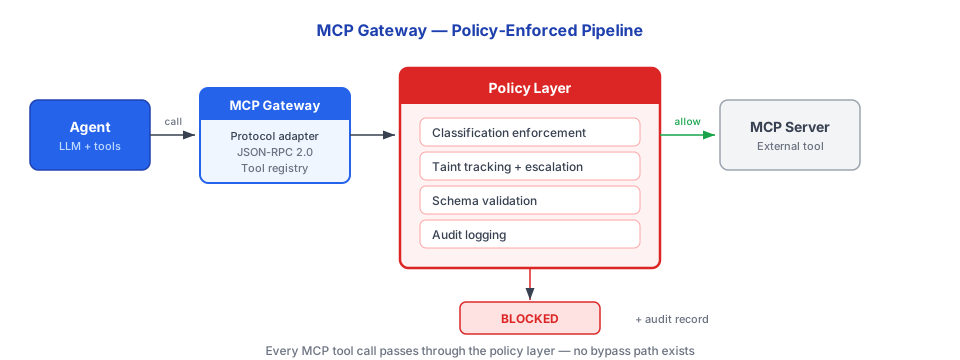
The gateway provides five core functions:
- Server authentication and classification -- MCP servers must be reviewed and classified before use
- Tool-level permission enforcement -- Individual tools can be permitted, restricted, or blocked
- Request/response taint tracking -- Session taint escalates based on server classification
- Schema validation -- All requests and responses validated against declared schemas
- Audit logging -- Every tool call, decision, and taint change is recorded
MCP Server States
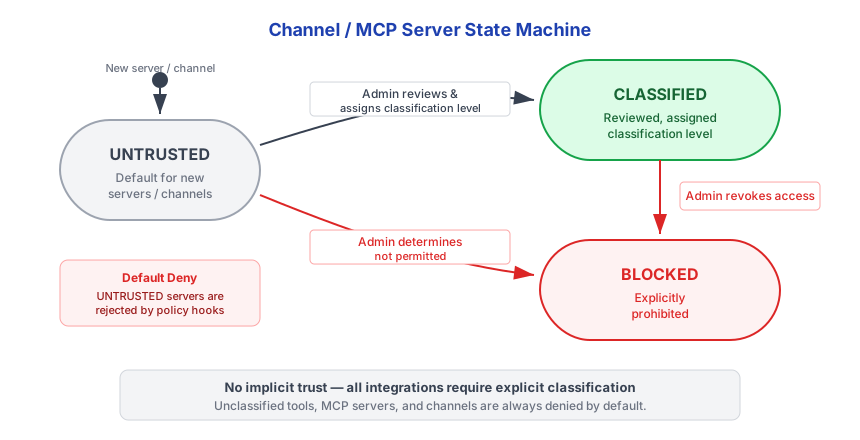
All MCP servers default to UNTRUSTED. They must be explicitly classified before the agent can invoke them.
| State | Description | Agent Can Invoke? |
|---|---|---|
UNTRUSTED | Default for new servers. Pending review. | No |
CLASSIFIED | Reviewed and assigned a classification level with per-tool permissions. | Yes (within policy) |
BLOCKED | Explicitly prohibited by admin. | No |
SECURITY An UNTRUSTED MCP server cannot be invoked by the agent
under any circumstances. The LLM cannot request, convince, or trick the system into using an unclassified server. Classification is a code-level gate, not an LLM decision. :::
Configuration
MCP servers are configured in triggerfish.yaml as a map keyed by server ID. Each server uses either a local subprocess (stdio transport) or a remote endpoint (SSE transport).
Local Servers (Stdio)
Local servers are spawned as subprocesses. Triggerfish communicates with them via stdin/stdout.
yaml
mcp_servers:
  github:
    command: npx
    args: ["-y", "@modelcontextprotocol/server-github"]
    env:
      GITHUB_PERSONAL_ACCESS_TOKEN: "keychain:github-pat"
    classification: CONFIDENTIAL

  filesystem:
    command: npx
    args: ["-y", "@modelcontextprotocol/server-filesystem", "/home/you/docs"]
    classification: INTERNAL

  weather:
    command: npx
    args: ["-y", "@mcp/server-weather"]
    classification: PUBLIC
Remote Servers (SSE)
Remote servers run elsewhere and are accessed via HTTP Server-Sent Events.
yaml
mcp_servers:
  remote_api:
    url: "https://mcp.example.com/sse"
    classification: CONFIDENTIAL
Configuration Keys
| Key | Type | Required | Description |
|---|---|---|---|
command | string | Yes (stdio) | Binary to spawn (e.g., npx, deno, node) |
args | string[] | No | Arguments passed to the command |
env | map | No | Environment variables for the subprocess |
url | string | Yes (SSE) | HTTP endpoint for remote servers |
classification | string | Yes | Data sensitivity level: PUBLIC, INTERNAL, CONFIDENTIAL, or RESTRICTED |
enabled | boolean | No | Default: true. Set to false to skip without removing config. |
Each server must have either command (local) or url (remote). Servers with neither are skipped.
Lazy Connection
MCP servers connect in the background after startup. You do not need to wait for all servers to be ready before using your agent.
- Servers retry with exponential backoff: 2s → 4s → 8s → 30s max
- New servers become available to the agent as they connect — no session restart needed
- If a server fails to connect after all retries, it enters the
failedstate and can be retried on the next daemon restart
The CLI and Tidepool interfaces display real-time MCP connection status. See CLI Channel for details.
Disabling a Server
To temporarily disable an MCP server without removing its configuration:
yaml
mcp_servers:
  github:
    command: npx
    args: ["-y", "@modelcontextprotocol/server-github"]
    classification: CONFIDENTIAL
    enabled: false # Skipped during startup
Environment Variables and Secrets
Env values prefixed with keychain: are resolved from the OS keychain at startup:
yaml
env:
  API_KEY: "keychain:my-secret-name" # Resolved from OS keychain
  PLAIN_VAR: "literal-value" # Passed as-is
Only PATH is inherited from the host environment (so npx, node, deno, etc. resolve correctly). No other host environment variables leak into MCP server subprocesses.
Store secrets with triggerfish config set-secret <name> <value>. Then
reference them as keychain:<name> in your MCP server env config. :::
Tool Naming
Tools from MCP servers are namespaced as mcp_<serverId>_<toolName> to avoid collision with built-in tools. For example, if a server named github exposes a tool called list_repos, the agent sees it as mcp_github_list_repos.
Classification and Default Deny
If you omit classification, the server is registered as UNTRUSTED and the gateway rejects all tool calls. You must explicitly choose a classification level. See the Classification Guide for help choosing the right level.
Tool Call Flow
When the agent requests an MCP tool call, the gateway executes a deterministic sequence of checks before forwarding the request.
1. Pre-Flight Checks
All checks are deterministic -- no LLM calls, no randomness.
| Check | Failure Result |
|---|---|
Server status is CLASSIFIED? | Block: "Server not approved" |
| Tool is permitted for this server? | Block: "Tool not permitted" |
| User has required permissions? | Block: "Permission denied" |
| Session taint compatible with server classification? | Block: "Would violate write-down" |
| Schema validation passes? | Block: "Invalid parameters" |
If the session taint is higher than the server classification, the call
is blocked to prevent write-down. A session tainted at CONFIDENTIAL cannot send data to a PUBLIC MCP server. :::
2. Execute
If all pre-flight checks pass, the gateway forwards the request to the MCP server.
3. Response Processing
When the MCP server returns a response:
- Validate the response against the declared schema
- Classify the response data at the server's classification level
- Update session taint:
taint = max(current_taint, server_classification) - Create a lineage record tracking the data origin
4. Audit
Every tool call is logged with: server identity, tool name, user identity, policy decision, taint change, and timestamp.
Response Taint Rules
MCP server responses inherit the server's classification level. Session taint can only escalate.
| Server Classification | Response Taint | Session Impact |
|---|---|---|
PUBLIC | PUBLIC | No taint change |
INTERNAL | INTERNAL | Taint escalates to at least INTERNAL |
CONFIDENTIAL | CONFIDENTIAL | Taint escalates to at least CONFIDENTIAL |
RESTRICTED | RESTRICTED | Taint escalates to RESTRICTED |
Once a session is tainted at a given level, it stays at that level or higher for the remainder of the session. A full session reset (which clears conversation history) is required to reduce taint.
User Authentication Passthrough
For MCP servers that support user-level authentication, the gateway passes through the user's delegated credentials rather than system credentials.
When a tool is configured with requires_user_auth: true:
- The gateway checks whether the user has connected this MCP server
- Retrieves the user's delegated credential from the secure credential store
- Adds user authentication to the MCP request headers
- The MCP server enforces user-level permissions
The result: the MCP server sees the user's identity, not a system identity. Permission inheritance works through the MCP boundary -- the agent can only access what the user can access.
User auth passthrough is the preferred pattern for any MCP server that
manages access control. It means the agent inherits the user's permissions rather than having blanket system access. :::
Schema Validation
The gateway validates all MCP requests and responses against declared schemas before forwarding:
typescript
// Request validation (simplified)
function validateMcpRequest(
  serverConfig: McpServerConfig,
  toolName: string,
  params: Record<string, unknown>,
): Result<void, McpError> {
  const toolSchema = serverConfig.getToolSchema(toolName);

  if (!toolSchema) {
    return err(new McpError("Unknown tool"));
  }

  // Validate params against JSON schema
  if (!validateJsonSchema(params, toolSchema.inputSchema)) {
    return err(new McpError("Invalid parameters"));
  }

  // Check for injection patterns in string params
  for (const [, value] of Object.entries(params)) {
    if (typeof value === "string" && containsInjectionPattern(value)) {
      return err(new McpError("Potential injection detected"));
    }
  }

  return ok(undefined);
}
Schema validation catches malformed requests before they reach the external server and flags potential injection patterns in string parameters.
Enterprise Controls
Enterprise deployments have additional controls for MCP server management:
- Admin-managed server registry -- Only admin-approved MCP servers can be classified
- Per-department tool permissions -- Different teams can have different tool access
- Compliance logging -- All MCP interactions available in compliance dashboards
- Rate limiting -- Per-server and per-tool rate limits
- Server health monitoring -- Gateway tracks server availability and response times