
MCP Gateway
எந்த MCP server உம் பயன்படுத்தவும். நாங்கள் boundary secure செய்கிறோம்.
Model Context Protocol (MCP) என்பது agent-to-tool communication க்கான emerging standard. Triggerfish classification controls, tool-level permissions, taint tracking, மற்றும் full audit logging enforce செய்கையில் எந்த MCP-compatible server உடனும் இணைக்க அனுமதிக்கும் ஒரு secure MCP Gateway வழங்குகிறது.
நீங்கள் MCP servers கொண்டுவருகிறீர்கள். Triggerfish boundary cross செய்யும் ஒவ்வொரு request மற்றும் response ஐயும் secure செய்கிறது.
எவ்வாறு செயல்படுகிறது
MCP Gateway உங்கள் agent மற்றும் எந்த MCP server இடையேயும் அமர்கிறது. ஒவ்வொரு tool call உம் external server ஐ அடைவதற்கு முன்பு policy enforcement layer மூலம் செல்கிறது, மற்றும் ஒவ்வொரு response உம் agent context க்கு நுழைவதற்கு முன்பு classified ஆகிறது.
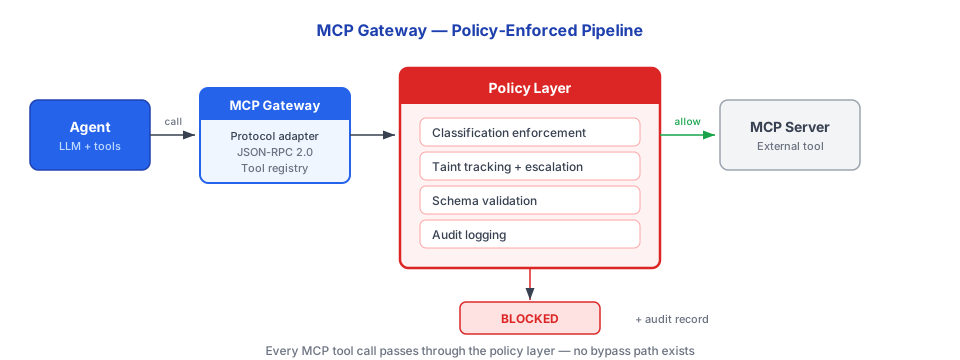
Gateway ஐந்து core functions வழங்குகிறது:
- Server authentication மற்றும் classification -- MCP servers பயன்படுத்துவதற்கு முன்பு reviewed மற்றும் classified ஆக வேண்டும்
- Tool-level permission enforcement -- Individual tools permitted, restricted, அல்லது blocked ஆக முடியும்
- Request/response taint tracking -- Server classification அடிப்படையில் Session taint escalate ஆகிறது
- Schema validation -- அனைத்து requests மற்றும் responses உம் declared schemas க்கு எதிராக validated
- Audit logging -- ஒவ்வொரு tool call, முடிவு, மற்றும் taint மாற்றமும் பதிவு செய்யப்படுகிறது
MCP Server நிலைகள்
அனைத்து MCP servers உம் default ஆக UNTRUSTED. Agent அவற்றை invoke செய்வதற்கு முன்பு வெளிப்படையாக classified ஆக வேண்டும்.
| நிலை | விளக்கம் | Agent Invoke செய்யலாமா? |
|---|---|---|
UNTRUSTED | புதிய servers க்கு Default. Review pending. | இல்லை |
CLASSIFIED | Reviewed மற்றும் per-tool permissions உடன் ஒரு classification நிலை assigned. | ஆம் (policy க்கு உட்பட்டு) |
BLOCKED | Admin மூலம் வெளிப்படையாக prohibited. | இல்லை |
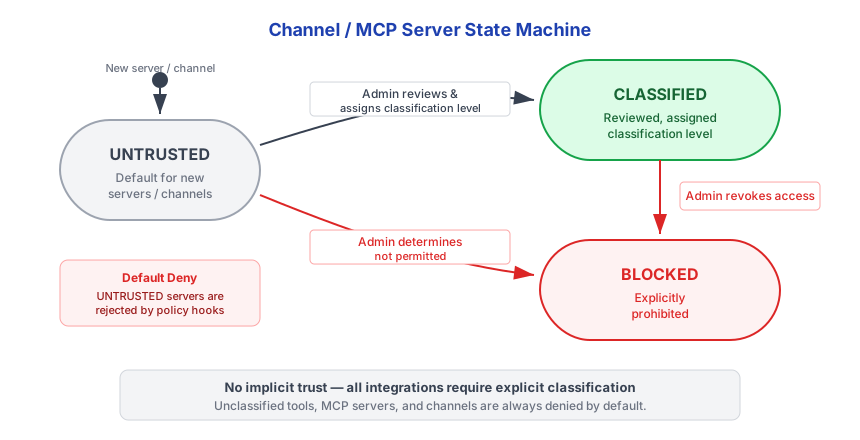
SECURITY ஒரு UNTRUSTED MCP server எந்த சூழ்நிலையிலும் agent மூலம் invoke செய்ய முடியாது. LLM unclassified server பயன்படுத்த system ஐ request செய்யவோ, convince செய்யவோ, அல்லது trick செய்யவோ முடியாது. Classification ஒரு code-level gate, LLM முடிவு அல்ல. :::
கட்டமைப்பு
MCP servers triggerfish.yaml இல் server ID மூலம் keyed map ஆக கட்டமைக்கப்படுகின்றன. ஒவ்வொரு server உம் local subprocess (stdio transport) அல்லது remote endpoint (SSE transport) பயன்படுத்துகிறது.
Local Servers (Stdio)
Local servers subprocesses ஆக spawned ஆகின்றன. Triggerfish stdin/stdout மூலம் அவற்றுடன் communicate செய்கிறது.
yaml
mcp_servers:
  github:
    command: npx
    args: ["-y", "@modelcontextprotocol/server-github"]
    env:
      GITHUB_PERSONAL_ACCESS_TOKEN: "keychain:github-pat"
    classification: CONFIDENTIAL

  filesystem:
    command: npx
    args: ["-y", "@modelcontextprotocol/server-filesystem", "/home/you/docs"]
    classification: INTERNAL

  weather:
    command: npx
    args: ["-y", "@mcp/server-weather"]
    classification: PUBLIC
Remote Servers (SSE)
Remote servers வேறெங்கோ இயங்கி HTTP Server-Sent Events மூலம் access ஆகின்றன.
yaml
mcp_servers:
  remote_api:
    url: "https://mcp.example.com/sse"
    classification: CONFIDENTIAL
கட்டமைப்பு Keys
| Key | Type | Required | விளக்கம் |
|---|---|---|---|
command | string | ஆம் (stdio) | Spawn செய்ய Binary (உதா., npx, deno, node) |
args | string[] | இல்லை | Command க்கு passed Arguments |
env | map | இல்லை | Subprocess க்கான Environment variables |
url | string | ஆம் (SSE) | Remote servers க்கான HTTP endpoint |
classification | string | ஆம் | Data sensitivity நிலை: PUBLIC, INTERNAL, CONFIDENTIAL, அல்லது RESTRICTED |
enabled | boolean | இல்லை | Default: true. Config நீக்காமல் skip செய்ய false அமைக்கவும். |
ஒவ்வொரு server க்கும் command (local) அல்லது url (remote) இல் ஒன்று இருக்க வேண்டும். இரண்டும் இல்லாத servers skip ஆகின்றன.
Lazy Connection
Startup க்கு பிறகு MCP servers background இல் connect ஆகின்றன. Agent பயன்படுத்துவதற்கு முன்பு அனைத்து servers உம் ready ஆக காத்திருக்க தேவையில்லை.
- Servers exponential backoff உடன் retry செய்கின்றன: 2s → 4s → 8s → 30s max
- புதிய servers connect ஆகும்போது agent க்கு available ஆகின்றன -- session restart தேவையில்லை
- அனைத்து retries க்கும் பிறகு ஒரு server connect fail ஆனால், அது
failedநிலைக்கு enter செய்கிறது மற்றும் அடுத்த daemon restart இல் retry செய்யலாம்
CLI மற்றும் Tidepool interfaces real-time MCP connection status display செய்கின்றன. விவரங்களுக்கு CLI Channel பாருங்கள்.
ஒரு Server Disable செய்யவும்
Configuration நீக்காமல் ஒரு MCP server தற்காலிகமாக disable செய்ய:
yaml
mcp_servers:
  github:
    command: npx
    args: ["-y", "@modelcontextprotocol/server-github"]
    classification: CONFIDENTIAL
    enabled: false # Startup போது Skipped
Environment Variables மற்றும் Secrets
keychain: prefix உடன் Env மதிப்புகள் startup போது OS keychain இலிருந்து resolve ஆகின்றன:
yaml
env:
  API_KEY: "keychain:my-secret-name" # OS keychain இலிருந்து Resolved
  PLAIN_VAR: "literal-value" # As-is passed
Host environment இலிருந்து PATH மட்டும் inherited ஆகிறது (npx, node, deno போன்றவை சரியாக resolve ஆக). மற்ற host environment variables MCP server subprocesses க்கு leak ஆவதில்லை.
triggerfish config set-secret <name> <value> உடன் secrets சேமிக்கவும். பின்னர் உங்கள் MCP server env config இல் அவற்றை keychain:<name> ஆக reference செய்யவும். :::
Tool Naming
MCP servers இலிருந்து tools built-in tools உடன் collision தவிர்க்க mcp_<serverId>_<toolName> என்று namespaced ஆகின்றன. உதாரணமாக, github என்ற server list_repos என்ற tool expose செய்தால், agent அதை mcp_github_list_repos என்று பாருகிறது.
Classification மற்றும் Default Deny
classification விட்டுவிட்டால், server UNTRUSTED என்று registered ஆகிறது மற்றும் gateway அனைத்து tool calls ஐயும் reject செய்கிறது. ஒரு classification நிலையை வெளிப்படையாக தேர்வு செய்ய வேண்டும். சரியான நிலை தேர்வு செய்ய உதவிக்கு Classification Guide பாருங்கள்.
Tool Call Flow
Agent ஒரு MCP tool call request செய்யும்போது, gateway request forward செய்வதற்கு முன்பு deterministic sequence of checks execute செய்கிறது.
1. Pre-Flight Checks
அனைத்து checks உம் deterministic -- LLM calls இல்லை, randomness இல்லை.
| Check | Failure Result |
|---|---|
Server status CLASSIFIED ஆக உள்ளதா? | Block: "Server not approved" |
| இந்த server க்கு Tool permitted ஆக உள்ளதா? | Block: "Tool not permitted" |
| பயனருக்கு required permissions உள்ளதா? | Block: "Permission denied" |
| Session taint server classification உடன் compatible ஆக உள்ளதா? | Block: "Would violate write-down" |
| Schema validation pass ஆகிறதா? | Block: "Invalid parameters" |
Session taint server classification ஐ விட அதிகமென்றால், write-down தடுக்க call block ஆகிறது. CONFIDENTIAL இல் tainted ஒரு session PUBLIC MCP server க்கு data அனுப்ப முடியாது. :::
2. Execute
அனைத்து pre-flight checks pass ஆனால், gateway MCP server க்கு request forward செய்கிறது.
3. Response Processing
MCP server ஒரு response return செய்யும்போது:
- Response ஐ declared schema க்கு எதிராக validate செய்யவும்
- Response data ஐ server இன் classification நிலையில் classify செய்யவும்
- Session taint update செய்யவும்:
taint = max(current_taint, server_classification) - Data origin track செய்யும் ஒரு lineage record உருவாக்கவும்
4. Audit
ஒவ்வொரு tool call உம் log ஆகிறது: server அடையாளம், tool name, user அடையாளம், policy முடிவு, taint மாற்றம், மற்றும் timestamp.
Response Taint விதிகள்
MCP server responses server இன் classification நிலையை inherit செய்கின்றன. Session taint மட்டுமே escalate ஆக முடியும்.
| Server Classification | Response Taint | Session Impact |
|---|---|---|
PUBLIC | PUBLIC | Taint மாற்றம் இல்லை |
INTERNAL | INTERNAL | Taint குறைந்தது INTERNAL க்கு escalate |
CONFIDENTIAL | CONFIDENTIAL | Taint குறைந்தது CONFIDENTIAL க்கு escalate |
RESTRICTED | RESTRICTED | Taint RESTRICTED க்கு escalate |
ஒரு session கொடுக்கப்பட்ட நிலையில் tainted ஆன பிறகு, session இன் மீதம் அந்த நிலையில் அல்லது அதிகமாக இருக்கிறது. Taint குறைக்க ஒரு full session reset (conversation history clear செய்கிறது) தேவை.
User Authentication Passthrough
User-level authentication support செய்யும் MCP servers க்கு, gateway system credentials க்கு பதிலாக user இன் delegated credentials pass through செய்கிறது.
requires_user_auth: true உடன் tool கட்டமைக்கப்படும்போது:
- Gateway பயனர் இந்த MCP server இணைத்திருக்கிறார்களா என்று சரிபார்க்கிறது
- Secure credential store இலிருந்து user இன் delegated credential retrieve செய்கிறது
- MCP request headers க்கு user authentication சேர்க்கிறது
- MCP server user-level permissions enforce செய்கிறது
Result: MCP server system அடையாளம் அல்ல, user இன் அடையாளம் பாருகிறது. Permission inheritance MCP boundary மூலம் வேலை செய்கிறது -- agent user அணுக முடியும் அனைத்தையும் மட்டுமே அணுக முடியும்.
User auth passthrough access control manage செய்யும் எந்த MCP server க்கும் preferred pattern. இதன் பொருள் agent blanket system access பெறுவதற்கு பதிலாக user இன் permissions inherit செய்கிறது. :::
Schema Validation
Gateway forward செய்வதற்கு முன்பு அனைத்து MCP requests மற்றும் responses ஐயும் declared schemas க்கு எதிராக validate செய்கிறது:
typescript
// Request validation (simplified)
function validateMcpRequest(
  serverConfig: McpServerConfig,
  toolName: string,
  params: Record<string, unknown>,
): Result<void, McpError> {
  const toolSchema = serverConfig.getToolSchema(toolName);

  if (!toolSchema) {
    return err(new McpError("Unknown tool"));
  }

  // Params ஐ JSON schema க்கு எதிராக Validate செய்யவும்
  if (!validateJsonSchema(params, toolSchema.inputSchema)) {
    return err(new McpError("Invalid parameters"));
  }

  // String params இல் injection patterns சரிபார்க்கவும்
  for (const [, value] of Object.entries(params)) {
    if (typeof value === "string" && containsInjectionPattern(value)) {
      return err(new McpError("Potential injection detected"));
    }
  }

  return ok(undefined);
}
Schema validation external server ஐ அடைவதற்கு முன்பு malformed requests catch செய்கிறது மற்றும் string parameters இல் potential injection patterns flag செய்கிறது.
Enterprise Controls
Enterprise deployments க்கு MCP server management க்கான கூடுதல் controls உள்ளன:
- Admin-managed server registry -- Admin-approved MCP servers மட்டுமே classify ஆக முடியும்
- Per-department tool permissions -- Different teams க்கு different tool access
- Compliance logging -- Compliance dashboards இல் அனைத்து MCP interactions available
- Rate limiting -- Per-server மற்றும் per-tool rate limits
- Server health monitoring -- Gateway server availability மற்றும் response times track செய்கிறது