
Tide Pool / A2UI
Tide Pool ಎಂಬುದು agent-driven ದೃಶ್ಯ workspace, ಅಲ್ಲಿ Triggerfish ಸಂವಾದಾತ್ಮಕ ವಿಷಯ render ಮಾಡುತ್ತದೆ: dashboards, charts, forms, code previews, ಮತ್ತು rich media. Chat ಒಂದು ರೇಖೀಯ ಸಂವಾದವಾಗಿದ್ದರೆ, Tide Pool agent ನಿಯಂತ್ರಿಸುವ canvas ಆಗಿದೆ.
A2UI ಏನು?
A2UI (Agent-to-UI) ಎಂಬುದು Tide Pool ಚಾಲನೆ ಮಾಡುವ protocol. Agent ದೃಶ್ಯ ವಿಷಯ ಮತ್ತು updates ಅನ್ನು real time ನಲ್ಲಿ ಸಂಪರ್ಕಿತ clients ಗೆ ಹೇಗೆ push ಮಾಡುತ್ತದೆ ಎಂದು ನಿರ್ಧರಿಸುತ್ತದೆ. Agent ಏನನ್ನು ತೋರಿಸಬೇಕೆಂದು ನಿರ್ಧರಿಸುತ್ತದೆ; client render ಮಾಡುತ್ತದೆ.
Architecture
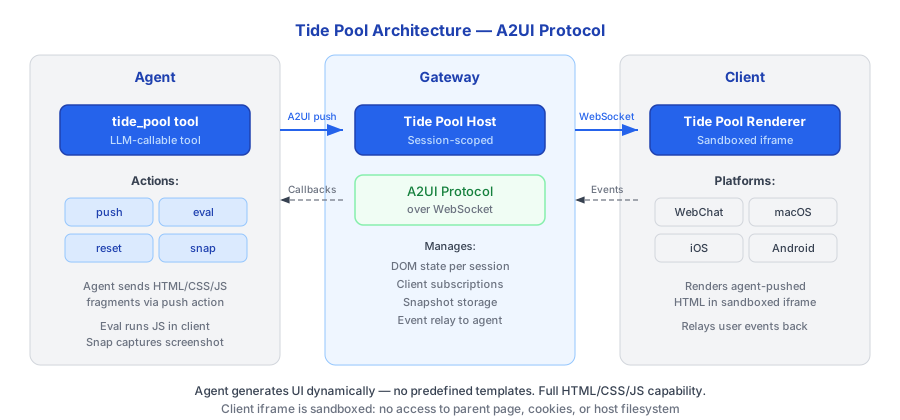
Agent Gateway ನಲ್ಲಿ ಚಲಿಸುವ Tide Pool Host ಗೆ ವಿಷಯ push ಮಾಡಲು tide_pool tool ಬಳಸುತ್ತದೆ. Host ಬೆಂಬಲಿಸಿದ platform ನಲ್ಲಿ ಯಾವ ಸಂಪರ್ಕಿತ Tide Pool Renderer ಗೂ WebSocket ಮೂಲಕ updates relay ಮಾಡುತ್ತದೆ.
Tide Pool Tools
Agent ಈ tools ಮೂಲಕ Tide Pool ಜೊತೆ ಸಂವಾದಿಸುತ್ತದೆ:
| Tool | Description | Use Case |
|---|---|---|
tidepool_render | Workspace ನಲ್ಲಿ component tree render ಮಾಡಿ | Dashboards, forms, visualizations, rich content |
tidepool_update | ID ಮೂಲಕ ಒಂದು component ನ props update ಮಾಡಿ | ಇಡೀ view ಬದಲಾಯಿಸದೆ incremental updates |
tidepool_clear | Workspace ಸ್ವಚ್ಛ ಮಾಡಿ, ಎಲ್ಲ components ತೆಗೆದುಹಾಕಿ | Session transitions, ಹೊಸದಾಗಿ ಪ್ರಾರಂಭಿಸಿ |
Legacy Actions
ಹಿಂದಿನ ಹೊಂದಾಣಿಕೆಗಾಗಿ underlying host lower-level actions ಕೂಡ ಬೆಂಬಲಿಸುತ್ತದೆ:
| Action | Description |
|---|---|
push | Raw HTML/JS ವಿಷಯ push ಮಾಡಿ |
eval | Sandbox ನಲ್ಲಿ JavaScript execute ಮಾಡಿ |
reset | ಎಲ್ಲ ವಿಷಯ ಸ್ವಚ್ಛ ಮಾಡಿ |
snapshot | Image ಆಗಿ capture ಮಾಡಿ |
ಬಳಕೆ ಪ್ರಕರಣಗಳು
Tide Pool chat ಒಂದೇ ಸಾಕಾಗದ scenarios ಗಾಗಿ ವಿನ್ಯಾಸ ಮಾಡಲ್ಪಟ್ಟಿದೆ:
- Dashboards -- Agent ನಿಮ್ಮ ಸಂಪರ್ಕಿತ integrations ನಿಂದ metrics ತೋರಿಸುವ live dashboard build ಮಾಡುತ್ತದೆ.
- Data Visualization -- Query ಫಲಿತಾಂಶಗಳಿಂದ render ಮಾಡಿದ Charts ಮತ್ತು graphs.
- Forms ಮತ್ತು Inputs -- ರಚನಾತ್ಮಕ data collection ಗಾಗಿ interactive forms.
- Code Previews -- Live execution results ಜೊತೆ syntax-highlighted code.
- Rich Media -- Images, maps, ಮತ್ತು embedded ವಿಷಯ.
- Collaborative Editing -- Agent ನೀವು review ಮತ್ತು annotate ಮಾಡಲು ದಾಖಲೆ ಪ್ರಸ್ತುತಿಸುತ್ತದೆ.
ಇದು ಹೇಗೆ ಕೆಲಸ ಮಾಡುತ್ತದೆ
- ನೀವು agent ಗೆ ಏನಾದರೂ visualize ಮಾಡಲು ಕೇಳುತ್ತೀರಿ (ಅಥವಾ agent visual response ಸೂಕ್ತ ಎಂದು ನಿರ್ಧರಿಸುತ್ತದೆ).
- Agent Tide Pool ಗೆ HTML ಮತ್ತು JavaScript ಕಳುಹಿಸಲು
pushaction ಬಳಸುತ್ತದೆ. - Gateway ನ Tide Pool Host ವಿಷಯ ಸ್ವೀಕರಿಸಿ ಸಂಪರ್ಕಿತ clients ಗೆ relay ಮಾಡುತ್ತದೆ.
- Renderer real time ನಲ್ಲಿ ವಿಷಯ ಪ್ರದರ್ಶಿಸುತ್ತದೆ.
- Agent ಇಡೀ view ಬದಲಾಯಿಸದೆ incremental updates ಮಾಡಲು
evalಬಳಸಬಹುದು. - Context ಬದಲಾದಾಗ, agent workspace ಸ್ವಚ್ಛ ಮಾಡಲು
resetಬಳಸುತ್ತದೆ.
ಭದ್ರತಾ ಸಂಯೋಜನೆ
Tide Pool ವಿಷಯ ಯಾವ ಇತರ output ಅದೇ security enforcement ಅಧೀನ:
- PRE_OUTPUT hook -- Tide Pool ಗೆ push ಮಾಡಿದ ಎಲ್ಲ ವಿಷಯ rendering ಮೊದಲು PRE_OUTPUT enforcement hook ಮೂಲಕ ಹಾದು ಹೋಗುತ್ತದೆ. Output policy ಉಲ್ಲಂಘಿಸುವ classified ಡೇಟಾ blocked.
- Session taint -- Rendered ವಿಷಯ session ನ taint ಮಟ್ಟ ಆನುವಂಶಿಕ ಪಡೆಯುತ್ತದೆ.
CONFIDENTIALಡೇಟಾ ತೋರಿಸುವ Tide Pool ಸ್ವತಃCONFIDENTIAL. - Snapshot classification -- Tide Pool snapshots capture ಸಮಯದಲ್ಲಿ session ನ taint ಮಟ್ಟದಲ್ಲಿ classified ಮಾಡಲ್ಪಡುತ್ತವೆ.
- JavaScript sandboxing --
evalಮೂಲಕ execute ಮಾಡಲ್ಪಟ್ಟ JavaScript Tide Pool context ಒಳಗೆ sandboxed. Host ವ್ಯವಸ್ಥೆ, network, ಅಥವಾ filesystem ಗೆ ಪ್ರವೇಶವಿಲ್ಲ. - Network ಪ್ರವೇಶ ಇಲ್ಲ -- Tide Pool runtime network requests ಮಾಡಲಾಗದು. ಎಲ್ಲ ಡೇಟಾ agent ಮತ್ತು policy layer ಮೂಲಕ flow ಮಾಡುತ್ತದೆ.
Status Indicators
Tidepool ವೆಬ್ interface real-time status indicators ಒಳಗೊಂಡಿದೆ:
Context Length Bar
Context window usage ತೋರಿಸುವ styled progress bar -- LLM ನ context window ಎಷ್ಟು ಬಳಸಲ್ಪಟ್ಟಿದೆ. Bar ಪ್ರತಿ message ನಂತರ ಮತ್ತು compaction ನಂತರ update ಆಗುತ್ತದೆ.
MCP Server Status
Configure ಮಾಡಿದ MCP servers ನ connection status ತೋರಿಸುತ್ತದೆ (ಉದಾ., "MCP 3/3"). Color-coded: ಎಲ್ಲ ಸಂಪರ್ಕಿತವಾಗಿದ್ದರೆ green, partial ಆಗಿದ್ದರೆ yellow, ಯಾವದೂ ಇಲ್ಲದಿದ್ದರೆ red.
Secure Secret Input
Agent (secret_save tool ಮೂಲಕ) secret ನಮೂದಿಸಲು ಕೇಳಿದಾಗ, Tidepool secure input popup ಪ್ರದರ್ಶಿಸುತ್ತದೆ. ನಮೂದಿಸಿದ value ನೇರವಾಗಿ keychain ಗೆ ಹೋಗುತ್ತದೆ -- ಇದು ಎಂದಿಗೂ chat ಮೂಲಕ ಕಳುಹಿಸಲ್ಪಡುವುದಿಲ್ಲ ಅಥವಾ conversation ಇತಿಹಾಸದಲ್ಲಿ ಗೋಚರಿಸುವುದಿಲ್ಲ.
Tide Pool ಅನ್ನು agent ನ whiteboard ಎಂದು ಯೋಚಿಸಿ. Chat agent ಜೊತೆ ಹೇಗೆ
ಮಾತನಾಡುತ್ತೀರಿ ಎಂದರೆ, Tide Pool agent ನಿಮಗೆ ಏನನ್ನು ತೋರಿಸುತ್ತದೆ ಎಂದು. :::