
Tide Pool / A2UI
Tide Pool हे एक agent-driven visual workspace आहे जिथे Triggerfish interactive content render करतो: dashboards, charts, forms, code previews, आणि rich media. Chat च्या विपरीत, जे linear conversation आहे, Tide Pool एक canvas आहे जे एजंट control करतो.
A2UI म्हणजे काय?
A2UI (Agent-to-UI) हा protocol आहे जो Tide Pool power करतो. तो define करतो की एजंट connected clients ला real time मध्ये visual content आणि updates कसे push करतो. एजंट काय दाखवायचे ते decide करतो; client ते render करतो.
Architecture
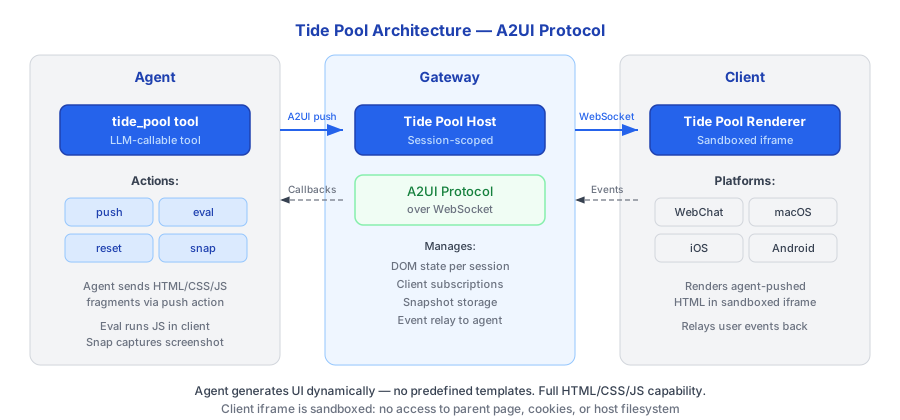
एजंट Gateway मध्ये run होणाऱ्या Tide Pool Host ला content push करण्यासाठी tide_pool tool वापरतो. Host supported platform वर connected Tide Pool Renderer ला WebSocket वर updates relay करतो.
Tide Pool Tools
एजंट या tools द्वारे Tide Pool शी interact करतो:
| Tool | वर्णन | Use Case |
|---|---|---|
tidepool_render | Workspace मध्ये component tree render करा | Dashboards, forms, visualizations, rich content |
tidepool_update | ID नुसार single component चे props update करा | Whole view replace न करता incremental updates |
tidepool_clear | Workspace clear करा, सर्व components remove करा | Session transitions, fresh start |
Legacy Actions
Underlying host backward compatibility साठी lower-level actions देखील support करतो:
| Action | वर्णन |
|---|---|
push | Raw HTML/JS content push करा |
eval | Sandbox मध्ये JavaScript execute करा |
reset | सर्व content clear करा |
snapshot | Image म्हणून capture करा |
Use Cases
Tide Pool त्या scenarios साठी designed आहे जिथे chat alone अपुरे आहे:
- Dashboards -- एजंट तुमच्या connected integrations मधील metrics दाखवणारा live dashboard build करतो.
- Data Visualization -- Query results मधून rendered charts आणि graphs.
- Forms आणि Inputs -- Structured data collection साठी interactive forms.
- Code Previews -- Live execution results सह syntax-highlighted code.
- Rich Media -- Images, maps, आणि embedded content.
- Collaborative Editing -- एजंट तुम्हाला review आणि annotate करण्यासाठी document present करतो.
हे कसे काम करते
- तुम्ही एजंटला काहीतरी visualize करण्यास सांगता (किंवा एजंट decide करतो की visual response appropriate आहे).
- एजंट Tide Pool ला HTML आणि JavaScript पाठवण्यासाठी
pushaction वापरतो. - Gateway चा Tide Pool Host content receive करतो आणि connected clients ला relay करतो.
- Renderer real time मध्ये content display करतो.
- एजंट संपूर्ण view replace न करता incremental updates करण्यासाठी
evalवापरू शकतो. - Context बदलतो तेव्हा, एजंट workspace clear करण्यासाठी
resetवापरतो.
Security Integration
Tide Pool content इतर कोणत्याही output प्रमाणेच security enforcement च्या अधीन आहे:
- PRE_OUTPUT hook -- Tide Pool ला push केलेले सर्व content rendering पूर्वी PRE_OUTPUT enforcement hook मधून जाते. Output policy violate करणारा classified data blocked आहे.
- Session taint -- Rendered content session चा taint level inherit करतो.
CONFIDENTIALdata दाखवणारे Tide Pool स्वतःCONFIDENTIALआहे. - Snapshot classification -- Tide Pool snapshots capture वेळी session च्या taint level वर classified आहेत.
- JavaScript sandboxing --
evalद्वारे execute केलेला JavaScript Tide Pool context मध्ये sandboxed आहे. त्याला host system, network, किंवा filesystem चा access नाही. - No network access -- Tide Pool runtime network requests करू शकत नाही. सर्व data एजंट आणि policy layer मधून flow करतो.
Status Indicators
Tidepool web interface मध्ये real-time status indicators समाविष्ट आहेत:
Context Length Bar
Context window usage दाखवणारा styled progress bar — LLM च्या context window किती consumed झाले आहे. Bar प्रत्येक message नंतर आणि compaction नंतर update होतो.
MCP Server Status
Configured MCP servers (उदा., "MCP 3/3") ची connection status दाखवतो. Color-coded: सर्व connected साठी green, partial साठी yellow, none साठी red.
Secure Secret Input
एजंटला secret enter करणे आवश्यक असताना (secret_save tool द्वारे), Tidepool secure input popup display करतो. Entered value थेट keychain ला जाते -- ते कधीही chat द्वारे पाठवले जात नाही किंवा conversation history मध्ये visible नाही.
Tide Pool एजंटचे whiteboard आहे असे समजा. Chat हे तुम्ही एजंटशी बोलण्याचा
मार्ग आहे तर Tide Pool हे एजंट तुम्हाला गोष्टी दाखवण्याचे ठिकाण आहे. :::