
Tide Pool / A2UI
The Tide Pool is an agent-driven visual workspace where Triggerfish renders interactive content: dashboards, charts, forms, code previews, and rich media. Unlike chat, which is a linear conversation, the Tide Pool is a canvas that the agent controls.
What is A2UI?
A2UI (Agent-to-UI) is the protocol that powers the Tide Pool. It defines how the agent pushes visual content and updates to connected clients in real time. The agent decides what to show; the client renders it.
Architecture
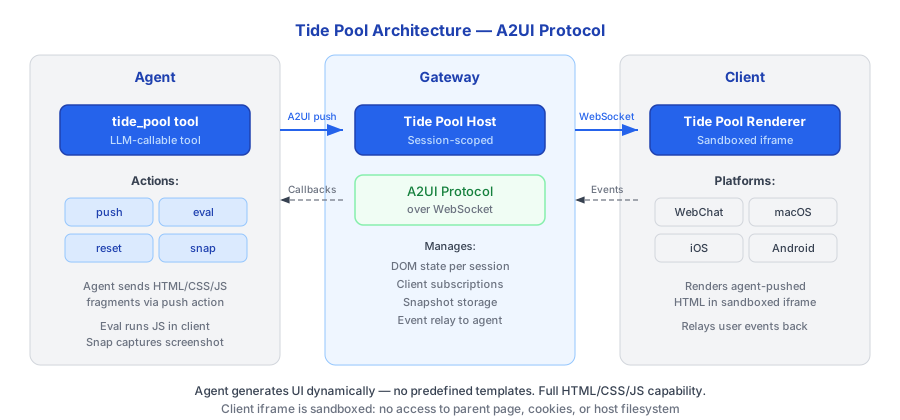
The agent uses the tide_pool tool to push content to the Tide Pool Host running in the Gateway. The Host relays updates over WebSocket to any connected Tide Pool Renderer on a supported platform.
Tide Pool Tools
The agent interacts with the Tide Pool through these tools:
| Tool | Description | Use Case |
|---|---|---|
tidepool_render | Render a component tree in the workspace | Dashboards, forms, visualizations, rich content |
tidepool_update | Update a single component's props by ID | Incremental updates without replacing the whole view |
tidepool_clear | Clear the workspace, removing all components | Session transitions, starting fresh |
Legacy Actions
The underlying host also supports lower-level actions for backward compatibility:
| Action | Description |
|---|---|
push | Push raw HTML/JS content |
eval | Execute JavaScript in the sandbox |
reset | Clear all content |
snapshot | Capture as an image |
Use Cases
The Tide Pool is designed for scenarios where chat alone is insufficient:
- Dashboards -- The agent builds a live dashboard showing metrics from your connected integrations.
- Data Visualization -- Charts and graphs rendered from query results.
- Forms and Inputs -- Interactive forms for structured data collection.
- Code Previews -- Syntax-highlighted code with live execution results.
- Rich Media -- Images, maps, and embedded content.
- Collaborative Editing -- The agent presents a document for you to review and annotate.
How It Works
- You ask the agent to visualize something (or the agent decides a visual response is appropriate).
- The agent uses the
pushaction to send HTML and JavaScript to the Tide Pool. - The Gateway's Tide Pool Host receives the content and relays it to connected clients.
- The renderer displays the content in real time.
- The agent can use
evalto make incremental updates without replacing the entire view. - When the context changes, the agent uses
resetto clear the workspace.
Security Integration
Tide Pool content is subject to the same security enforcement as any other output:
- PRE_OUTPUT hook -- All content pushed to the Tide Pool passes through the PRE_OUTPUT enforcement hook before rendering. Classified data that violates the output policy is blocked.
- Session taint -- Rendered content inherits the session's taint level. A Tide Pool showing
CONFIDENTIALdata is itselfCONFIDENTIAL. - Snapshot classification -- Tide Pool snapshots are classified at the session's taint level at the time of capture.
- JavaScript sandboxing -- JavaScript executed via
evalis sandboxed within the Tide Pool context. It has no access to the host system, network, or filesystem. - No network access -- The Tide Pool runtime cannot make network requests. All data flows through the agent and policy layer.
Status Indicators
The Tidepool web interface includes real-time status indicators:
Context Length Bar
A styled progress bar showing context window usage — how much of the LLM's context window has been consumed. The bar updates after each message and after compaction.
MCP Server Status
Shows the connection status of configured MCP servers (e.g., "MCP 3/3"). Color-coded: green for all connected, yellow for partial, red for none.
Secure Secret Input
When the agent needs you to enter a secret (via the secret_save tool), Tidepool displays a secure input popup. The entered value goes directly to the keychain — it is never sent through the chat or visible in conversation history.
Think of the Tide Pool as the agent's whiteboard. While chat is how you
talk to the agent, the Tide Pool is where the agent shows you things. :::