
Multi-Agent Routing
Triggerfish supports routing different channels, accounts, or contacts to separate isolated agents, each with its own workspace, sessions, personality, and classification ceiling.
Why Multiple Agents?
A single agent with a single personality is not always enough. You may want:
- A personal assistant on WhatsApp that handles calendar, reminders, and family messages.
- A work assistant on Slack that manages Jira tickets, GitHub PRs, and code reviews.
- A support agent on Discord that answers community questions with a different tone and limited access.
Multi-agent routing lets you run all of these simultaneously from a single Triggerfish installation.
How It Works
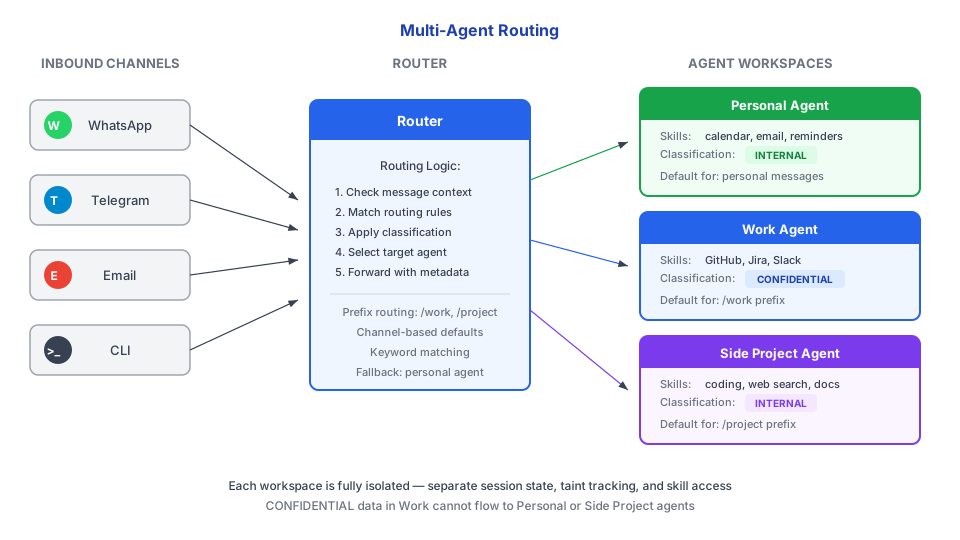
The AgentRouter examines each inbound message and maps it to an agent based on configurable routing rules. If no rule matches, messages go to a default agent.
Routing Rules
Messages can be routed by:
| Criteria | Description | Example |
|---|---|---|
| Channel | Route by messaging platform | All Slack messages go to "Work" |
| Account | Route by specific account within a channel | Work email vs personal email |
| Contact | Route by sender/peer identity | Messages from your manager go to "Work" |
| Default | Fallback when no rule matches | Everything else goes to "Personal" |
Configuration
Define agents and routing in triggerfish.yaml:
yaml
agents:
  list:
    - id: personal
      name: "Personal Assistant"
      channels: [whatsapp-personal, telegram-dm]
      tools:
        profile: "full"
      model: claude-opus-4-5
      classification_ceiling: PERSONAL

    - id: work
      name: "Work Assistant"
      channels: [slack-work, email-work]
      tools:
        profile: "coding"
        allow: [browser, github]
      model: claude-sonnet-4-5
      classification_ceiling: CONFIDENTIAL

    - id: support
      name: "Customer Support"
      channels: [discord-server]
      tools:
        profile: "messaging"
      model: claude-haiku-4-5
      classification_ceiling: PUBLIC
Each agent specifies:
- id -- Unique identifier for routing.
- name -- Human-readable name.
- channels -- Which channel instances this agent handles.
- tools -- Tool profile and explicit allow/deny lists.
- model -- Which LLM model to use (can differ per agent).
- classification_ceiling -- Maximum classification level this agent can reach.
Agent Identity
Each agent has its own SPINE.md defining its personality, mission, and boundaries. SPINE.md files live in the agent's workspace directory:
~/.triggerfish/
  workspace/
    personal/
      SPINE.md          # Personal assistant personality
    work/
      SPINE.md          # Work assistant personality
    support/
      SPINE.md          # Support bot personality
Isolation
Multi-agent routing enforces strict isolation between agents:
| Aspect | Isolation |
|---|---|
| Sessions | Each agent has independent session space. Sessions are never shared. |
| Taint | Taint is tracked per-agent, not across agents. Work taint does not affect personal sessions. |
| Skills | Skills are loaded per-workspace. A work skill is not available to the personal agent. |
| Secrets | Credentials are isolated per-agent. The support agent cannot access work API keys. |
| Workspaces | Each agent has its own filesystem workspace for code execution. |
Inter-agent communication is possible through sessions_send but is
gated by the policy layer. One agent cannot silently access another agent's data or sessions without explicit policy rules allowing it. :::
Multi-agent routing is for separating concerns across channels and
personas. For agents that need to collaborate on a shared task, see Agent Teams. :::
Default Agent
When no routing rule matches an inbound message, it goes to the default agent. You can set this in configuration:
yaml
agents:
  default: personal
If no default is configured, the first agent in the list is used as the default.