
Tide Pool / A2UI
Tide Pool ایک agent-driven visual workspace ہے جہاں Triggerfish interactive content render کرتا ہے: dashboards، charts، forms، code previews، اور rich media۔ Chat کے برخلاف، جو linear conversation ہے، Tide Pool ایک canvas ہے جسے ایجنٹ control کرتا ہے۔
A2UI کیا ہے؟
A2UI (Agent-to-UI) وہ protocol ہے جو Tide Pool کو power کرتا ہے۔ یہ define کرتا ہے کہ ایجنٹ real time میں connected clients کو visual content اور updates کیسے push کرتا ہے۔ ایجنٹ decide کرتا ہے کیا دکھانا ہے؛ client render کرتا ہے۔
Architecture
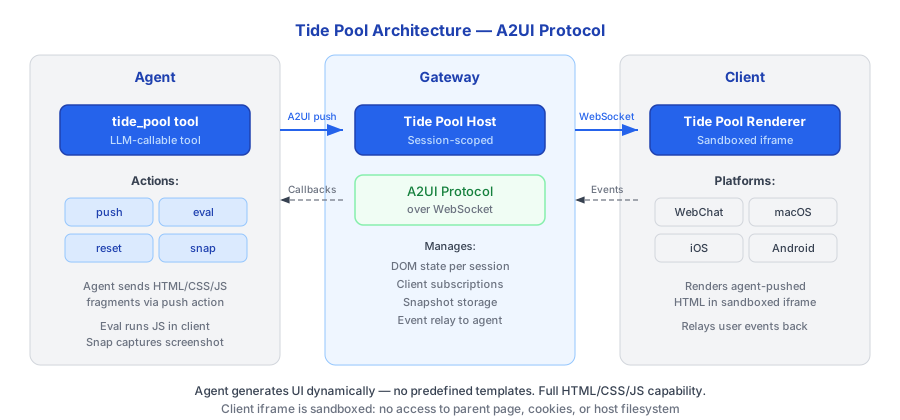
ایجنٹ tide_pool tool استعمال کر کے Gateway میں چلنے والے Tide Pool Host کو content push کرتا ہے۔ Host supported platform پر کسی بھی connected Tide Pool Renderer کو WebSocket پر updates relay کرتا ہے۔
Tide Pool Tools
ایجنٹ ان tools کے ذریعے Tide Pool سے interact کرتا ہے:
| Tool | تفصیل | Use Case |
|---|---|---|
tidepool_render | Workspace میں component tree render کریں | Dashboards، forms، visualizations، rich content |
tidepool_update | ID سے single component کے props update کریں | پوری view replace کیے بغیر incremental updates |
tidepool_clear | Workspace clear کریں، تمام components ہٹائیں | Session transitions، fresh start |
Legacy Actions
Underlying host backward compatibility کے لیے lower-level actions بھی support کرتا ہے:
| Action | تفصیل |
|---|---|
push | Raw HTML/JS content push کریں |
eval | Sandbox میں JavaScript execute کریں |
reset | تمام content clear کریں |
snapshot | Image کے طور پر capture کریں |
Use Cases
Tide Pool ان scenarios کے لیے designed ہے جہاں صرف chat ناکافی ہو:
- Dashboards -- ایجنٹ آپ کے connected integrations سے metrics دکھانے والا live dashboard build کرتا ہے۔
- Data Visualization -- Query results سے render ہونے والے charts اور graphs۔
- Forms اور Inputs -- Structured data collection کے لیے interactive forms۔
- Code Previews -- Live execution results کے ساتھ syntax-highlighted code۔
- Rich Media -- Images، maps، اور embedded content۔
- Collaborative Editing -- ایجنٹ review اور annotate کرنے کے لیے document present کرتا ہے۔
یہ کیسے کام کرتا ہے
- آپ ایجنٹ سے کچھ visualize کرنے کو کہتے ہیں (یا ایجنٹ decide کرتا ہے کہ visual response مناسب ہے)۔
- ایجنٹ
pushaction استعمال کر کے Tide Pool کو HTML اور JavaScript بھیجتا ہے۔ - Gateway کا Tide Pool Host content receive کرتا ہے اور connected clients کو relay کرتا ہے۔
- Renderer real time میں content display کرتا ہے۔
- ایجنٹ
evalاستعمال کر کے پوری view replace کیے بغیر incremental updates کر سکتا ہے۔ - Context change ہونے پر، ایجنٹ workspace clear کرنے کے لیے
resetاستعمال کرتا ہے۔
Security Integration
Tide Pool content کسی بھی دوسرے output کی طرح security enforcement کے تابع ہے:
- PRE_OUTPUT hook -- Tide Pool کو push ہونے والا تمام content rendering سے پہلے PRE_OUTPUT enforcement hook سے گزرتا ہے۔ Output policy violate کرنے والا classified data block ہوتا ہے۔
- Session taint -- Rendered content session کا taint level inherit کرتا ہے۔
CONFIDENTIALdata دکھانے والا Tide Pool خودCONFIDENTIALہے۔ - Snapshot classification -- Tide Pool snapshots capture کے وقت session کے taint level پر classified ہوتے ہیں۔
- JavaScript sandboxing --
evalکے ذریعے execute ہونے والا JavaScript Tide Pool context کے اندر sandboxed ہے۔ اسے host system، network، یا filesystem تک رسائی نہیں۔ - Network access نہیں -- Tide Pool runtime network requests نہیں کر سکتا۔ تمام data ایجنٹ اور policy layer سے گزرتا ہے۔
Status Indicators
Tidepool web interface میں real-time status indicators شامل ہیں:
Context Length Bar
Context window usage دکھانے والی styled progress bar — LLM کا کتنا context window consume ہوا۔ Bar ہر message اور compaction کے بعد update ہوتی ہے۔
MCP Server Status
Configured MCP servers کا connection status دکھاتا ہے (مثلاً، "MCP 3/3")۔ Color-coded: سب connected ہوں تو green، partial ہوں تو yellow، کوئی نہ ہو تو red۔
Secure Secret Input
جب ایجنٹ کو آپ سے secret درج کروانا ہو (secret_save tool کے ذریعے)، Tidepool secure input popup display کرتا ہے۔ Entered value directly keychain کو جاتی ہے — یہ کبھی chat سے نہیں گزرتی یا conversation history میں visible نہیں ہوتی۔
Tide Pool کو ایجنٹ کی whiteboard سمجھیں۔ جبکہ chat وہ طریقہ ہے جس سے
آپ ایجنٹ سے بات کرتے ہیں، Tide Pool وہ جگہ ہے جہاں ایجنٹ آپ کو چیزیں دکھاتا ہے۔ :::