
Gateway
The Gateway is Triggerfish's central control plane -- a long-running local service that coordinates sessions, channels, tools, events, and agent processes through a single WebSocket endpoint. Everything that happens in Triggerfish flows through the Gateway.
Architecture
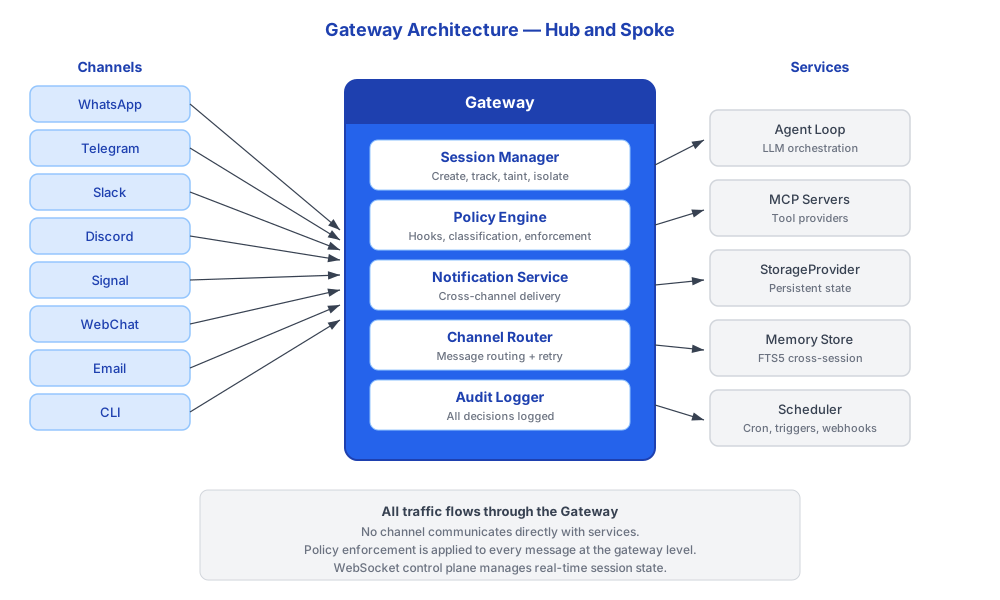
The Gateway listens on a configurable port (default 18789) and accepts connections from channel adapters, CLI commands, companion apps, and internal services. All communication uses JSON-RPC over WebSocket.
Gateway Services
The Gateway provides these services through its WebSocket and HTTP endpoints:
| Service | Description | Security Integration |
|---|---|---|
| Sessions | Create, list, retrieve history, send between sessions, spawn background tasks | Session taint tracked per-session |
| Channels | Route messages, manage connections, retry failed deliveries, chunk large messages | Classification checks on all output |
| Cron | Schedule recurring tasks and trigger wakeups from TRIGGER.md | Cron actions pass through policy hooks |
| Webhooks | Accept inbound events from external services via POST /webhooks/:sourceId | Inbound data classified at ingestion |
| Ripple | Track online status and typing indicators across channels | No sensitive data exposed |
| Config | Hot-reload settings without restart | Admin-only in enterprise |
| Control UI | Web dashboard for gateway health and management | Token-authenticated |
| Tide Pool | Host agent-driven A2UI visual workspace | Content subject to output hooks |
| Notifications | Cross-channel notification delivery with priority routing | Classification rules apply |
WebSocket JSON-RPC Protocol
Clients connect to the Gateway over WebSocket and exchange JSON-RPC 2.0 messages. Each message is a method call with typed parameters and a typed response.
typescript
// Client sends:
{
  "jsonrpc": "2.0",
  "id": 1,
  "method": "sessions.list",
  "params": { "filter": "active" }
}

// Gateway responds:
{
  "jsonrpc": "2.0",
  "id": 1,
  "result": [
    { "id": "sess_abc", "taint": "CONFIDENTIAL", "channel": "telegram" },
    { "id": "sess_def", "taint": "PUBLIC", "channel": "cli" }
  ]
}
The Gateway also serves HTTP endpoints for webhook ingestion. When a SchedulerService is attached, POST /webhooks/:sourceId routes are available for inbound webhook events.
Server Interface
typescript
interface GatewayServerOptions {
  /** Port to listen on. Use 0 for a random available port. */
  readonly port?: number;
  /** Authentication token for connections. */
  readonly authToken?: string;
  /** Optional scheduler service for webhook endpoints. */
  readonly schedulerService?: SchedulerService;
}

interface GatewayAddr {
  readonly port: number;
  readonly hostname: string;
}

interface GatewayServer {
  /** Start the server. Returns the bound address. */
  start(): Promise<GatewayAddr>;
  /** Stop the server gracefully. */
  stop(): Promise<void>;
}
Authentication
Gateway connections are authenticated with a token. The token is generated during setup (triggerfish dive) and stored locally.
SECURITY The Gateway binds to 127.0.0.1 by default and is not
exposed to the network. Remote access requires explicit tunnel configuration. Never expose the Gateway WebSocket to the public internet without authentication. :::
Session Management
The Gateway manages the full lifecycle of sessions. Sessions are the fundamental unit of conversation state, each with independent taint tracking.
Session Types
| Type | Key Pattern | Description |
|---|---|---|
| Main | main | Primary direct conversation with the owner. Persists across restarts. |
| Channel | channel:<type>:<id> | One per connected channel. Isolated taint per channel. |
| Background | bg:<task_id> | Spawned for cron jobs and webhook-triggered tasks. Starts at PUBLIC taint. |
| Agent | agent:<agent_id> | Per-agent sessions for multi-agent routing. |
| Group | group:<channel>:<group_id> | Group chat sessions. |
Session Tools
The agent interacts with sessions through these tools, all routed through the Gateway:
| Tool | Description | Taint Implications |
|---|---|---|
sessions_list | List active sessions with optional filters | No taint change |
sessions_history | Retrieve transcript for a session | Taint inherits from referenced session |
sessions_send | Send message to another session | Subject to write-down check |
sessions_spawn | Create background task session | New session starts at PUBLIC taint |
session_status | Check current session state, model, cost | No taint change |
Inter-session communication via sessions_send is subject to the same
write-down rules as any other output. A CONFIDENTIAL session cannot send data to a session connected to a PUBLIC channel. :::
Channel Routing
The Gateway routes messages between channels and sessions through the channel router. The router handles:
- Classification gate: Every outbound message passes through
PRE_OUTPUTbefore delivery - Retry with backoff: Failed deliveries are retried with exponential backoff via
sendWithRetry() - Message chunking: Large messages are split into platform-appropriate chunks (e.g., Telegram's 4096-char limit)
- Streaming: Responses stream to channels that support it
- Connection management:
connectAll()anddisconnectAll()for lifecycle management
Notification Service
The Gateway integrates a first-class notification service that replaces ad-hoc "notify owner" patterns across the platform. All notifications flow through a single NotificationService.
typescript
interface NotificationService {
  notify(recipient: UserId, notification: Notification): Promise<void>;
  getPreferences(userId: UserId): Promise<NotificationPreference>;
  setPreferences(userId: UserId, prefs: NotificationPreference): Promise<void>;
  getPending(userId: UserId): Promise<Notification[]>;
}
Priority Routing
| Priority | Behavior |
|---|---|
CRITICAL | Bypass quiet hours, deliver to ALL connected channels immediately |
HIGH | Deliver to preferred channel immediately, queue if offline |
NORMAL | Deliver to active session, or queue for next session start |
LOW | Queue, deliver in batches during active sessions |
Notification Sources
| Source | Category | Default Priority |
|---|---|---|
| Policy violations | security | CRITICAL |
| Threat intelligence alerts | security | CRITICAL |
| Skill approval requests | approval | HIGH |
| Cron job failures | system | HIGH |
| System health warnings | system | HIGH |
| Webhook event triggers | info | NORMAL |
| The Reef updates available | info | LOW |
Notifications are persisted via StorageProvider (namespace: notifications:) and survive restarts. Undelivered notifications are retried on next Gateway startup or session connection.
Delivery Preferences
Users configure notification preferences per-channel:
yaml
notifications:
  preferred_channel: telegram
  quiet_hours:
    start: "22:00"
    end: "07:00"
    timezone: "America/Chicago"
  overrides:
    security: all_channels
    approval: preferred_channel
    info: active_session
Scheduler Integration
The Gateway hosts the scheduler service, which manages:
- Cron tick loop: Periodic evaluation of scheduled tasks
- Trigger wakeups: Agent wakeups defined in
TRIGGER.md - Webhook HTTP endpoints:
POST /webhooks/:sourceIdfor inbound events - Orchestrator isolation: Each scheduled task runs in its own
OrchestratorFactorywith isolated session state
Cron-triggered and webhook-triggered tasks spawn background sessions
with fresh PUBLIC taint. They do not inherit the taint of any existing session, ensuring that autonomous tasks start with a clean classification state.
Health and Diagnostics
The triggerfish patrol command connects to the Gateway and runs diagnostic health checks, verifying:
- Gateway is running and responsive
- All configured channels are connected
- Storage is accessible
- Scheduled tasks are executing on time
- No undelivered critical notifications are stuck in the queue