
Classification System
The data classification system is the foundation of Triggerfish's security model. Every piece of data that enters, moves through, or leaves the system carries a classification label. These labels determine where data can flow -- and more importantly, where it cannot.
Classification Levels
Triggerfish uses a single four-tier ordered hierarchy for all deployments.
| Level | Rank | Description | Examples |
|---|---|---|---|
RESTRICTED | 4 (highest) | Most sensitive data requiring maximum protection | M&A documents, board materials, PII, bank accounts, medical records |
CONFIDENTIAL | 3 | Business-sensitive or personal-sensitive information | CRM data, financials, HR records, contracts, tax records |
INTERNAL | 2 | Not meant for external sharing | Internal wikis, team documents, personal notes, contacts |
PUBLIC | 1 (lowest) | Safe for anyone to see | Marketing materials, public documentation, general web content |
The No Write-Down Rule
The single most important security invariant in Triggerfish:
Data can only flow to channels or recipients at equal or higher
classification. This is a fixed rule -- it cannot be configured, overridden, or disabled. The LLM cannot influence this decision. :::
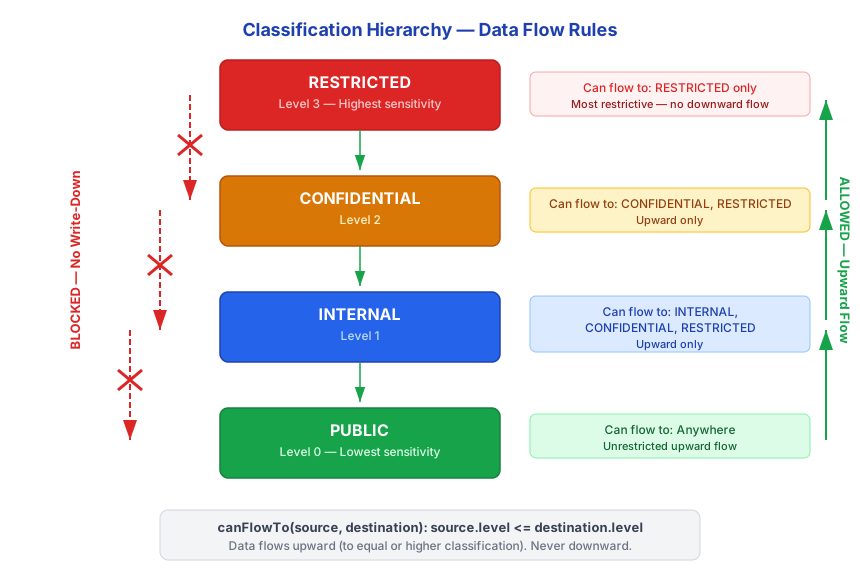
This means:
- A response containing
CONFIDENTIALdata cannot be sent to aPUBLICchannel - A session tainted at
RESTRICTEDcannot output to any channel belowRESTRICTED - There is no admin override, no enterprise escape hatch, and no LLM workaround
Effective Classification
Channels and recipients both carry classification levels. When data is about to leave the system, the effective classification of the destination determines what can be sent:
EFFECTIVE_CLASSIFICATION = min(channel_classification, recipient_classification)The effective classification is the lower of the two. This means a high-classification channel with a low-classification recipient is still treated as low-classification.
| Channel | Recipient | Effective | Can receive CONFIDENTIAL data? |
|---|---|---|---|
INTERNAL | INTERNAL | INTERNAL | No (CONFIDENTIAL > INTERNAL) |
INTERNAL | EXTERNAL | PUBLIC | No |
CONFIDENTIAL | INTERNAL | INTERNAL | No (CONFIDENTIAL > INTERNAL) |
CONFIDENTIAL | EXTERNAL | PUBLIC | No |
RESTRICTED | INTERNAL | INTERNAL | No (CONFIDENTIAL > INTERNAL) |
Channel Classification Rules
Each channel type has specific rules for determining its classification level.
Email
- Domain matching:
@company.commessages are classified asINTERNAL - Admin configures which domains are internal
- Unknown or external domains default to
EXTERNAL - External recipients reduce effective classification to
PUBLIC
Slack / Teams
- Workspace membership: Members of the same workspace/tenant are
INTERNAL - Slack Connect external users are classified as
EXTERNAL - Guest users are classified as
EXTERNAL - Classification derived from platform API, not from LLM interpretation
WhatsApp / Telegram / iMessage
- Enterprise: Phone numbers matched against HR directory sync determine internal vs. external
- Personal: All recipients default to
EXTERNAL - Users can mark trusted contacts, but this does not change the classification math -- it changes the recipient classification
WebChat
- WebChat visitors are always classified as
PUBLIC(visitors are never verified as owner) - WebChat is intended for public-facing interactions
CLI
- The CLI channel runs locally and is classified based on the authenticated user
- Direct terminal access is typically
INTERNALor higher
Recipient Classification Sources
Enterprise
- Directory sync (Okta, Azure AD, Google Workspace) automatically populates recipient classifications
- All directory members are classified as
INTERNAL - External guests and vendors are classified as
EXTERNAL - Admins can override per-contact or per-domain
Personal
- Default: All recipients are
EXTERNAL - Users reclassify trusted contacts through in-flow prompts or the companion app
- Reclassification is explicit and logged
Channel States
Every channel progresses through a state machine before it can carry data:
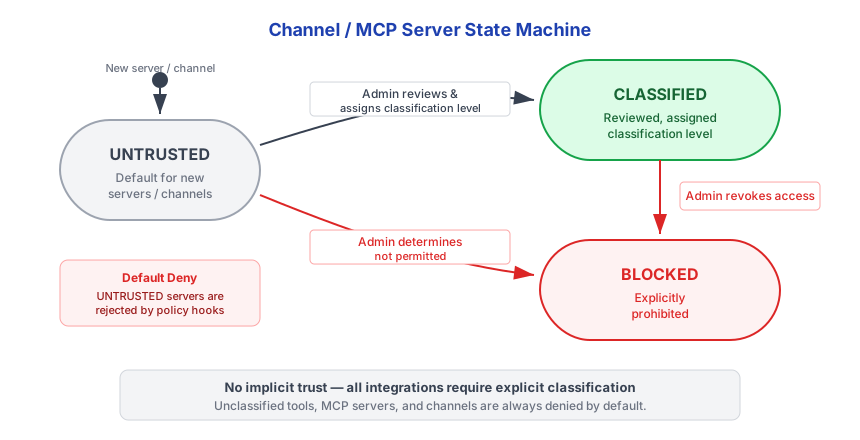
| State | Can receive data? | Can send data into agent context? | Description |
|---|---|---|---|
UNTRUSTED | No | No | Default for new/unknown channels. Completely isolated. |
CLASSIFIED | Yes (within policy) | Yes (with classification) | Reviewed and assigned a classification level. |
BLOCKED | No | No | Explicitly prohibited by admin or user. |
SECURITY New channels always land in the UNTRUSTED state. They
cannot receive any data from the agent and cannot send data into the agent context. The channel remains completely isolated until an admin (enterprise) or the user (personal) explicitly classifies it. :::
How Classification Interacts with Other Systems
Classification is not a standalone feature -- it drives decisions across the entire platform:
| System | How classification is used |
|---|---|
| Session taint | Accessing classified data escalates the session to that level |
| Policy hooks | PRE_OUTPUT compares session taint against destination classification |
| MCP Gateway | MCP server responses carry classification that taints the session |
| Data lineage | Every lineage record includes the classification level and reason |
| Notifications | Notification content is subject to the same classification rules |
| Agent delegation | Callee agent's classification ceiling must meet caller's taint |
| Plugin sandbox | Plugin SDK auto-classifies all emitted data |