
Multi-Agent Routing
Triggerfish வெவ்வேறு channels, accounts, அல்லது contacts ஐ தனி isolated agents க்கு routing support செய்கிறது, ஒவ்வொன்றும் அதன் சொந்த workspace, sessions, personality, மற்றும் classification ceiling உடன்.
ஏன் Multiple Agents?
ஒரு personality உடன் ஒரு single agent எப்போதும் போதுமானதில்லை. நீங்கள் விரும்பலாம்:
- Calendar, reminders, மற்றும் family செய்திகள் கையாளும் WhatsApp இல் ஒரு personal assistant.
- Jira tickets, GitHub PRs, மற்றும் code reviews manage செய்யும் Slack இல் ஒரு work assistant.
- Community கேள்விகளுக்கு வேறு tone மற்றும் limited access உடன் answer செய்யும் Discord இல் ஒரு support agent.
Multi-agent routing ஒரே Triggerfish installation இலிருந்து இவை அனைத்தையும் simultaneously இயக்க அனுமதிக்கிறது.
எவ்வாறு செயல்படுகிறது
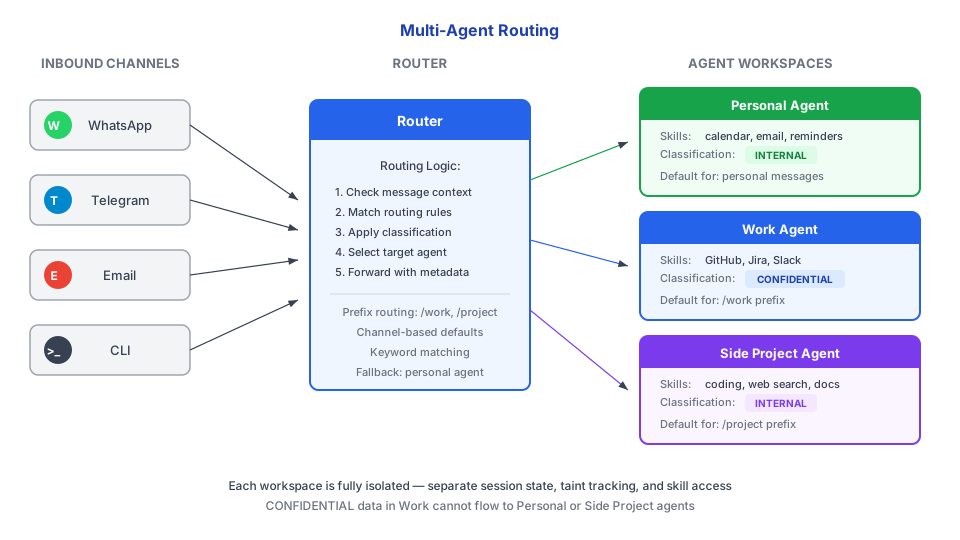
AgentRouter ஒவ்வொரு inbound செய்தியையும் examine செய்கிறது மற்றும் கட்டமைக்கக்கூடிய routing rules அடிப்படையில் ஒரு agent க்கு map செய்கிறது. எந்த rule உம் பொருந்தாவிட்டால், செய்திகள் ஒரு default agent க்கு செல்கின்றன.
Routing விதிகள்
செய்திகள் இவற்றால் route ஆக முடியும்:
| Criteria | விளக்கம் | எடுத்துக்காட்டு |
|---|---|---|
| Channel | Messaging platform மூலம் Route | அனைத்து Slack செய்திகளும் "Work" க்கு செல்கின்றன |
| Account | ஒரு channel க்குள் specific account மூலம் | Work email vs personal email |
| Contact | Sender/peer அடையாளம் மூலம் | உங்கள் manager இடமிருந்து செய்திகள் "Work" க்கு செல்கின்றன |
| Default | எந்த rule உம் பொருந்தாவிட்டால் Fallback | மற்ற எல்லாவற்றும் "Personal" க்கு செல்கின்றன |
கட்டமைப்பு
triggerfish.yaml இல் agents மற்றும் routing வரையறுக்கவும்:
yaml
agents:
  list:
    - id: personal
      name: "Personal Assistant"
      channels: [whatsapp-personal, telegram-dm]
      tools:
        profile: "full"
      model: claude-opus-4-5
      classification_ceiling: PERSONAL

    - id: work
      name: "Work Assistant"
      channels: [slack-work, email-work]
      tools:
        profile: "coding"
        allow: [browser, github]
      model: claude-sonnet-4-5
      classification_ceiling: CONFIDENTIAL

    - id: support
      name: "Customer Support"
      channels: [discord-server]
      tools:
        profile: "messaging"
      model: claude-haiku-4-5
      classification_ceiling: PUBLIC
ஒவ்வொரு agent உம் குறிப்பிடுகிறது:
- id -- Routing க்கான Unique identifier.
- name -- Human-readable name.
- channels -- இந்த agent கையாளும் channel instances.
- tools -- Tool profile மற்றும் explicit allow/deny lists.
- model -- எந்த LLM model பயன்படுத்துவது (per agent வேறுபடலாம்).
- classification_ceiling -- இந்த agent அடையக்கூடிய maximum classification நிலை.
Agent அடையாளம்
ஒவ்வொரு agent க்கும் அதன் personality, mission, மற்றும் boundaries வரையறுக்கும் சொந்த SPINE.md உள்ளது. SPINE.md files agent இன் workspace directory இல் உள்ளன:
~/.triggerfish/
  workspace/
    personal/
      SPINE.md          # Personal assistant personality
    work/
      SPINE.md          # Work assistant personality
    support/
      SPINE.md          # Support bot personality
Isolation
Multi-agent routing agents இடையே strict isolation enforce செய்கிறது:
| Aspect | Isolation |
|---|---|
| Sessions | ஒவ்வொரு agent க்கும் independent session space உள்ளது. Sessions ஒருபோதும் shared ஆவதில்லை. |
| Taint | Taint per-agent track ஆகிறது, agents முழுவதும் அல்ல. Work taint personal sessions ஐ பாதிப்பதில்லை. |
| Skills | Skills per-workspace load ஆகின்றன. ஒரு work skill personal agent க்கு available இல்லை. |
| Secrets | Credentials per-agent isolated. Support agent work API keys அணுக முடியாது. |
| Workspaces | ஒவ்வொரு agent க்கும் code execution க்கு சொந்த filesystem workspace உள்ளது. |
Inter-agent communication sessions_send மூலம் possible ஆனால் policy layer மூலம் gated. ஒரு agent explicit policy rules அனுமதிக்காமல் மற்றொரு agent இன் data அல்லது sessions ஐ silently அணுக முடியாது. :::
Multi-agent routing channels மற்றும் personas முழுவதும் concerns பிரிப்பதற்காக. Shared task இல் collaborate செய்ய வேண்டும் agents க்கு, Agent Teams பாருங்கள். :::
Default Agent
எந்த routing rule உம் ஒரு inbound செய்தியுடன் பொருந்தாவிட்டால், அது default agent க்கு செல்கிறது. Configuration இல் இதை அமைக்கலாம்:
yaml
agents:
  default: personal
Default கட்டமைக்கப்படவில்லையென்றால், list இல் முதல் agent default ஆக பயன்படுத்தப்படுகிறது.