
Rate Limiting
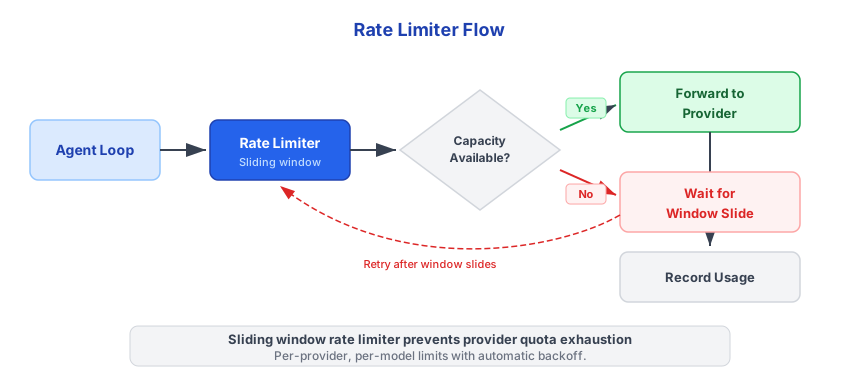
Triggerfish includes a sliding-window rate limiter that prevents hitting LLM provider API limits. It wraps any provider transparently -- the agent loop does not need to know about rate limits. When capacity is exhausted, calls are delayed automatically until the window slides enough to free capacity.
How It Works
The rate limiter uses a sliding window (default 60 seconds) to track two metrics:
- Tokens per minute (TPM) -- total tokens consumed (prompt + completion) within the window
- Requests per minute (RPM) -- total API calls within the window
Before each LLM call, the limiter checks available capacity against both limits. If either is exhausted, the call awaits until the oldest entries slide out of the window and free enough capacity. After each call completes, actual token usage is recorded.
Both streaming and non-streaming calls consume from the same budget. For streaming calls, token usage is recorded when the stream finishes.
OpenAI Tier Limits
The rate limiter ships with built-in defaults for OpenAI's published tier limits:
| Tier | GPT-4o TPM | GPT-4o RPM | o1 TPM | o1 RPM |
|---|---|---|---|---|
| Free | 30,000 | 500 | 30,000 | 500 |
| Tier 1 | 30,000 | 500 | 30,000 | 500 |
| Tier 2 | 450,000 | 5,000 | 100,000 | 1,000 |
| Tier 3 | 800,000 | 5,000 | 100,000 | 1,000 |
| Tier 4 | 2,000,000 | 10,000 | 200,000 | 10,000 |
| Tier 5 | 30,000,000 | 10,000 | 200,000 | 10,000 |
These are defaults based on OpenAI's published limits. Your actual
limits depend on your OpenAI account tier and usage history. Other providers (Anthropic, Google) manage their own rate limits server-side -- the limiter is most useful for OpenAI where client-side throttling prevents 429 errors. :::
Configuration
Rate limiting is automatic when using the wrapped provider. No user configuration is needed for default behavior. The limiter detects your provider and applies the appropriate limits.
Advanced users can customize limits via the provider config in triggerfish.yaml:
yaml
models:
  providers:
    openai:
      model: gpt-4o
      rate_limit:
        tpm: 450000 # Tokens per minute
        rpm: 5000 # Requests per minute
        window_ms: 60000 # Window size (default 60s)
Rate limiting protects you from 429 errors and unexpected bills. It
works alongside the failover chain -- if rate limits are hit and the limiter cannot wait (timeout), failover kicks in to try the next provider. :::
Monitoring Usage
The rate limiter exposes a live snapshot of current usage:
{tokensUsed, requestsUsed, tpmLimit, rpmLimit, windowMs}The context progress bar in CLI and Tide Pool shows context usage. Rate limit status is visible in debug logs:
[DEBUG] [provider] Rate limiter: 12,450/30,000 TPM, 8/500 RPM (window: 60s)When the limiter delays a call, it logs the wait time:
[INFO] [provider] Rate limited: waiting 4.2s for TPM capacityChannel Rate Limiting
In addition to LLM provider rate limiting, Triggerfish enforces per-channel message rate limits to prevent flooding messaging platforms. Each channel adapter tracks outbound message frequency and delays sends when limits are approached.
This protects against:
- Platform API bans from excessive message volume
- Accidental spam from runaway agent loops
- Webhook-triggered message storms
Channel rate limits are enforced transparently by the channel router. If the agent generates output faster than the channel allows, messages are queued and delivered at the maximum permitted rate.
Related
- LLM Providers and Failover -- failover chain integration with rate limiting
- Configuration -- full
triggerfish.yamlschema