
Secrets Management
Triggerfish never stores credentials in configuration files. All secrets -- API keys, OAuth tokens, integration credentials -- are stored in platform-native secure storage: the OS keychain for personal tier, or a vault service for enterprise tier. Plugins and agents interact with credentials through the SDK, which enforces strict access controls.
Storage Backends
| Tier | Backend | Details |
|---|---|---|
| Personal | OS keychain | macOS Keychain, Linux Secret Service (via D-Bus), Windows Credential Manager |
| Enterprise | Vault integration | HashiCorp Vault, AWS Secrets Manager, Azure Key Vault, or other enterprise vault services |
In both cases, secrets are encrypted at rest by the storage backend. Triggerfish does not implement its own encryption for secrets -- it delegates to purpose-built, audited secret storage systems.
On platforms without a native keychain (Windows without Credential Manager, Docker containers), Triggerfish falls back to an encrypted JSON file at ~/.triggerfish/secrets.json. Entries are encrypted with AES-256-GCM using a machine-bound 256-bit key stored at ~/.triggerfish/secrets.key (permissions: 0600). Each entry uses a fresh random 12-byte IV on every write. Legacy plaintext secret files are automatically migrated to the encrypted format on first load.
The personal tier requires zero configuration for secrets. When you
connect an integration during setup (triggerfish dive), credentials are automatically stored in your OS keychain. You do not need to install or configure anything beyond what your operating system already provides. :::
Secret References in Configuration
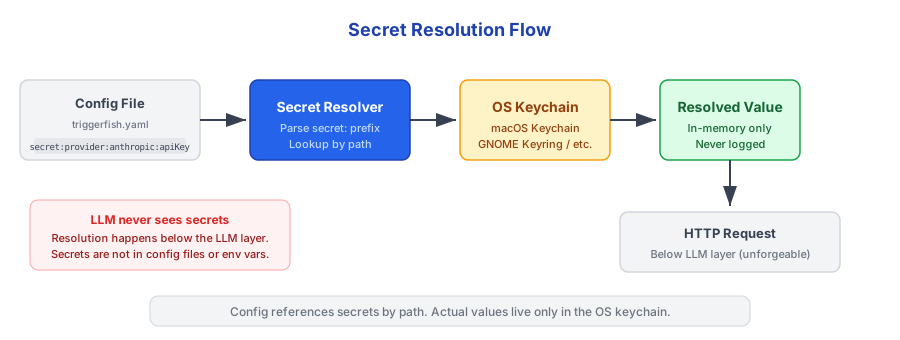
Triggerfish supports secret: references in triggerfish.yaml. Instead of storing credentials as plaintext, you reference them by name and they are resolved from the OS keychain at startup.
yaml
models:
  providers:
    anthropic:
      apiKey: "secret:provider:anthropic:apiKey"
    openai:
      apiKey: "secret:provider:openai:apiKey"

channels:
  telegram:
    botToken: "secret:channel:telegram:botToken"
The resolver performs a depth-first walk of the configuration file. Any string value starting with secret: is substituted with the corresponding keychain entry. If a referenced secret is not found, startup fails immediately with a clear error message.
Migrating Existing Secrets
If you have plaintext credentials in your config file from an earlier version, the migration command moves them to the keychain automatically:
bash
triggerfish config migrate-secretsThis command:
- Scans
triggerfish.yamlfor plaintext credential values - Stores each one in the OS keychain
- Replaces the plaintext value with a
secret:reference - Creates a backup of the original file
After migration, verify your agent starts correctly before deleting
the backup file. The migration is not reversible without the backup. :::
Delegated Credential Architecture
A core security principle in Triggerfish is that data queries run with the user's credentials, not system credentials. This ensures that the agent inherits the source system's permission model -- a user can only access data they could access directly.
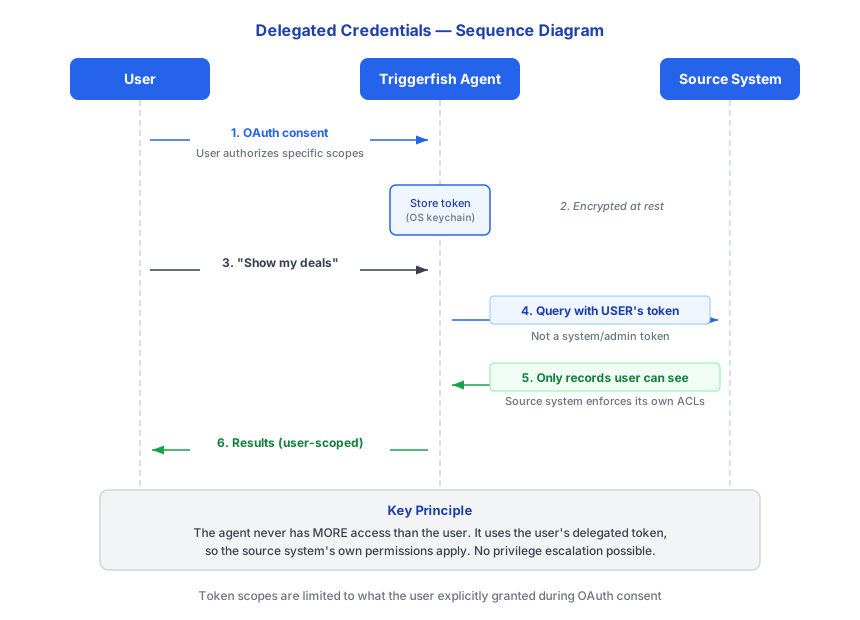
This architecture means:
- No over-permissioning -- the agent cannot access data the user cannot access directly
- No system service accounts -- there is no all-powerful credential that could be compromised
- Source system enforcement -- the source system (Salesforce, Jira, GitHub, etc.) enforces its own permissions on every query
SECURITY Traditional AI agent platforms often use a single system
service account to access integrations on behalf of all users. This means the agent has access to all data in the integration, and relies on the LLM to decide what to show each user. Triggerfish eliminates this risk entirely: queries run with the user's own delegated OAuth token. :::
Plugin SDK Enforcement
Plugins interact with credentials exclusively through the Triggerfish SDK. The SDK provides permission-aware methods and blocks any attempt to access system-level credentials.
Allowed: User Credential Access
python
def get_user_opportunities(sdk, params):
    # SDK retrieves user's delegated token from secure storage
    # If user hasn't connected Salesforce, returns helpful error
    user_token = sdk.get_user_credential("salesforce")

    # Query runs with user's permissions
    # Source system enforces access control
    return sdk.query_as_user(
        integration="salesforce",
        query="SELECT Id, Name, Amount FROM Opportunity",
        user_id=sdk.current_user_id
    )
Blocked: System Credential Access
python
def get_all_opportunities(sdk, params):
    # This will raise PermissionError -- BLOCKED by SDK
    token = sdk.get_system_credential("SALESFORCE_TOKEN")
    return query_salesforce(token, "SELECT * FROM Opportunity")
sdk.get_system_credential() is always blocked. There is no
configuration to enable it, no admin override, and no escape hatch. This is a fixed security rule, the same as the no-write-down rule. :::
LLM-Callable Secret Tools
The agent can help you manage secrets through three tools. Critically, the LLM never sees the actual secret values -- input and storage happen out-of-band.
secret_save
Prompts you to enter a secret value securely:
- CLI: Terminal switches to hidden input mode (characters not echoed)
- Tidepool: A secure input popup appears in the web interface
The LLM requests that a secret be saved, but the actual value is entered by you through the secure prompt. The value is stored directly in the keychain -- it never passes through the LLM context.
secret_list
Lists the names of all stored secrets. Never exposes values.
secret_delete
Deletes a secret by name from the keychain.
Tool Argument Substitution
When the agent uses a tool that needs a secret (for example, setting an API key in an MCP server environment variable), it uses the {{secret:name}} syntax in tool arguments:
tool_call: set_env_var
arguments: { "key": "API_TOKEN", "value": "{{secret:my-api-token}}" }
The runtime resolves {{secret:name}} references below the LLM layer before the tool executes. The resolved value never appears in conversation history or logs.
SECURITY The {{secret:name}} substitution is
enforced by code, not by the LLM. Even if the LLM attempted to log or return the resolved value, the policy layer would catch the attempt in the PRE_OUTPUT hook. :::
SDK Permission Methods
| Method | Behavior |
|---|---|
sdk.get_user_credential(integration) | Returns the user's delegated OAuth token for the specified integration. If the user has not connected the integration, returns an error with instructions. |
sdk.query_as_user(integration, query) | Executes a query against the integration using the user's delegated credentials. The source system enforces its own permissions. |
sdk.get_system_credential(name) | Always blocked. Raises PermissionError. Logged as a security event. |
sdk.has_user_connection(integration) | Returns true if the user has connected the specified integration, false otherwise. Does not expose any credential data. |
Permission-Aware Data Access
The delegated credential architecture works hand-in-hand with the classification system. Even if a user has permission to access data in the source system, Triggerfish's classification rules govern where that data can flow after it is retrieved.
Example:
User: "Summarize the Acme deal and send to my wife"

Step 1: Permission check
  --> User's Salesforce token used
  --> Salesforce returns Acme opportunity (user has access)

Step 2: Classification
  --> Salesforce data classified as CONFIDENTIAL
  --> Session taint escalates to CONFIDENTIAL

Step 3: Output check
  --> Wife = EXTERNAL recipient
  --> CONFIDENTIAL --> EXTERNAL: BLOCKED

Result: Data retrieved (user has permission), but cannot be sent
        (classification rules prevent leakage)
The user has legitimate access to the Acme deal in Salesforce. Triggerfish respects that and retrieves the data. But the classification system prevents that data from flowing to an external recipient. Permission to access data is separate from permission to share it.
Secret Access Logging
Every credential access is logged through the SECRET_ACCESS enforcement hook:
json
{
  "timestamp": "2025-01-29T10:23:45Z",
  "hook_type": "SECRET_ACCESS",
  "session_id": "sess_456",
  "decision": "ALLOW",
  "details": {
    "method": "get_user_credential",
    "integration": "salesforce",
    "user_id": "user_456",
    "credential_type": "oauth_delegated"
  }
}
Blocked attempts are also logged:
json
{
  "timestamp": "2025-01-29T10:23:46Z",
  "hook_type": "SECRET_ACCESS",
  "session_id": "sess_456",
  "decision": "BLOCK",
  "details": {
    "method": "get_system_credential",
    "requested_name": "SALESFORCE_TOKEN",
    "reason": "System credential access is prohibited",
    "plugin_id": "plugin_789"
  }
}
Blocked credential access attempts are logged at an elevated alert
level. In enterprise deployments, these events can trigger notifications to the security team. :::
Enterprise Vault Integration
Enterprise deployments can connect Triggerfish to a centralized vault service for credential management:
| Vault Service | Integration |
|---|---|
| HashiCorp Vault | Native API integration |
| AWS Secrets Manager | AWS SDK integration |
| Azure Key Vault | Azure SDK integration |
| Custom vault | Pluggable SecretProvider interface |
Enterprise vault integration provides:
- Centralized rotation -- credentials are rotated in the vault and automatically picked up by Triggerfish
- Access policies -- vault-level policies control which agents and users can access which credentials
- Audit consolidation -- credential access logs from Triggerfish and the vault can be correlated
What Is Never Stored in Config Files
The following never appear as plaintext values in triggerfish.yaml or any other configuration file. They are either stored in the OS keychain and referenced via secret: syntax, or managed through the secret_save tool:
- API keys for LLM providers
- OAuth tokens for integrations
- Database credentials
- Webhook secrets
- Encryption keys
- Pairing codes (ephemeral, in-memory only)
If you find plaintext credentials in a Triggerfish configuration file
(values that are NOT secret: references), something has gone wrong. Run triggerfish config migrate-secrets to move them to the keychain. Credentials found as plaintext should be rotated immediately. :::
Related Pages
- Security-First Design -- overview of the security architecture
- No Write-Down Rule -- how classification controls complement credential isolation
- Identity & Auth -- how user identity feeds into delegated credential access
- Audit & Compliance -- how credential access events are recorded