
The No Write-Down Rule
The no-write-down rule is the foundation of Triggerfish's data protection model. It is a fixed, non-configurable rule that applies to every session, every channel, and every agent -- with no exceptions and no LLM override.
The rule: Data can only flow to channels and recipients at an equal or higher classification level.
This single rule prevents an entire class of data leakage scenarios, from accidental oversharing to sophisticated prompt injection attacks designed to exfiltrate sensitive information.
How Classification Flows
Triggerfish uses four classification levels (highest to lowest):
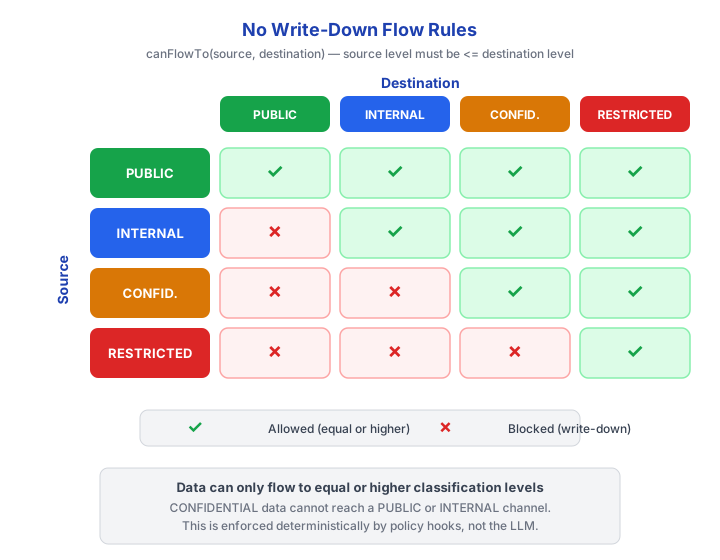
Data classified at a given level can flow to that level or any level above it. It can never flow downward. This is the no-write-down rule.
The no-write-down rule is fixed and non-configurable. It cannot
be relaxed by administrators, overridden by policy rules, or bypassed by the LLM. It is the architectural foundation on which all other security controls rest. :::
Effective Classification
When data is about to leave the system, Triggerfish computes the effective classification of the destination:
EFFECTIVE_CLASSIFICATION = min(channel_classification, recipient_classification)Both the channel and the recipient must be at or above the data's classification level. If either one is below, the output is blocked.
| Channel | Recipient | Effective Classification |
|---|---|---|
| INTERNAL (Slack) | INTERNAL (coworker) | INTERNAL |
| INTERNAL (Slack) | EXTERNAL (vendor) | PUBLIC |
| CONFIDENTIAL (Slack) | INTERNAL (coworker) | INTERNAL |
| CONFIDENTIAL (Email) | EXTERNAL (personal contact) | PUBLIC |
A CONFIDENTIAL channel with an EXTERNAL recipient has an effective
classification of PUBLIC. If the session has accessed any data above PUBLIC, the output is blocked. :::
Real-World Example
Here is a concrete scenario showing the no-write-down rule in action.
User: "Check my Salesforce pipeline"

Agent: [accesses Salesforce via user's delegated token]
       [Salesforce data classified as CONFIDENTIAL]
       [session taint escalates to CONFIDENTIAL]

       "You have 3 deals closing this week totaling $2.1M..."

User: "Send a message to my wife that I'll be late tonight"

Policy layer: BLOCKED
  - Session taint: CONFIDENTIAL
  - Recipient (wife): EXTERNAL
  - Effective classification: PUBLIC
  - CONFIDENTIAL > PUBLIC --> write-down violation

Agent: "I can't send to external contacts in this session
        because we accessed confidential data.

        -> Reset session and send message
        -> Cancel"
The user accessed Salesforce data (classified CONFIDENTIAL), which tainted the entire session. When they then tried to send a message to an external contact (effective classification PUBLIC), the policy layer blocked the output because CONFIDENTIAL data cannot flow to a PUBLIC destination.
The agent's message to the wife ("I'll be late tonight") does not itself
contain Salesforce data. But the session has been tainted by the earlier Salesforce access, and the entire session context -- including anything the LLM might have retained from the Salesforce response -- could influence the output. The no-write-down rule prevents this entire class of context leakage. :::
What the User Sees
When the no-write-down rule blocks an action, the user receives a clear, actionable message. Triggerfish offers two response modes:
Default (specific):
I can't send confidential data to a public channel.

-> Reset session and send message
-> Cancel
Educational (opt-in via configuration):
I can't send confidential data to a public channel.

Why: This session accessed Salesforce (CONFIDENTIAL).
WhatsApp personal is classified as PUBLIC.
Data can only flow to equal or higher classification.

Options:
  - Reset session and send message
  - Ask your admin to reclassify the WhatsApp channel
  - Learn more: https://trigger.fish/security/no-write-down
In both cases, the user is given clear options. They are never left confused about what happened or what they can do about it.
Session Reset
When a user chooses "Reset session and send message," Triggerfish performs a full reset:
- The session taint is cleared back to PUBLIC
- The entire conversation history is cleared (preventing context leakage)
- The requested action is then re-evaluated against the fresh session
- If the action is now permitted (PUBLIC data to a PUBLIC channel), it proceeds
SECURITY Session reset clears both taint and conversation
history. This is not optional. If only the taint label were cleared while the conversation context remained, the LLM could still reference classified information from earlier messages, defeating the purpose of the reset. :::
How Enforcement Works
The no-write-down rule is enforced at the PRE_OUTPUT hook -- the last enforcement point before any data leaves the system. The hook runs as synchronous, deterministic code:
typescript
// Simplified enforcement logic
function preOutputHook(context: HookContext): HookResult {
  const sessionTaint = getSessionTaint(context.sessionId);
  const channelClassification = getChannelClassification(context.channelId);
  const recipientClassification = getRecipientClassification(
    context.recipientId,
  );

  const effectiveClassification = min(
    channelClassification,
    recipientClassification,
  );

  if (sessionTaint > effectiveClassification) {
    return {
      decision: "BLOCK",
      reason: `Session taint (${sessionTaint}) exceeds effective ` +
        `classification (${effectiveClassification})`,
    };
  }

  return { decision: "ALLOW", reason: "Classification check passed" };
}
This code is:
- Deterministic -- same inputs always produce the same decision
- Synchronous -- the hook completes before any output is sent
- Unforgeable -- the LLM cannot influence the hook's decision
- Logged -- every execution is recorded with full context
Session Taint and Escalation
Session taint tracks the highest classification level of data accessed during a session. It follows two strict rules:
- Escalation only -- taint can increase, never decrease within a session
- Automatic -- taint is updated by the
POST_TOOL_RESPONSEhook whenever data enters the session
| Action | Taint Before | Taint After |
|---|---|---|
| Access weather API (PUBLIC) | PUBLIC | PUBLIC |
| Access internal wiki (INTERNAL) | PUBLIC | INTERNAL |
| Access Salesforce (CONFIDENTIAL) | INTERNAL | CONFIDENTIAL |
| Access weather API again (PUBLIC) | CONFIDENTIAL | CONFIDENTIAL (unchanged) |
Once a session reaches CONFIDENTIAL, it stays CONFIDENTIAL until the user explicitly resets. There is no automatic decay, no timeout, and no way for the LLM to lower the taint.
Why This Rule Is Fixed
The no-write-down rule is not configurable because making it configurable would undermine the entire security model. If an administrator could create an exception -- "allow CONFIDENTIAL data to flow to PUBLIC channels for this one integration" -- that exception becomes an attack surface.
Every other security control in Triggerfish builds on the assumption that the no-write-down rule is absolute. Session taint, data lineage, agent delegation ceilings, and audit logging all depend on it. Making it configurable would require rethinking the entire architecture.
Administrators can configure the classification levels assigned to
channels, recipients, and integrations. This is the correct way to adjust data flow: if a channel should receive higher-classified data, classify the channel at a higher level. The rule itself remains fixed; the inputs to the rule are configurable. :::
Related Pages
- Security-First Design -- overview of the security architecture
- Identity & Auth -- how channel identity is established
- Audit & Compliance -- how blocked actions are recorded
- Architecture: Taint & Sessions -- session taint mechanics in detail