
Policy Engine at Hooks
Ang policy engine ang enforcement layer na nasa pagitan ng LLM at ng labas ng mundo. Hinaharang nito ang bawat action sa mga kritikal na punto sa data flow at gumagawa ng deterministic na ALLOW, BLOCK, o REDACT decisions. Hindi kayang i-bypass, baguhin, o i-influence ng LLM ang mga decisions na ito.
Core Principle: Enforcement sa Ilalim ng LLM
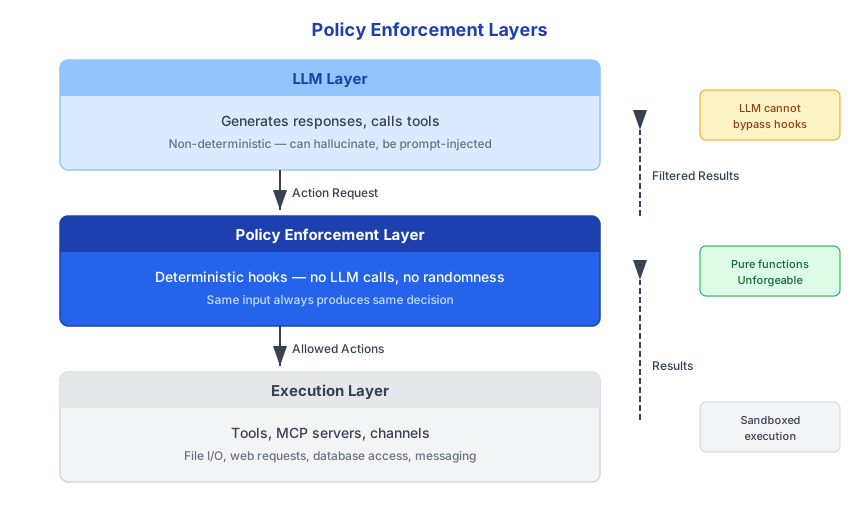
SECURITY Nasa itaas ng policy layer ang LLM. Maaari itong ma-prompt-inject,
ma-jailbreak, o ma-manipulate -- at hindi mahalaga. Ang policy layer ay pure code na tumatakbo sa ilalim ng LLM, na sinusuri ang structured action requests at gumagawa ng binary decisions base sa classification rules. Walang pathway mula sa LLM output patungo sa hook bypass. :::
Mga Uri ng Hook
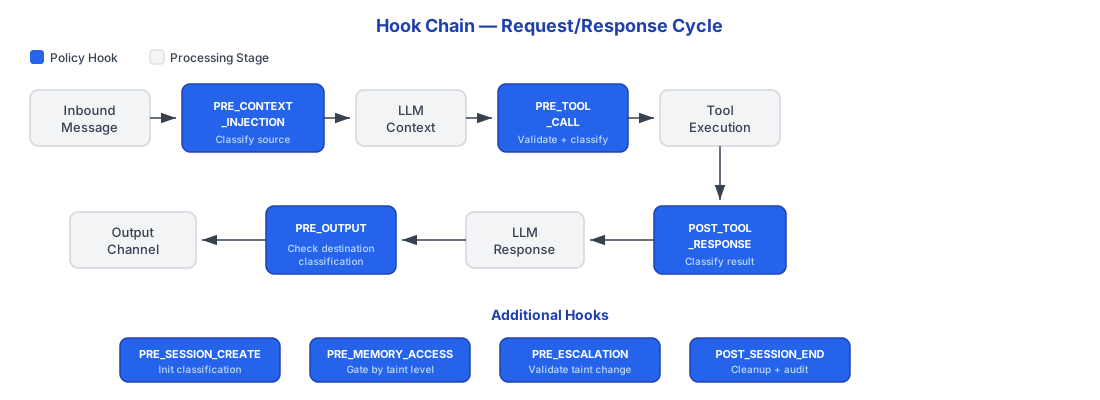
Walong enforcement hooks ang humaharang sa actions sa bawat kritikal na punto sa data flow.
Hook Architecture
Lahat ng Uri ng Hook
| Hook | Trigger | Mga Pangunahing Aksyon | Failure Mode |
|---|---|---|---|
PRE_CONTEXT_INJECTION | Pumapasok ang external input sa context | Classify input, assign taint, create lineage, scan for injection | Reject input |
PRE_TOOL_CALL | Humihiling ang LLM ng tool execution | Permission check, rate limit, parameter validation | Block tool call |
POST_TOOL_RESPONSE | Nagbabalik ng data ang tool | Classify response, update session taint, create/update lineage | Redact o block |
PRE_OUTPUT | Malapit nang umalis ang response sa system | Final classification check laban sa target, PII scan | Block output |
SECRET_ACCESS | Humihiling ang plugin ng credential | Log access, verify permission laban sa declared scope | Deny credential |
SESSION_RESET | Humihiling ang user ng taint reset | Archive lineage, clear context, verify confirmation | Require confirmation |
AGENT_INVOCATION | Tumatawag ang agent sa ibang agent | Verify delegation chain, enforce taint ceiling | Block invocation |
MCP_TOOL_CALL | Na-invoke ang MCP server tool | Gateway policy check (server status, tool permissions, schema) | Block MCP call |
Hook Interface
Bawat hook ay tumatanggap ng context at nagbabalik ng result. Ang handler ay isang synchronous, pure function.
typescript
interface HookContext {
  readonly sessionId: SessionId;
  readonly hookType: HookType;
  readonly timestamp: Date;
  // Hook-specific payload na iba-iba depende sa type
}

interface HookResult {
  readonly decision: "ALLOW" | "BLOCK" | "REDACT";
  readonly reason: string;
  readonly metadata?: Record<string, unknown>;
}

type HookHandler = (context: HookContext) => HookResult;
Synchronous ang HookHandler at direktang nagbabalik ng HookResult -- hindi
Promise. Sadya ito. Kailangang makumpleto ng hooks bago magpatuloy ang action, at ang paggawa nitong synchronous ay nag-aalis ng anumang posibilidad ng async bypass. Kung mag-timeout ang hook, nire-reject ang action. :::
Mga Garantiya ng Hook
Bawat hook execution ay may apat na invariant:
| Garantiya | Ano ang ibig sabihin |
|---|---|
| Deterministic | Parehong input ay palaging gumagawa ng parehong decision. Walang randomness. Walang LLM calls sa loob ng hooks. Walang external API calls na nakakaapekto sa decisions. |
| Synchronous | Nakukumpleto ang hooks bago magpatuloy ang action. Walang async bypass na posible. Timeout ay katumbas ng rejection. |
| Logged | Bawat hook execution ay nire-record: input parameters, decision na ginawa, timestamp, at policy rules na na-evaluate. |
| Unforgeable | Hindi maaaring maglaman ang LLM output ng hook bypass instructions. Walang "parse LLM output for commands" logic ang hook layer. |
Policy Rules Hierarchy
Ang policy rules ay nakaayos sa tatlong tier. Hindi maaaring ma-override ng mas mataas na tiers ang mas mababang tiers.
Fixed Rules (palaging ine-enforce, HINDI configurable)
Ang mga rules na ito ay hardcoded at hindi maaaring i-disable ng anumang admin, user, o configuration:
- No write-down: Isang direksyon lang ang classification flow. Hindi maaaring dumaloy ang data sa mas mababang level.
- UNTRUSTED channels: Walang data na papasok o lalabas. Period.
- Session taint: Kapag tumaas, nananatiling mataas sa buong session lifetime.
- Audit logging: Lahat ng actions ay nilo-log. Walang exceptions. Walang paraan para i-disable.
Configurable Rules (admin-tunable)
Maaaring i-adjust ng mga administrators ang mga ito sa pamamagitan ng UI o configuration files:
- Integration default classifications (hal., naka-default ang Salesforce sa
CONFIDENTIAL) - Channel classifications
- Action allow/deny lists per integration
- Domain allowlists para sa external communications
- Rate limits per tool, per user, o per session
Declarative Escape Hatch (enterprise)
Maaaring mag-define ang enterprise deployments ng custom policy rules sa structured YAML para sa advanced scenarios:
yaml
# Block ang anumang Salesforce query na naglalaman ng SSN patterns
hook: POST_TOOL_RESPONSE
conditions:
  - tool_name: salesforce.*
  - content_matches: '\b\d{3}-\d{2}-\d{4}\b'
action: REDACT
redaction_pattern: "[SSN REDACTED]"
log_level: ALERT
notify: security-team@company.com
yaml
# Mangailangan ng approval para sa high-value transactions
hook: PRE_TOOL_CALL
conditions:
  - tool_name: stripe.create_charge
  - parameter.amount: ">10000"
action: REQUIRE_APPROVAL
approvers:
  - role: finance-admin
timeout: 1h
timeout_action: DENY
yaml
# Time-based restriction: walang external sends pagkatapos ng oras
hook: PRE_OUTPUT
conditions:
  - recipient_type: EXTERNAL
  - time_of_day: "18:00-08:00"
  - day_of_week: "Mon-Fri"
action: BLOCK
reason: "External communications restricted outside business hours"
Kailangang pumasa sa validation ang custom YAML rules bago ma-activate. Nire-reject ang invalid rules
sa configuration time, hindi sa runtime. Pinipigilan nito ang misconfiguration na lumikha ng security gaps. :::
Denial User Experience
Kapag bina-block ng policy engine ang isang action, may makikitang malinaw na paliwanag ang user -- hindi generic error.
Default (specific):
I can't send confidential data to a public channel.

  -> Reset session and send message
  -> Cancel
Opt-in (educational):
I can't send confidential data to a public channel.

Why: This session accessed Salesforce (CONFIDENTIAL).
WhatsApp personal is classified as PUBLIC.
Data can only flow to equal or higher classification.

Options:
  -> Reset session and send message
  -> Ask your admin to reclassify the WhatsApp channel
  -> Learn more: [docs link]
Ang educational mode ay opt-in at tumutulong sa users na maunawaan bakit na-block ang isang action, kasama kung aling data source ang naging dahilan ng taint escalation at kung ano ang classification mismatch. Parehong mode ay nag-aalok ng actionable next steps sa halip na dead-end errors.
Paano Nagcha-chain ang mga Hooks
Sa isang tipikal na request/response cycle, maraming hooks ang nagfi-fire nang sunod-sunod. Bawat hook ay may buong visibility sa mga decisions na ginawa ng mga naunang hooks sa chain.
User sends: "Check my Salesforce pipeline and message my wife"

1. PRE_CONTEXT_INJECTION
   - Input mula sa owner, classified bilang PUBLIC
   - Session taint: PUBLIC

2. PRE_TOOL_CALL (salesforce.query_opportunities)
   - Tool permitted? YES
   - May Salesforce connection ba ang user? YES
   - Rate limit? OK
   - Decision: ALLOW

3. POST_TOOL_RESPONSE (salesforce results)
   - Data classified: CONFIDENTIAL
   - Session taint escalates: PUBLIC -> CONFIDENTIAL
   - Lineage record created

4. PRE_TOOL_CALL (whatsapp.send_message)
   - Tool permitted? YES
   - Decision: ALLOW (tool-level check passes)

5. PRE_OUTPUT (message sa wife sa pamamagitan ng WhatsApp)
   - Session taint: CONFIDENTIAL
   - Target effective classification: PUBLIC (external recipient)
   - CONFIDENTIAL -> PUBLIC: BLOCKED
   - Decision: BLOCK
   - Reason: "classification_violation"

6. Nagpapakita ang agent ng reset option sa user