
Gateway
Ang Gateway ang central control plane ng Triggerfish -- isang long-running local service na nag-coordinate ng sessions, channels, tools, events, at agent processes sa pamamagitan ng isang WebSocket endpoint. Lahat ng nangyayari sa Triggerfish ay dumadaan sa Gateway.
Architecture
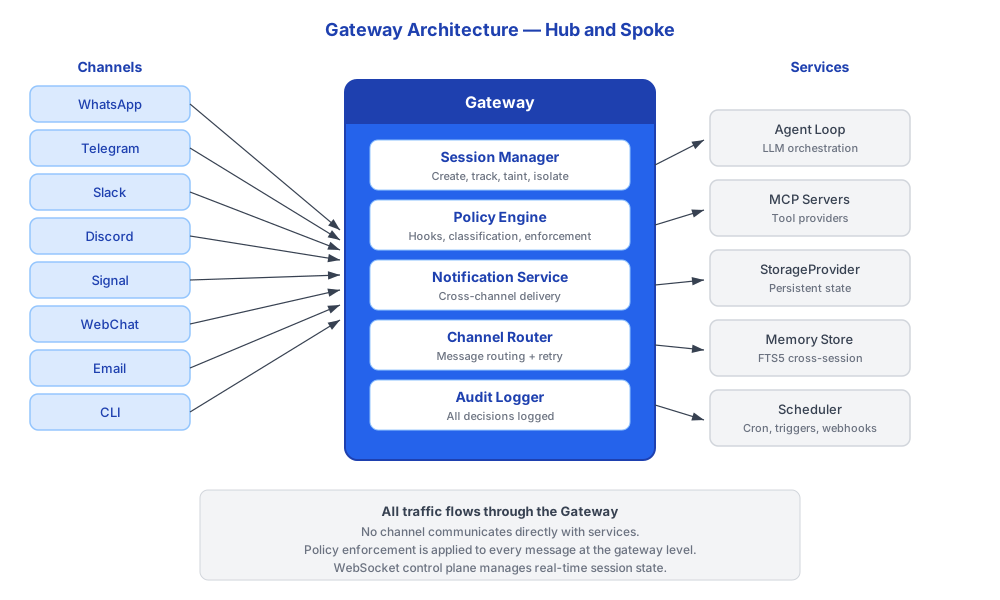
Nakikinig ang Gateway sa isang configurable port (default 18789) at tumatanggap ng connections mula sa channel adapters, CLI commands, companion apps, at internal services. Lahat ng communication ay gumagamit ng JSON-RPC sa WebSocket.
Mga Gateway Service
Nagbibigay ang Gateway ng mga sumusunod na services sa pamamagitan ng WebSocket at HTTP endpoints:
| Service | Paglalarawan | Security Integration |
|---|---|---|
| Sessions | Gumawa, mag-list, mag-retrieve ng history, magpadala sa pagitan ng sessions, mag-spawn ng background tasks | Session taint tracked per-session |
| Channels | Mag-route ng messages, mag-manage ng connections, mag-retry ng failed deliveries, mag-chunk ng malalaking messages | Classification checks sa lahat ng output |
| Cron | Mag-schedule ng recurring tasks at trigger wakeups mula sa TRIGGER.md | Dumadaan ang cron actions sa policy hooks |
| Webhooks | Tumatanggap ng inbound events mula sa external services sa pamamagitan ng POST /webhooks/:sourceId | Ini-classify ang inbound data sa ingestion |
| Ripple | Nag-track ng online status at typing indicators sa mga channels | Walang sensitive data na na-expose |
| Config | Hot-reload ng settings nang walang restart | Admin-only sa enterprise |
| Control UI | Web dashboard para sa gateway health at management | Token-authenticated |
| Tide Pool | Nag-host ng agent-driven A2UI visual workspace | Napapailalim ang content sa output hooks |
| Notifications | Cross-channel notification delivery na may priority routing | Nalalapat ang classification rules |
WebSocket JSON-RPC Protocol
Kumokonekta ang mga clients sa Gateway sa pamamagitan ng WebSocket at nagpapalitan ng JSON-RPC 2.0 messages. Bawat mensahe ay isang method call na may typed parameters at typed response.
typescript
// Nagpapadala ang client:
{
  "jsonrpc": "2.0",
  "id": 1,
  "method": "sessions.list",
  "params": { "filter": "active" }
}

// Tumutugon ang Gateway:
{
  "jsonrpc": "2.0",
  "id": 1,
  "result": [
    { "id": "sess_abc", "taint": "CONFIDENTIAL", "channel": "telegram" },
    { "id": "sess_def", "taint": "PUBLIC", "channel": "cli" }
  ]
}
Nagse-serve din ang Gateway ng HTTP endpoints para sa webhook ingestion. Kapag naka-attach ang SchedulerService, available ang POST /webhooks/:sourceId routes para sa inbound webhook events.
Server Interface
typescript
interface GatewayServerOptions {
  /** Port na papakinggan. Gamitin ang 0 para sa random available port. */
  readonly port?: number;
  /** Authentication token para sa connections. */
  readonly authToken?: string;
  /** Optional scheduler service para sa webhook endpoints. */
  readonly schedulerService?: SchedulerService;
}

interface GatewayAddr {
  readonly port: number;
  readonly hostname: string;
}

interface GatewayServer {
  /** Simulan ang server. Nagbabalik ng bound address. */
  start(): Promise<GatewayAddr>;
  /** Gracefully na ihinto ang server. */
  stop(): Promise<void>;
}
Authentication
Ang Gateway connections ay authenticated gamit ang token. Ang token ay generated sa panahon ng setup (triggerfish dive) at locally stored.
SECURITY Naka-bind ang Gateway sa 127.0.0.1 bilang default at hindi
naka-expose sa network. Nangangailangan ang remote access ng explicit tunnel configuration. Huwag kailanman i-expose ang Gateway WebSocket sa public internet nang walang authentication. :::
Session Management
Namamahala ang Gateway ng buong lifecycle ng sessions. Ang sessions ang fundamental unit ng conversation state, bawat isa ay may independent taint tracking.
Mga Uri ng Session
| Uri | Key Pattern | Paglalarawan |
|---|---|---|
| Main | main | Pangunahing direct conversation sa owner. Persistent sa mga restart. |
| Channel | channel:<type>:<id> | Isa sa bawat connected channel. Isolated taint per channel. |
| Background | bg:<task_id> | Nag-spawn para sa cron jobs at webhook-triggered tasks. Nagsisimula sa PUBLIC taint. |
| Agent | agent:<agent_id> | Per-agent sessions para sa multi-agent routing. |
| Group | group:<channel>:<group_id> | Group chat sessions. |
Mga Session Tool
Nag-interact ang agent sa sessions sa pamamagitan ng mga tools na ito, lahat ay nire-route sa Gateway:
| Tool | Paglalarawan | Taint Implications |
|---|---|---|
sessions_list | Mag-list ng active sessions na may optional filters | Walang pagbabago sa taint |
sessions_history | Mag-retrieve ng transcript para sa session | Ini-inherit ng taint mula sa referenced session |
sessions_send | Magpadala ng mensahe sa ibang session | Napapailalim sa write-down check |
sessions_spawn | Gumawa ng background task session | Nagsisimula ang bagong session sa PUBLIC taint |
session_status | Mag-check ng current session state, model, cost | Walang pagbabago sa taint |
Ang inter-session communication sa pamamagitan ng sessions_send ay napapailalim sa parehong
write-down rules tulad ng ibang output. Ang CONFIDENTIAL session ay hindi makapagpadala ng data sa session na konektado sa PUBLIC channel. :::
Channel Routing
Nire-route ng Gateway ang mga mensahe sa pagitan ng channels at sessions sa pamamagitan ng channel router. Hinahandle ng router ang:
- Classification gate: Bawat outbound message ay dumadaan sa
PRE_OUTPUTbago ang delivery - Retry with backoff: Nire-retry ang failed deliveries na may exponential backoff sa pamamagitan ng
sendWithRetry() - Message chunking: Hinahati ang malalaking mensahe sa platform-appropriate chunks (e.g., 4096-char limit ng Telegram)
- Streaming: Nag-stream ng responses sa channels na sumusuporta nito
- Connection management:
connectAll()atdisconnectAll()para sa lifecycle management
Notification Service
Nag-integrate ang Gateway ng first-class notification service na pumapalit sa ad-hoc "notify owner" patterns sa buong platform. Lahat ng notifications ay dumadaan sa isang NotificationService.
typescript
interface NotificationService {
  notify(recipient: UserId, notification: Notification): Promise<void>;
  getPreferences(userId: UserId): Promise<NotificationPreference>;
  setPreferences(userId: UserId, prefs: NotificationPreference): Promise<void>;
  getPending(userId: UserId): Promise<Notification[]>;
}
Priority Routing
| Priority | Behavior |
|---|---|
CRITICAL | I-bypass ang quiet hours, i-deliver sa LAHAT ng connected channels agad |
HIGH | I-deliver sa preferred channel agad, i-queue kung offline |
NORMAL | I-deliver sa active session, o i-queue para sa susunod na session start |
LOW | I-queue, i-deliver sa mga batch habang may active sessions |
Mga Source ng Notification
| Source | Category | Default Priority |
|---|---|---|
| Policy violations | security | CRITICAL |
| Threat intelligence alerts | security | CRITICAL |
| Skill approval requests | approval | HIGH |
| Cron job failures | system | HIGH |
| System health warnings | system | HIGH |
| Webhook event triggers | info | NORMAL |
| The Reef updates available | info | LOW |
Persistent ang notifications sa pamamagitan ng StorageProvider (namespace: notifications:) at tumatagal sa mga restart. Nire-retry ang undelivered notifications sa susunod na Gateway startup o session connection.
Delivery Preferences
Kino-configure ng users ang notification preferences per-channel:
yaml
notifications:
  preferred_channel: telegram
  quiet_hours:
    start: "22:00"
    end: "07:00"
    timezone: "America/Chicago"
  overrides:
    security: all_channels
    approval: preferred_channel
    info: active_session
Scheduler Integration
Nag-host ang Gateway ng scheduler service, na namamahala ng:
- Cron tick loop: Periodic evaluation ng scheduled tasks
- Trigger wakeups: Agent wakeups na tinukoy sa
TRIGGER.md - Webhook HTTP endpoints:
POST /webhooks/:sourceIdpara sa inbound events - Orchestrator isolation: Bawat scheduled task ay tumatakbo sa sariling
OrchestratorFactoryna may isolated session state
Ang cron-triggered at webhook-triggered tasks ay nag-spawn ng background sessions
na may fresh PUBLIC taint. Hindi sila nag-inherit ng taint ng anumang existing session, na nagtitiyak na nagsisimula ang autonomous tasks sa malinis na classification state.
Health at Diagnostics
Ang triggerfish patrol command ay kumokonekta sa Gateway at nagpapatakbo ng diagnostic health checks, na vine-verify ang:
- Tumatakbo at responsive ang Gateway
- Lahat ng configured channels ay connected
- Accessible ang storage
- Nagpapatakbo ang scheduled tasks sa tamang oras
- Walang naka-stuck na undelivered critical notifications sa queue