
Webhooks
Triggerfish external services कडून inbound events accept करू शकतो, emails, error alerts, CI/CD events, calendar changes, आणि बरेच काही ला real-time reactions enable करतो. Webhooks तुमच्या एजंटला reactive question-answering system वरून तुमच्या workflows मध्ये proactive participant मध्ये बदलतात.
Webhooks कसे काम करतात
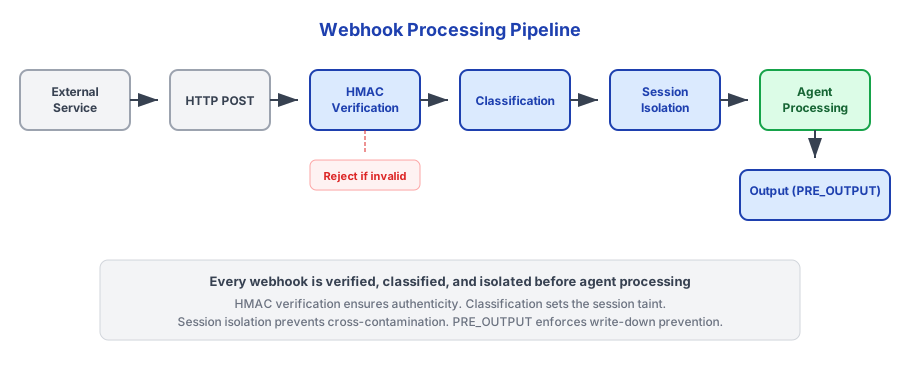
External services Triggerfish gateway वर registered webhook endpoints ला HTTP POST requests पाठवतात. प्रत्येक incoming event authenticity साठी verified, classified, आणि processing साठी एजंटकडे routed केला जातो.
Supported Event Sources
Triggerfish HTTP webhook delivery support करणाऱ्या कोणत्याही service कडून webhooks receive करू शकतो. Common integrations:
| Source | Mechanism | Example Events |
|---|---|---|
| Gmail | Pub/Sub push notifications | New email, label change |
| GitHub | Webhook | PR opened, issue comment, CI failure |
| Sentry | Webhook | Error alert, regression detected |
| Stripe | Webhook | Payment received, subscription change |
| Calendar | Polling किंवा push | Event reminder, conflict detected |
| Custom | Generic webhook endpoint | कोणताही JSON payload |
Configuration
Webhook endpoints triggerfish.yaml मध्ये configured आहेत:
yaml
webhooks:
  endpoints:
    - id: github-events
      path: /webhook/github
      # secret OS keychain मध्ये stored
      classification: INTERNAL
      actions:
        - event: "pull_request.opened"
          task: "Review PR and post summary"
        - event: "issues.opened"
          task: "Triage new issue"

    - id: sentry-alerts
      path: /webhook/sentry
      # secret OS keychain मध्ये stored
      classification: CONFIDENTIAL
      actions:
        - event: "error"
          task: "Investigate error and create fix PR if possible"

    - id: stripe-payments
      path: /webhook/stripe
      # secret OS keychain मध्ये stored
      classification: CONFIDENTIAL
      actions:
        - event: "payment_intent.succeeded"
          task: "Log payment and update customer record"
        - event: "charge.failed"
          task: "Alert owner about failed charge"
Configuration Fields
| Field | Required | वर्णन |
|---|---|---|
id | हो | या webhook endpoint साठी unique identifier |
path | हो | Endpoint registered असलेला URL path |
secret | हो | HMAC signature verification साठी Shared secret |
classification | हो | या source कडील events ला assigned classification level |
actions | हो | Event-to-task mappings ची list |
actions[].event | हो | Match करायचा Event type pattern |
actions[].task | हो | एजंटने execute करण्यासाठी Natural language task |
Webhook secrets OS keychain मध्ये stored आहेत. Securely enter करण्यासाठी
triggerfish dive run करा किंवा interactively webhooks configure करा. :::
HMAC Signature Verification
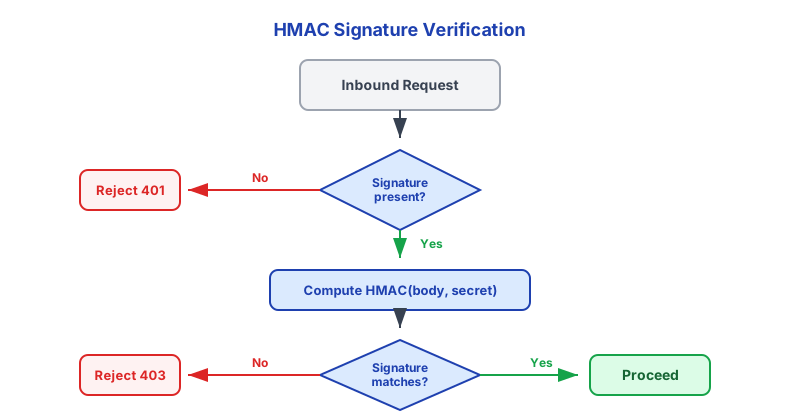
Payload process होण्यापूर्वी प्रत्येक inbound webhook request HMAC signature validation वापरून authenticity साठी verified आहे.
Verification कसे काम करते
- External service signature header सह webhook पाठवतो (उदाहरणार्थ, GitHub साठी
X-Hub-Signature-256) - Triggerfish configured shared secret वापरून request body चा HMAC compute करतो
- Computed signature request header मधील signature विरुद्ध compare केला जातो
- Signatures match नसल्यास, request लगेच rejected आहे
- Verified असल्यास, payload classification आणि processing कडे proceeds
SECURITY Valid HMAC signatures शिवाय Webhook requests कोणत्याही
processing होण्यापूर्वी rejected केल्या जातात. हे spoofed events ला agent actions trigger करण्यापासून रोखते. Production मध्ये signature verification कधीही disable करू नका. :::
Event Processing Pipeline
Webhook event signature verification pass केल्यावर, ते standard security pipeline मधून flow होते:
1. Classification
Event payload webhook endpoint साठी configured level वर classified आहे. CONFIDENTIAL म्हणून configured webhook endpoint CONFIDENTIAL events produce करतो.
2. Session Isolation
प्रत्येक webhook event स्वतःचे isolated session spawn करतो. याचा अर्थ:
- Event ongoing conversations पासून independently processed आहे
- Session taint fresh सुरू होते (webhook च्या classification level वर)
- Webhook-triggered sessions आणि user sessions दरम्यान data leak नाही
- प्रत्येक session ला स्वतःचे taint tracking आणि lineage मिळते
3. PRE_CONTEXT_INJECTION Hook
Agent context मध्ये enter होण्यापूर्वी Event payload PRE_CONTEXT_INJECTION hook मधून जातो. हा hook:
- Payload structure validate करतो
- सर्व data fields ला classification apply करतो
- Inbound data साठी lineage record तयार करतो
- String fields मधील injection patterns scan करतो
- Policy rules dictate असल्यास event block करू शकतो
4. Agent Processing
एजंट classified event receive करतो आणि configured task execute करतो. Task एक natural language instruction आहे -- एजंट policy constraints च्या आत ते complete करण्यासाठी त्याच्या full capabilities (tools, skills, browser, exec environment) वापरतो.
5. Output Delivery
एजंटचा कोणताही output (messages, notifications, actions) PRE_OUTPUT hook मधून जातो. No Write-Down rule लागू होतो: CONFIDENTIAL webhook-triggered session कडून output PUBLIC channel ला पाठवला जाऊ शकत नाही.
6. Audit
Complete event lifecycle logged आहे: receipt, verification, classification, session creation, agent actions, आणि output decisions.
Scheduler शी Integration
Webhooks Triggerfish च्या cron आणि trigger system शी naturally integrate होतात. Webhook event:
- Existing cron job आधी schedule trigger करू शकतो (उदाहरणार्थ, deployment webhook immediate health check trigger करतो)
- नवीन scheduled task create करू शकतो (उदाहरणार्थ, calendar webhook reminder schedule करतो)
- Trigger priorities update करू शकतो (उदाहरणार्थ, Sentry alert एजंटला पुढच्या trigger wakeup वर error investigation prioritize करायला लावतो)
yaml
webhooks:
  endpoints:
    - id: deploy-notify
      path: /webhook/deploy
      # secret OS keychain मध्ये stored
      classification: INTERNAL
      actions:
        - event: "deployment.completed"
          task: "Run health check on the deployed service and report results"
          # एजंट follow-up checks schedule करण्यासाठी cron.create वापरू शकतो
Security Summary
| Control | वर्णन |
|---|---|
| HMAC verification | सर्व inbound webhooks processing पूर्वी verified |
| Classification | Webhook payloads configured level वर classified |
| Session isolation | प्रत्येक event ला स्वतःचे isolated session मिळते |
PRE_CONTEXT_INJECTION | Context मध्ये enter होण्यापूर्वी Payload scanned आणि classified |
| No Write-Down | High-classification events कडून output low-classification channels ला reach करू शकत नाही |
| Audit logging | Complete event lifecycle recorded |
| Publicly exposed नाही | Webhook endpoints default वर public internet ला exposed नाहीत |
Enterprise Controls
- Webhook allowlist admin द्वारे managed -- फक्त approved external sources endpoints register करू शकतात
- Abuse रोखण्यासाठी per endpoint Rate limiting
- Memory exhaustion रोखण्यासाठी Payload size limits
- Additional source verification साठी IP allowlisting
- Webhook event logs साठी Retention policies
Webhook endpoints default वर public internet ला exposed नाहीत. External
services तुमच्या Triggerfish instance ला reach करण्यासाठी, तुम्हाला port forwarding, reverse proxy, किंवा tunnel configure करणे आवश्यक आहे. :::