
Audit & Compliance
Triggerfish मधील प्रत्येक policy decision full context सह logged आहे. कोणतेही exceptions नाहीत, logging disable करणारा "debug mode" नाही, आणि LLM audit records suppress करण्याचा कोणताही मार्ग नाही. हे system ने घेतलेल्या प्रत्येक security decision ची complete, tamper-evident record provide करते.
काय Recorded होते
Audit logging एक fixed rule आहे -- ते नेहमी active असते आणि disable केले जाऊ शकत नाही. प्रत्येक enforcement hook execution एक audit record produce करते:
| Field | वर्णन |
|---|---|
timestamp | Decision कधी घेतला गेला (ISO 8601, UTC) |
hook_type | कोणता enforcement hook run झाला (PRE_CONTEXT_INJECTION, PRE_TOOL_CALL, POST_TOOL_RESPONSE, PRE_OUTPUT, SECRET_ACCESS, SESSION_RESET, AGENT_INVOCATION, MCP_TOOL_CALL) |
session_id | Action झालेले session |
decision | ALLOW, BLOCK, किंवा REDACT |
reason | Decision चे Human-readable explanation |
input | Hook trigger केलेला data किंवा action |
rules_evaluated | Decision ला reach करण्यासाठी कोणते policy rules checked केले गेले |
taint_before | Action पूर्वी Session taint level |
taint_after | Action नंतर Session taint level (changed असल्यास) |
metadata | Hook type साठी specific additional context |
Audit Record Examples
Allowed Output
json
{
  "timestamp": "2025-01-29T10:23:47Z",
  "hook_type": "PRE_OUTPUT",
  "session_id": "sess_456",
  "decision": "ALLOW",
  "reason": "Classification check passed",
  "input": {
    "target_channel": "telegram",
    "recipient": "owner"
  },
  "rules_evaluated": [
    "no_write_down",
    "channel_classification"
  ],
  "taint_before": "INTERNAL",
  "taint_after": "INTERNAL"
}
Blocked Write-Down
json
{
  "timestamp": "2025-01-29T10:24:12Z",
  "hook_type": "PRE_OUTPUT",
  "session_id": "sess_456",
  "decision": "BLOCK",
  "reason": "Session taint (CONFIDENTIAL) exceeds effective classification (PUBLIC)",
  "input": {
    "target_channel": "whatsapp",
    "recipient": "external_user_789",
    "effective_classification": "PUBLIC"
  },
  "rules_evaluated": [
    "no_write_down",
    "channel_classification",
    "recipient_classification"
  ],
  "taint_before": "CONFIDENTIAL",
  "taint_after": "CONFIDENTIAL"
}
Taint Escalation सह Tool Call
json
{
  "timestamp": "2025-01-29T10:23:45Z",
  "hook_type": "POST_TOOL_RESPONSE",
  "session_id": "sess_456",
  "decision": "ALLOW",
  "reason": "Tool response classified and taint updated",
  "input": {
    "tool_name": "salesforce.query_opportunities",
    "response_classification": "CONFIDENTIAL"
  },
  "rules_evaluated": [
    "tool_response_classification",
    "taint_escalation"
  ],
  "taint_before": "PUBLIC",
  "taint_after": "CONFIDENTIAL",
  "metadata": {
    "lineage_id": "lin_789xyz",
    "records_returned": 3
  }
}
Agent Delegation Blocked
json
{
  "timestamp": "2025-01-29T10:25:00Z",
  "hook_type": "AGENT_INVOCATION",
  "session_id": "sess_456",
  "decision": "BLOCK",
  "reason": "Agent ceiling (INTERNAL) below session taint (CONFIDENTIAL)",
  "input": {
    "caller_agent_id": "agent_abc",
    "callee_agent_id": "agent_def",
    "callee_ceiling": "INTERNAL",
    "task": "Generate public summary"
  },
  "rules_evaluated": [
    "delegation_ceiling_check",
    "delegation_allowlist",
    "delegation_depth"
  ],
  "taint_before": "CONFIDENTIAL",
  "taint_after": "CONFIDENTIAL"
}
Audit Trace Capabilities
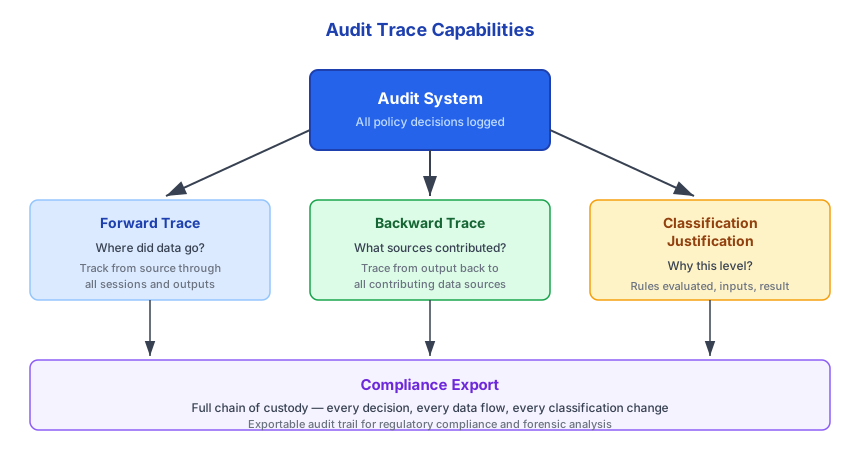
Audit records चार प्रकारे queried केले जाऊ शकतात, प्रत्येक different compliance आणि forensic need serve करतो.
Forward Trace
प्रश्न: "Salesforce record opp_00123ABC मधील data चे काय झाले?"
एक forward trace data element त्याच्या origin point पासून प्रत्येक transformation, session, आणि output मधून follow करतो. हे answers करतो: हा data कुठे गेला, कोणी पाहिला, आणि तो कधी organization च्या बाहेर पाठवला गेला का?
Origin: salesforce.query_opportunities
  --> lineage_id: lin_789xyz
  --> classification: CONFIDENTIAL
  --> session: sess_456

Transformations:
  --> Extracted fields: name, amount, stage
  --> LLM summarized 3 records into pipeline overview

Outputs:
  --> Sent to owner via Telegram (ALLOWED)
  --> Blocked from WhatsApp external contact (BLOCKED)
Backward Trace
प्रश्न: "10:24 UTC ला पाठवलेल्या message ला कोणत्या sources contribute केले?"
Backward trace output पासून सुरू होतो आणि output ला influence केलेल्या प्रत्येक data source ओळखण्यासाठी lineage chain मधून walk back करतो. Response मध्ये classified data included होता का हे समजण्यासाठी हे essential आहे.
Output: Message sent to Telegram at 10:24:00Z
  --> session: sess_456
  --> lineage sources:
      --> lin_789xyz: Salesforce opportunity (CONFIDENTIAL)
      --> lin_790xyz: Salesforce opportunity (CONFIDENTIAL)
      --> lin_791xyz: Salesforce opportunity (CONFIDENTIAL)
      --> lin_792xyz: Weather API (PUBLIC)
Classification Justification
प्रश्न: "हा data CONFIDENTIAL का marked आहे?"
Classification justification classification level assign केलेल्या rule किंवा policy ला trace back करतो:
Data: Pipeline summary (lin_789xyz)
Classification: CONFIDENTIAL
Reason: source_system_default
  --> Salesforce integration default classification: CONFIDENTIAL
  --> Configured by: admin_001 at 2025-01-10T08:00:00Z
  --> Policy rule: "All Salesforce data classified as CONFIDENTIAL"
Compliance Export
Legal, regulatory, किंवा internal review साठी, Triggerfish कोणत्याही data element किंवा time range साठी full chain of custody export करू शकतो:
Export request:
  --> Time range: 2025-01-29T00:00:00Z to 2025-01-29T23:59:59Z
  --> Scope: All sessions for user_456
  --> Format: JSON

Export includes:
  --> All audit records in the time range
  --> All lineage records referenced by audit records
  --> All session state transitions
  --> All policy decisions (ALLOW, BLOCK, REDACT)
  --> All taint changes
  --> All delegation chain records
Compliance exports structured JSON files आहेत जे SIEM systems, compliance
dashboards, किंवा legal review tools द्वारे ingested केले जाऊ शकतात. Export format stable आणि versioned आहे. :::
Data Lineage
Audit logging Triggerfish च्या data lineage system सह conjunction मध्ये काम करते. Triggerfish द्वारे processed प्रत्येक data element provenance metadata carry करतो:
json
{
  "lineage_id": "lin_789xyz",
  "content_hash": "sha256:a1b2c3d4...",
  "origin": {
    "source_type": "integration",
    "source_name": "salesforce",
    "record_id": "opp_00123ABC",
    "record_type": "Opportunity",
    "accessed_at": "2025-01-29T10:23:45Z",
    "accessed_by": "user_456",
    "access_method": "plugin_query"
  },
  "classification": {
    "level": "CONFIDENTIAL",
    "reason": "source_system_default",
    "assigned_at": "2025-01-29T10:23:45Z",
    "can_be_downgraded": false
  },
  "transformations": [
    {
      "type": "extraction",
      "description": "Selected fields: name, amount, stage",
      "timestamp": "2025-01-29T10:23:46Z",
      "agent_id": "agent_123"
    },
    {
      "type": "summarization",
      "description": "LLM summarized 3 records into pipeline overview",
      "timestamp": "2025-01-29T10:23:47Z",
      "input_lineage_ids": ["lin_789xyz", "lin_790xyz", "lin_791xyz"],
      "agent_id": "agent_123"
    }
  ],
  "current_location": {
    "session_id": "sess_456",
    "context_position": "assistant_response_3"
  }
}
Lineage records POST_TOOL_RESPONSE वर (data system मध्ये enter झाल्यावर) created होतात आणि data transformed होताना updated होतात. Aggregated data max(input classifications) inherit करतो -- कोणताही input CONFIDENTIAL असल्यास, output कमीत कमी CONFIDENTIAL आहे.
| Event | Lineage Action |
|---|---|
| Integration मधून Data read | Origin सह lineage record create करा |
| LLM द्वारे Data transformed | Transformation append करा, input lineages link करा |
| Multiple sources मधून Data aggregated | Lineage merge करा, classification = max(inputs) |
| Channel ला Data sent | Destination record करा, classification verify करा |
| Session reset | Lineage records archive करा, context मधून clear करा |
Storage आणि Retention
Audit logs audit: namespace खाली StorageProvider abstraction द्वारे persisted आहेत. Lineage records lineage: namespace खाली stored आहेत.
| Data Type | Namespace | Default Retention |
|---|---|---|
| Audit logs | audit: | 1 year |
| Lineage records | lineage: | 90 days |
| Session state | sessions: | 30 days |
| Taint history | taint: | Session retention शी matches |
SECURITY Retention periods configurable आहेत, पण audit logs compliance
requirements (SOC 2, GDPR, HIPAA) support करण्यासाठी default 1 year ला आहेत. तुमच्या organization च्या regulatory requirement च्या खाली retention period reduce करणे administrator ची responsibility आहे. :::
Storage Backends
| Tier | Backend | Details |
|---|---|---|
| Personal | SQLite | ~/.triggerfish/data/triggerfish.db वर WAL-mode database. Audit records सर्व Triggerfish state सारख्याच database मध्ये structured JSON म्हणून stored आहेत. |
| Enterprise | Pluggable | Enterprise backends (Postgres, S3, इ.) StorageProvider interface द्वारे वापरले जाऊ शकतात. हे existing log aggregation infrastructure सह integration allow करते. |
Immutability आणि Integrity
Audit records append-only आहेत. एकदा written झाल्यावर, system च्या कोणत्याही component द्वारे -- LLM, agent, किंवा plugins सह -- ते modify किंवा delete केले जाऊ शकत नाहीत. Deletion फक्त retention policy expiration द्वारे होते.
प्रत्येक audit record एक content hash include करतो जो integrity verify करण्यासाठी वापरला जाऊ शकतो. Records compliance review साठी exported असल्यास, tampering detect करण्यासाठी stored records विरुद्ध hashes validate केले जाऊ शकतात.
Enterprise Compliance Features
Enterprise deployments audit logging extend करू शकतात:
| Feature | वर्णन |
|---|---|
| Legal hold | Specified users, sessions, किंवा time ranges साठी retention-based deletion suspend करा |
| SIEM integration | Real time मध्ये Splunk, Datadog, किंवा इतर SIEM systems ला audit events stream करा |
| Compliance dashboards | Policy decisions, blocked actions, आणि taint patterns चे Visual overview |
| Scheduled exports | Regulatory review साठी Automatic periodic exports |
| Alert rules | Specific audit patterns occur झाल्यावर notifications trigger करा (उदा. repeated blocked write-downs) |
Related Pages
- Security-First Design -- security architecture चे overview
- No Write-Down Rule -- classification flow rule ज्याचे enforcement logged आहे
- Identity & Auth -- identity decisions कसे recorded होतात
- Agent Delegation -- delegation chains audit records मध्ये कसे appear होतात
- Secrets Management -- credential access कसे logged आहे